Programming of time parameters Installer Manual - TP8-96 VIDEO
4-4
Associated programs or remote controls
To associate the timers to the programs or remote controls
press the key below the number key. It is possible to associate
a total of 8 programs and 8 remote controls to every timer.
Repeat the procedure for every timer to be configured.
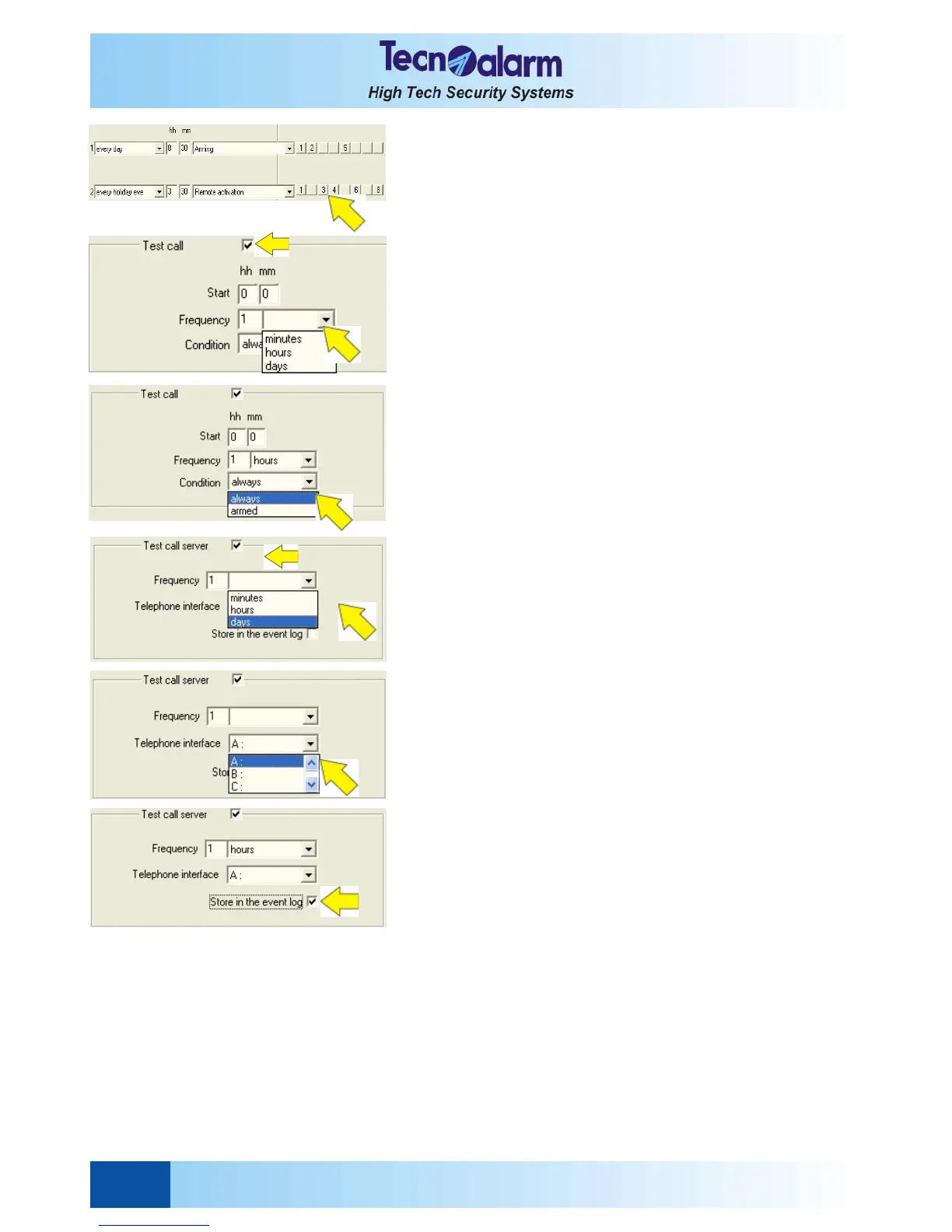
TEST CALL CONFIGURATION
Permits the remote functioning check of the control panel. It
consists in one or several telephone calls made by the channels
the test call is associated to (see report codes) to the
programmed telephone numbers
The calls are made at a determined time with a programmed
frequency.
To enable the test call check the corresponding item.
The following parameters can be set for every timer:
z Hour of activation
z Frequency of activation
z Condition
Starting hour of the test call cycle
To program the starting hour of the test call cycle, select the
item next to Start and enter the time (hh:mm).
Frequency
To program the test call frequency select the item Frequency
and enter a value from 1 to 255.
Then select the unit of the intervall between a test call and the
next (i.e. minutes, hours or days).
Condition
The test call cycle can be bound to system status, i.e. it can
always be executed or only if the control panel is armed.
Select the item Condition and subsequently the condition of
execution requested (i.e. always or armed).
TEST CALL SERVER CONFIGURATION
Permits the automatic check-up of the network connection
between the control panel and the monitoring station. The
connection is made via Ethernet using the TCP/IP protocol.
Frequency
To program the test call server frequency select the item
Frequency and enter a value from 1 to 255.
Then select the unit of the intervall between a test call and the
next (i.e. minutes, hours or days).
Telephone interface
Select the channel (A...H). Ensure that the channel in question
is prgrammed with the TCP/IP Tecnoalarm data protocol
(number code 192).
Store in the event log
Permits to enable/disable the test call event in the archive of the
control panel
Check the item to enable the function.
See § 4.5 for explanatory notes.
Press:
z OK to confirm and quit
z Abandon to quit without saving


 To Next Page