iTRANS 2
FIXED POINT SINGLE OR DUAL GAS MONITOR
WITH DUAL ANALOG OUTPUTS
USER MANUAL
Revision 7.0
4.6 Digital ModBus RTU Interface Wiring (J1)
4.6.1 ModBus Interface Wiring Overview
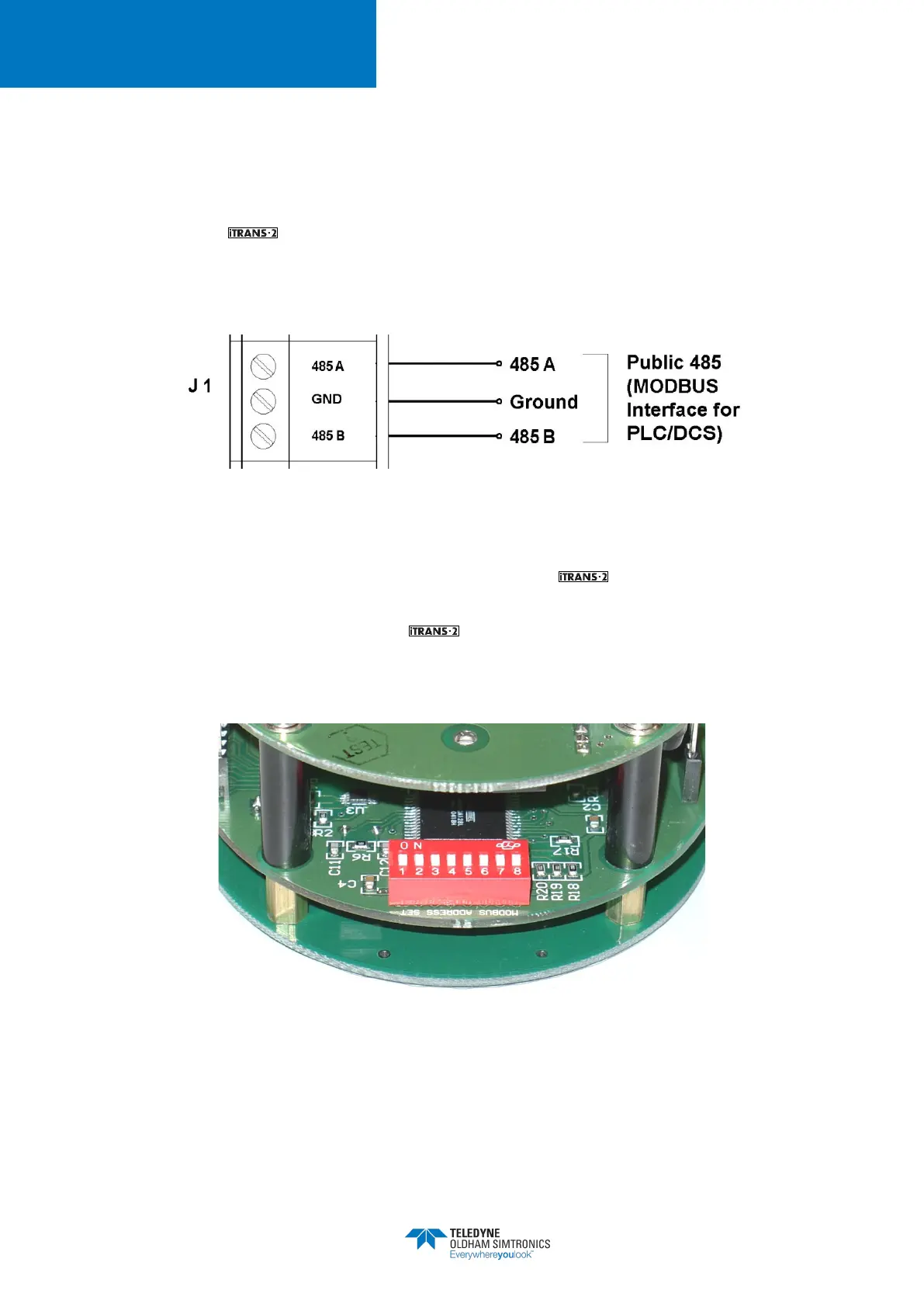
To interface the to a digital controller, PLC, or HMI, connect the power and ground to the
appropriate terminals mentioned above. The digital signals are wired into the RS485A and
RS485B terminals on the board. See Figure 4-9.
Figure 4-9 Wiring Diagram for the ModBus Interface
4.6.2 Setting the ModBus Address on the
Located on the back of the electronics module is an 8-position DIP switch. This switch bank is used
to set the ModBus Slave Address for the unit. The address can be set from 1 to 255. Use
the DIP switches to set the binary representation of the desired address. 1 is bit zero, and 8 is bit
7. ON represents a 1, and OFF represents zero. Refer to Appendix B for hex-to-decimal
equivalents.
Figure 4-10 Switch Bank for Setting ModBus Slave Address


 To Next Page