Operation Model 7600
Teledyne Analytical Instruments 64
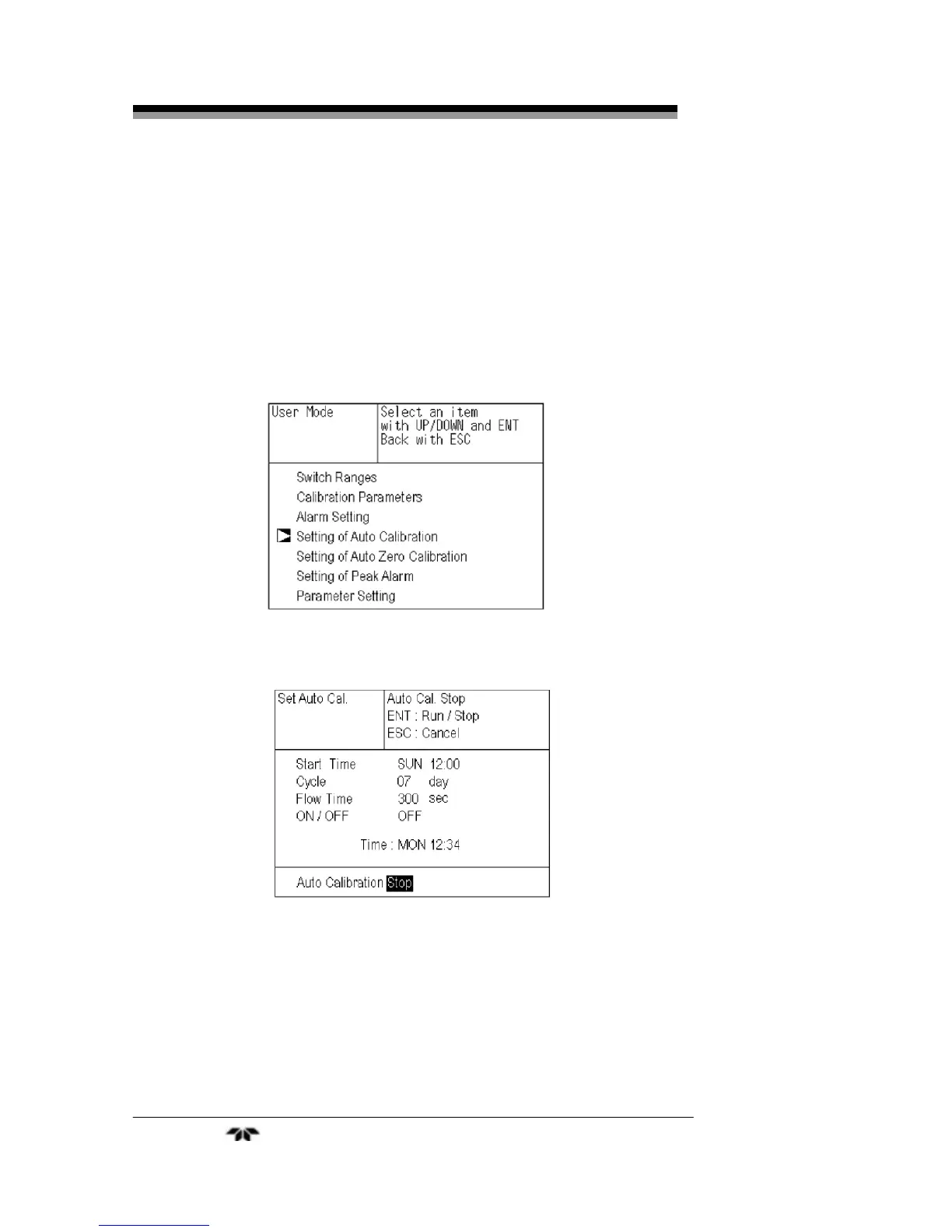
5. From the measurement mode, press the MODE key to
display the user mode.
6.
Point the cursor to “Setting of Auto Calibration” by
pressing the UP or DOWN key and press the ENT key.
7.
In the “Setting of Auto Calibration” item selection screen
that appears, point the cursor to “Auto Calibration Run”
by pressing the
UP or DOWN keys. Press the ENT
key.
8.
“Stop” is highlighted, displaying a message to confirm
the stop of auto calibration. Press the ENT key to stop the
auto calibration, or press the ESC key to cancel the abort.
Note: During auto calibration, the keys are inoperable other than
key lock ON/OFF and “Stop Auto Calibration.”
When the key lock is set to ON, even the “Auto Calibration
Stop” is locked out. To stop “Auto Calibration” forcedly, set
the key lock to OFF and then execute “Auto Calibration
Stop” as detailed above.


 To Next Page