TTE Combo Communication Module – Installation and Programming Manual
12
3. PROGRAMMING WITH ProsTE
ProsTE is a specialized software for programming of panels and modules produced by Teletek
Electronics JSC. The installer can quickly read the current configuration, to set new parameters and
to write it back to the panel or module.
Attention: Always use the latest version of ProsTE software downloaded from
www.teletek-electronics.com
or ask your local distributer for more information and details.
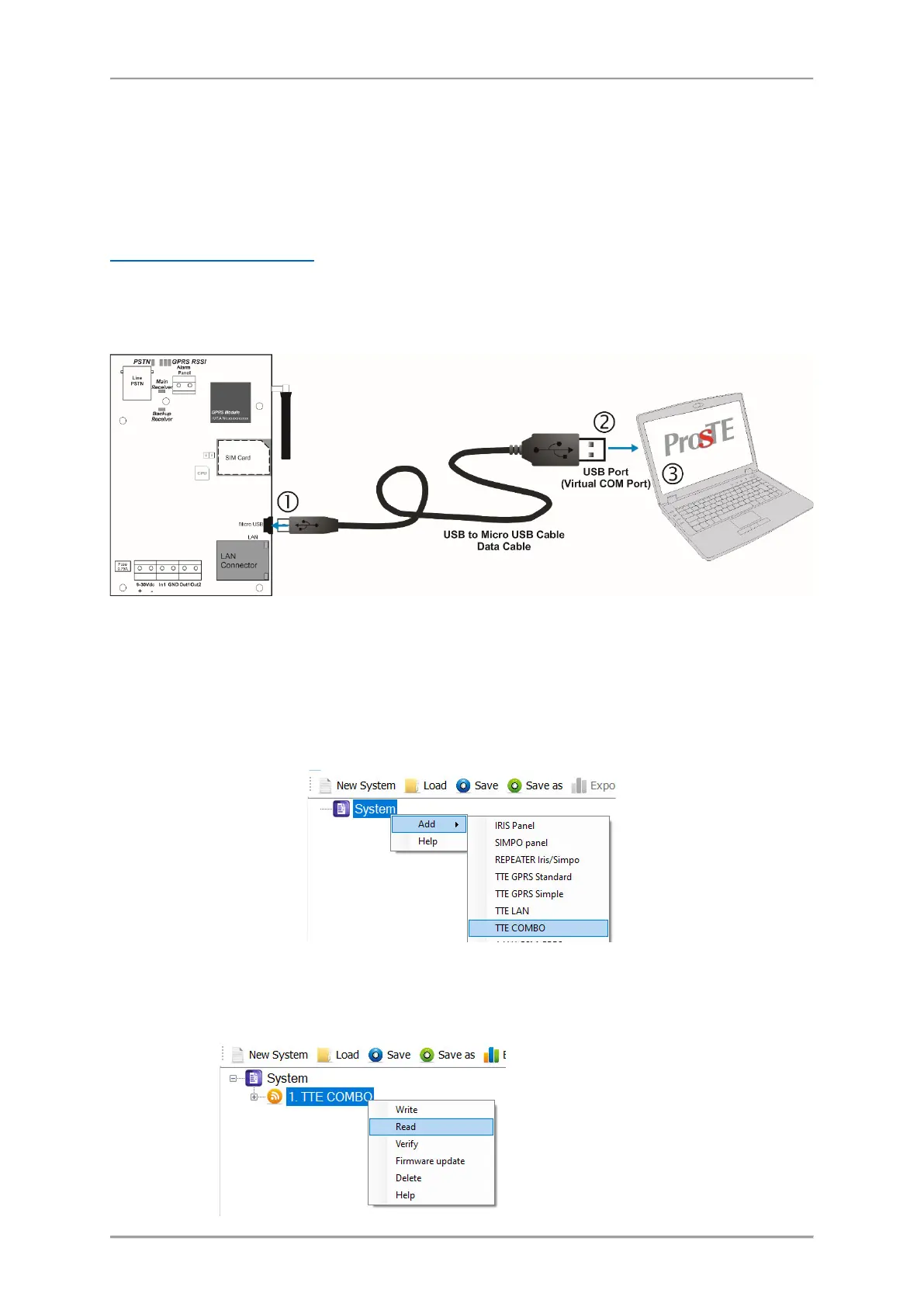
To connect the TTE Combo to a local computer or laptop for programming, use a standard USB-Micro
USB data cable.
Note: The TTE Combo module must be powered up during programming! After connecting to the
computer, you may be asked to wait until the system is installing some USB drivers.
3.1 Reading a Configuration
Run the ProsTE software and choose in sequence using the right mouse button: System – Add – TTE
Combo.
The TTE Combo menus are loaded at the left side as a tree structure. Select the module and using the
right mouse button again choose in sequence: TTE Combo – Read.
Read is a command for downloading
the current module’s parameters and
settings into ProsTE software.



 To Next Page