TTE Combo Communication Module – Installation and Programming Manual
13
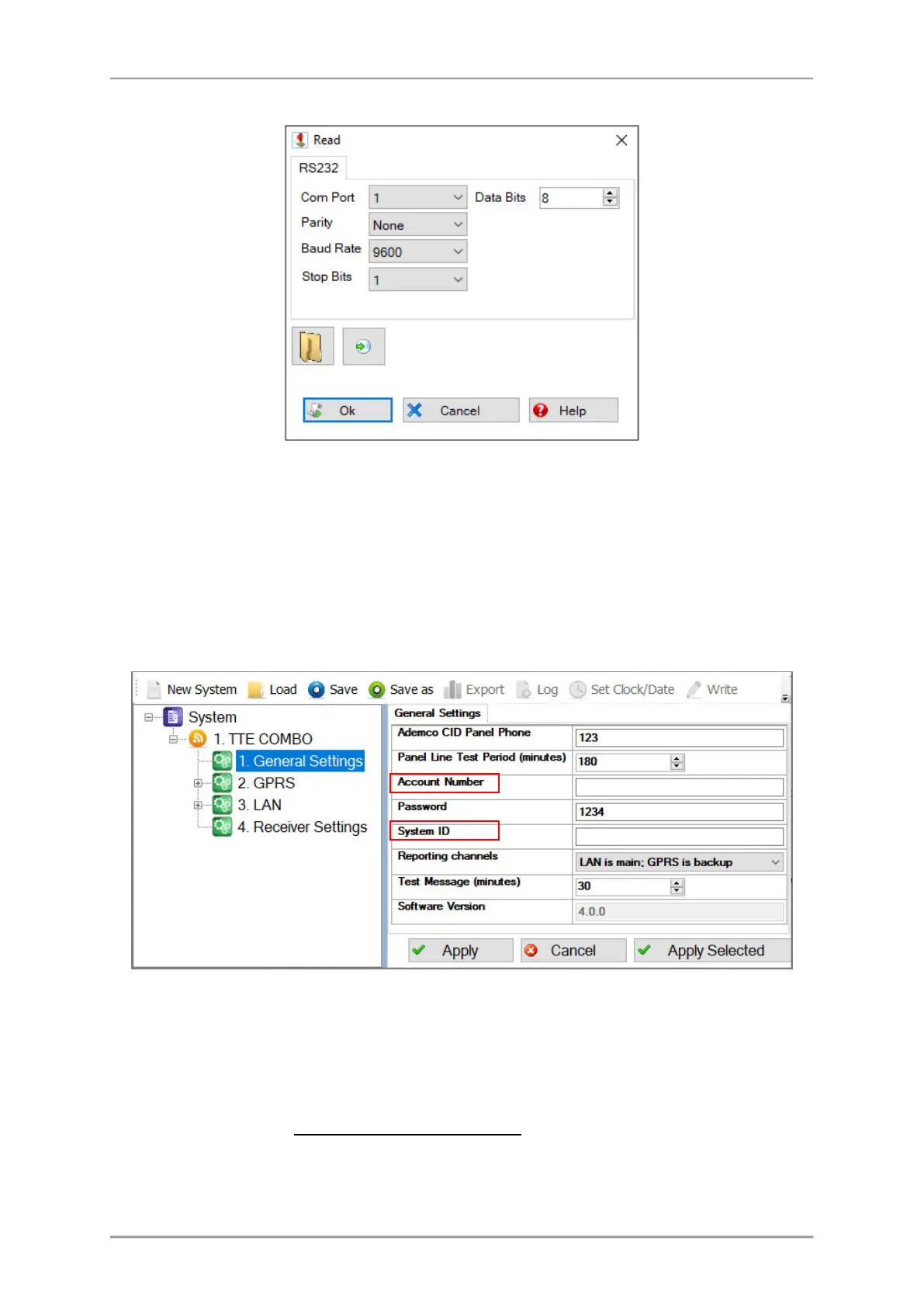
A new window with options for Reading is opened:
In Com Port field, select the number of USB port to which the module is physically connected. Press
OK button to continue. Next you have to enter a Password code – “1234” by default.
If the downloading is successful a message “Download from hardware finished successfully!” will
appear on the screen.
3.2 General Settings Menu
Click on the “+” icon in front of TTE Combo module to expand the programming menus. Select
General Settings menu. The possible settings are displayed on the right side on the screen:
Important Note. According the used way for monitoring, there are two general approaches for
programming of the Account Number and System ID fields.
- For Monitoring stations. Enter into the fields the specific information for the site according
the used software for monitoring. See the description of the fields below.
- For AJAX SP Pro Server. Leave empty. The fields will be filled in automatically after the
registration of the TTE Combo as standalone device to a User account at AJAX WEB.



 To Next Page