TELSTRA ELITE™ GATEWAY USER GUIDE
20
STATI C IP MODE
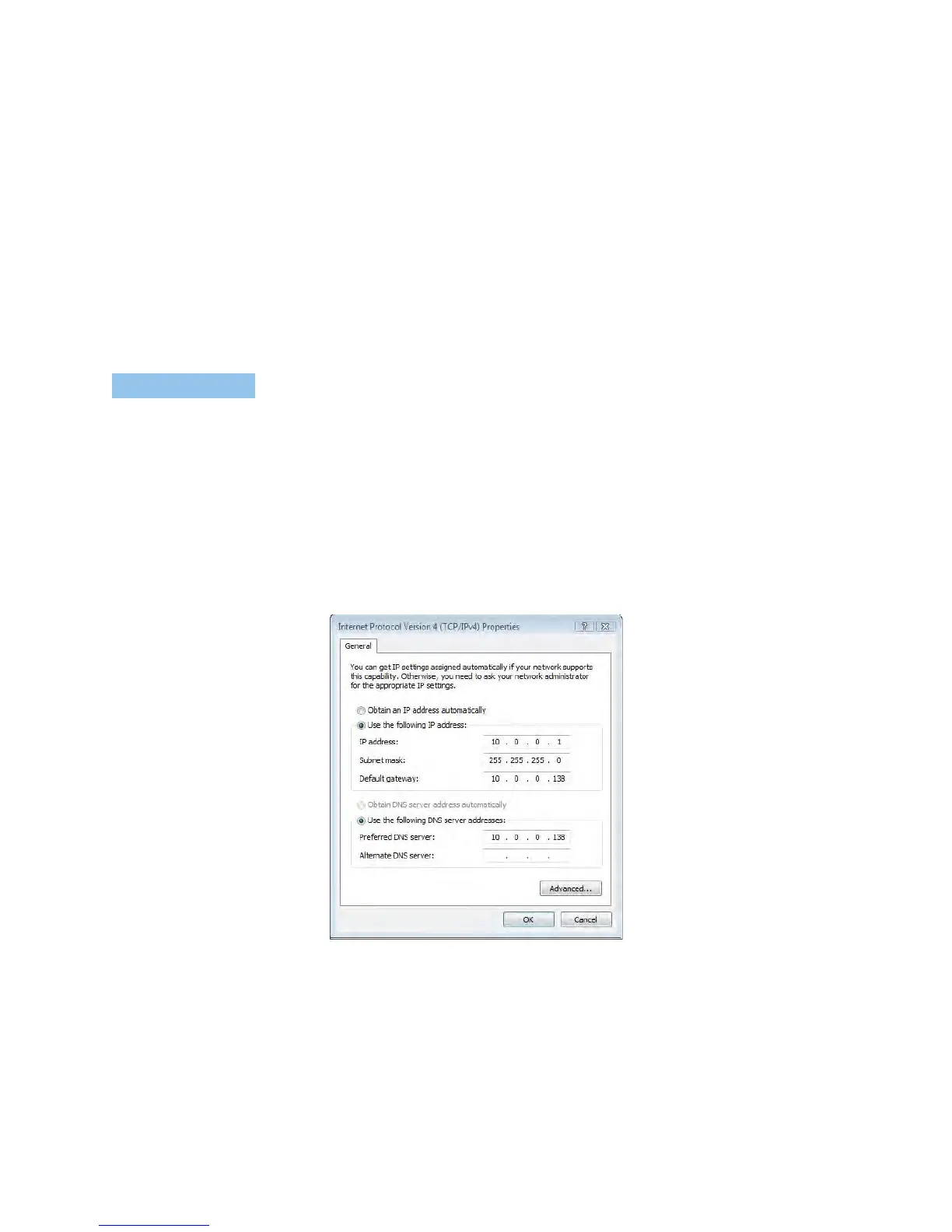
Toconfigureyourgatewaymanually,yourPCmusthaveastaticIPaddresswithinthe
gateway’ssubnet.ThefollowingstepsshowhowtoassignaStaticIPaddresstoyourPC
usingsubnet10.0.0.x.
1: SettheIPaddressto10.0.0.x.(wherexisanumberbetween1and254)withsubnetmask
of255.255.255.0.
2: SetthedefaultgatewayandDNSservertothegateway’sIPaddress.
NOTE: The IP address of the gateway is 10.0.0.138. (default), so the PC must be set with a different Ip. In the case below, the
PC’s IP address is set as 10.0.0.1
3. ClickOKtoapplythesettings.



 To Next Page