TELSTRA ELITE® GATEWAY USER GUIDE
69
8.5 DOMA I N NAMESERVER(DNS)
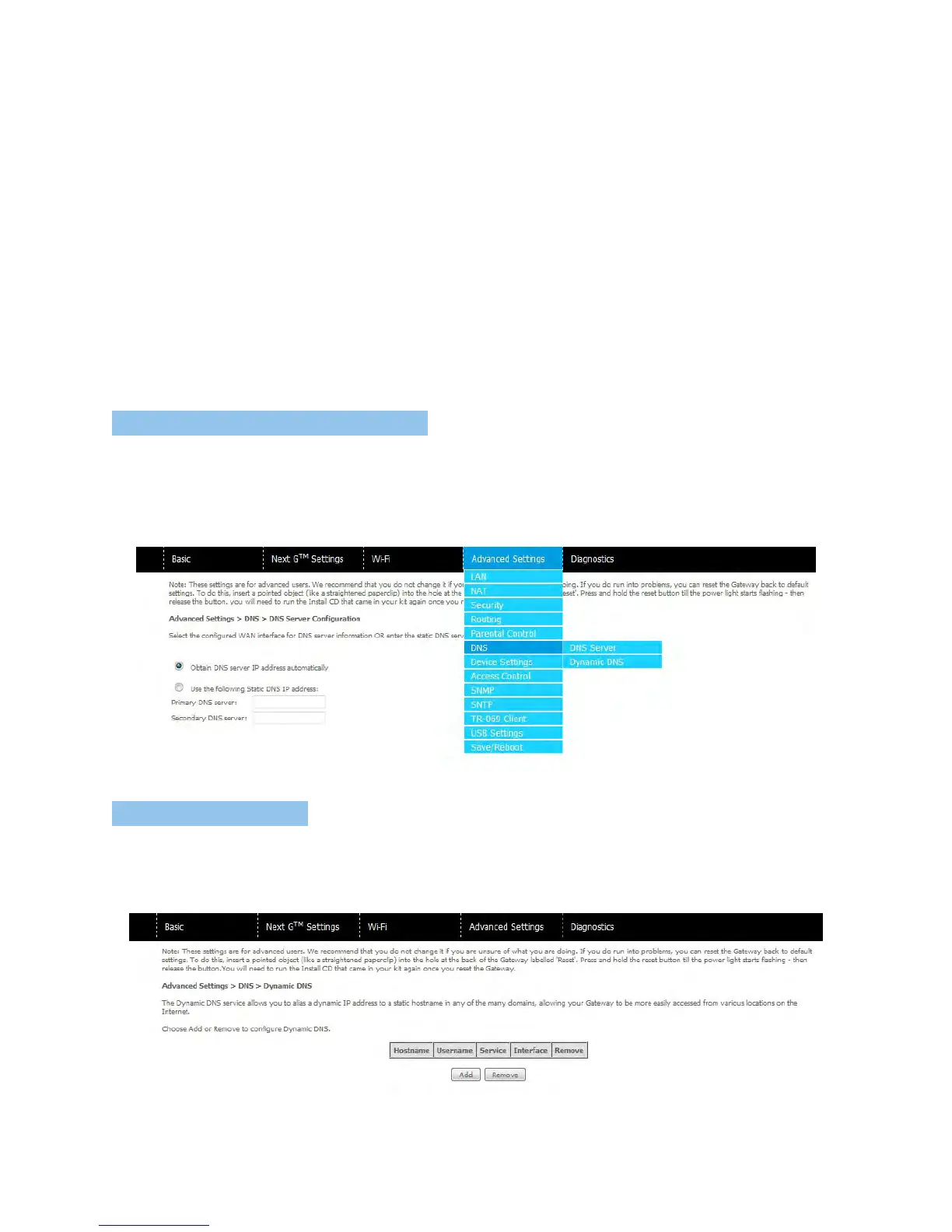
8. 5.1 D NS SERVER CO NFIGURATI ON
IfEnableAutomaticAssignedDNSisselected,thisdevicewillacceptthefirstreceivedDNS
assignmentfromtheWideAreaNetwork(WAN)interfaceduringtheconnectionprocess.
Otherwise,youcanentertheprimaryandoptionalsecondaryDNSserverIPaddresses.Click
onSavetoapply.
NOTE: Click the Save button to save the new configuration. To make the new configuration effective, reboot your gateway.
8. 5.2 DYNAMI C D NS
TheDynamicDNSserviceallowsadynamicIPaddresstobealiasedtoastatichostnamein
anyofaselectionofdomains,allowingthegatewaytobemoreeasilyaccessedfromvarious
locationsontheInternet.
NOTE: The Add/Remove buttons will be displayed only if the gateway has been assigned an IP address from the remote server.



 To Next Page