TERA
TR-590
24
ID Name
Function
Shortcut
Screen Display Setting Select Optional Paramenter
Confrim
Setting
Return to
Standby
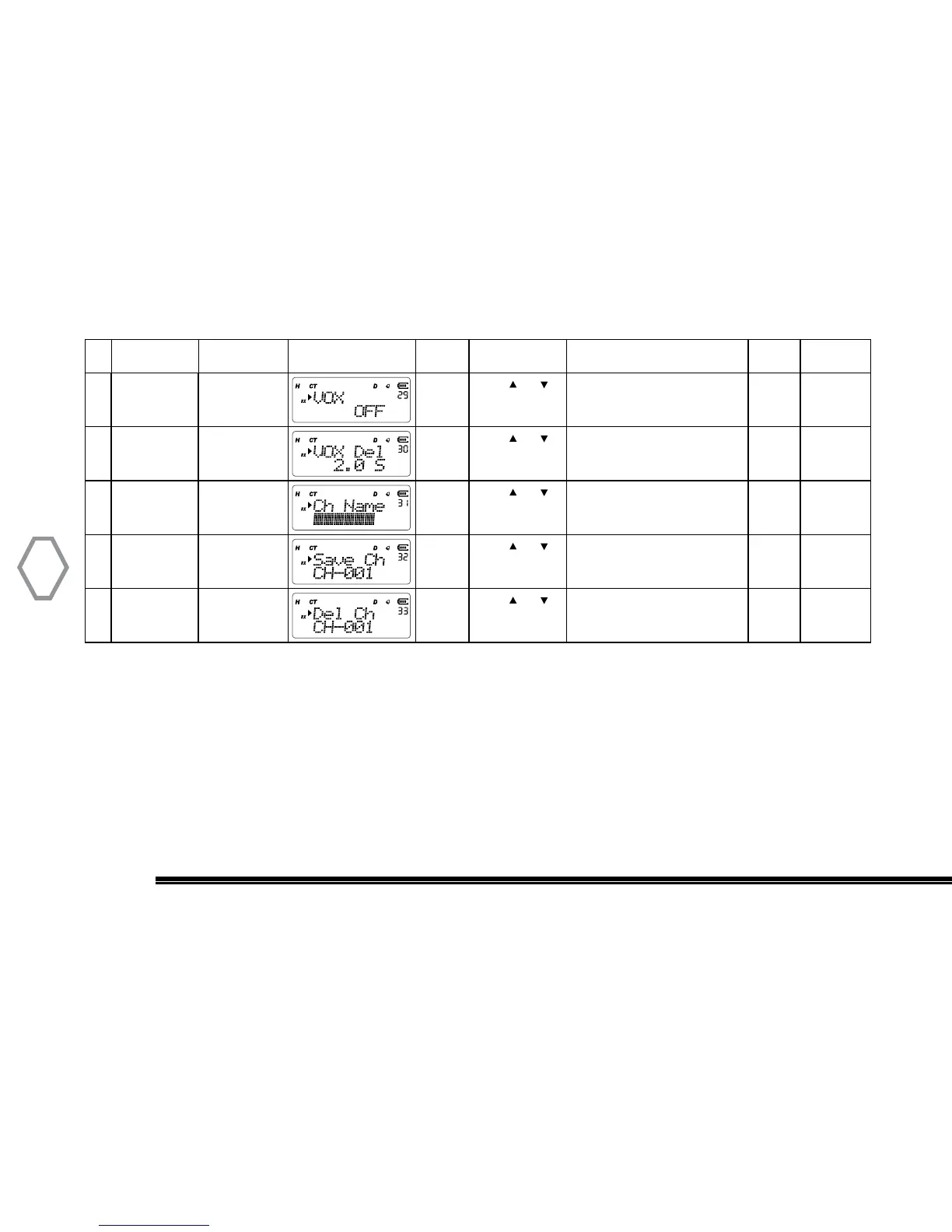
29 VOX Setting “MENU” + “29” “MENU”
Press or
to select
VOX level 1~9
OFF: turns VOX off
“MENU” “A/B EXIT”
30 VOX Delay
Time
“MENU” + “30” “MENU”
Press or
to select
0.3s~5.0s; “MENU” “A/B EXIT”
31 Channel Name
Edit
“MENU” + “31” “MENU”
Press or
to select
Edits the current name of the
channel
“MENU” “A/B EXIT”
32 Memory
Channel Store
“MENU” + “32” “MENU”
Press or
to select
Save the current frequency into
a memory channel
“MENU” “A/B EXIT”
33 Memory
Channel
Delete
“MENU” + “33” “MENU”
Press or
to select
Deletes the selected memory
channel
“MENU” “A/B EXIT”
All menu operation is to press “MENU” key to confirm, and press “Exit” key to quit. Use knob or
keys to select, long-press 2 sec. into quick select mode in the select interface of menu.


 To Next Page