5-9 TV800/900 Roller 0102-5 April 2011
Description
Drive Control Lever
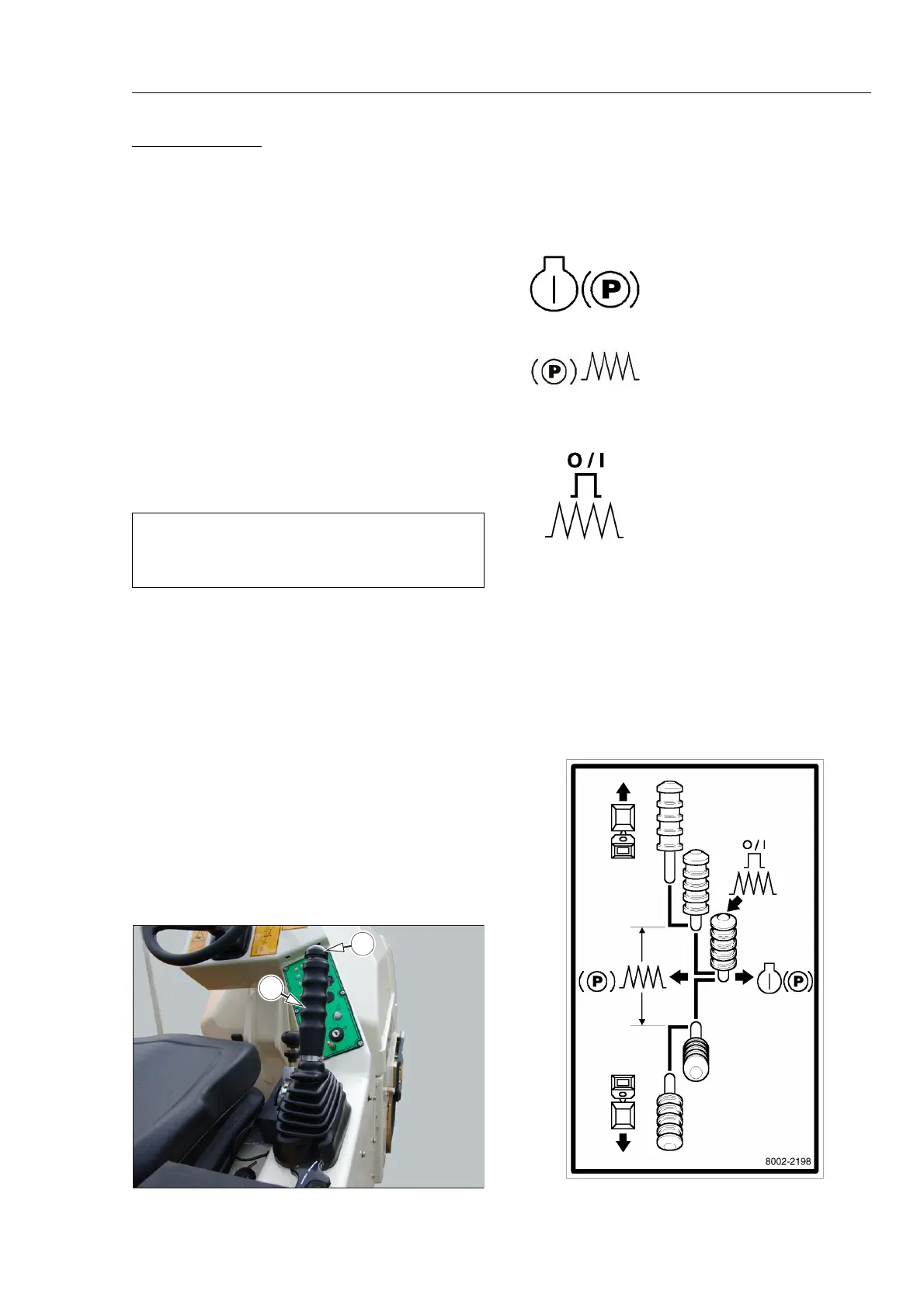
The drive control lever (A) is used to control speed, braking and
direction of the roller.
A button (B) in the end of the lever selects vibration.
Direction of the roller is controlled by moving the lever towards
the front of the roller to go forwards and towards the back of the
roller for reverse.
The lever has a gated action and is sprung towards the gated side
of its travel. There is a neutral gate in the central position of the
lever travel and there is a half speed gate in both forward and
reverse.
The lever must be pulled towards the operator, out of the
Neutral position, to release the brakes before the lever can be
moved forward or backwards.
When the lever is returned to the neutral position the brakes are
applied.
Drive Control Lever - Functions
The functions of the drive control lever are shown on a decal
positioned on the machine and replicated below.
NOTICE
When Changing Direction Ensure The Lever Does Not
Enter The Neutral Gate.
In this position the engine may be
started, and when running will idle.
The brakes are applied.
In this position the brakes are
released. Move the lever forwards or
backwards to move the machine.
Move the throttle lever to position 1 or
2 to increase engine speed.
By pressing the button in the end of
the control lever vibration is selected.
Ensure the throttle lever is in position
1 or 2.



 To Next Page