7-7 TV800/900 Roller 0102-5 April 2011
Operating Instructions
To Move the Roller
• Start the engine.
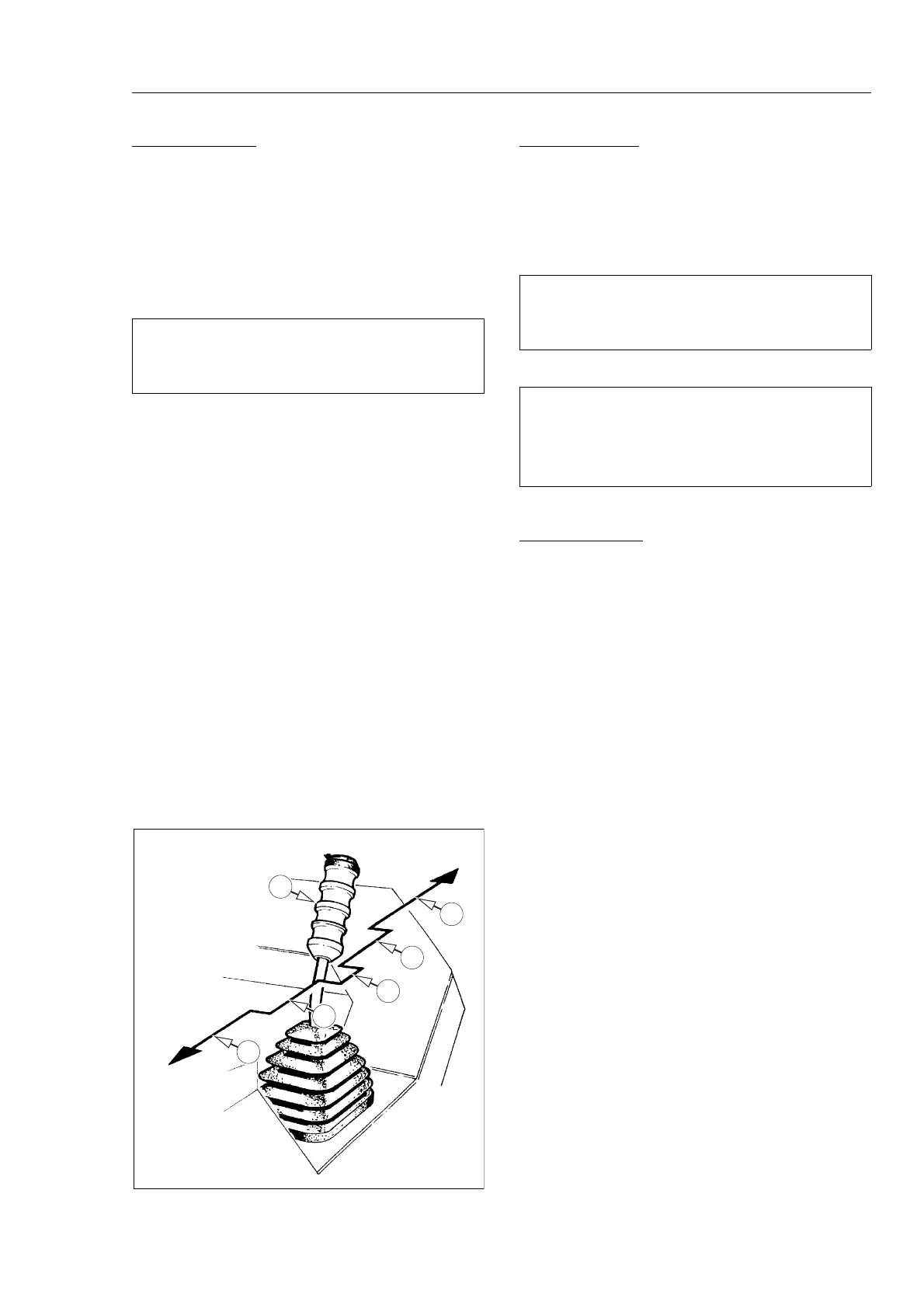
• Pull the drive lever (A) away from the Neutral gate (B).
• Move the lever forward or backwards; depending on the
direction of travel required, to the Half Speed gate (C).
• To select Full Speed move the lever to the Full Speed gate
(D).
To Stop the Roller
• Move the control lever towards the Neutral position, the
machine will automatically reduce speed.
• When the machine has stopped allow the lever to enter the
Neutral gate. The parking brake will be applied.
Parking The Roller
• Select a flat level site where the roller will cause least
obstruction to others.
• Remove start key.
• Chock drums if necessary.
• Fit anti vandal cover and lock in place.
• If parking over night and there is a possibility of frost the
water tank must be drained.
NOTICE
When Changing Direction Do Not Allow Lever To Enter
NEUTRAL Gate If The Machine Is Moving.
NOTICE
The Machine Must Have Stopped Before Allowing Control
Lever To Enter Neutral Gate.
b
To Stop The Machine In An Emergency Push The
Emergency Stop Button. This Will Stop The Engine A
Automatically Apply The Parking Brake.



 To Next Page