User's Manual
MH3D
©2004 TESA Switzerland All Rights Reserved.
Page A-7
CCD Optical Probe - Adjustments
The possible configurations of the reference crosshairs are shown on the
preceeding page. If you change magnification (use zooming) while measuring, be
sure that the reference crosshair is coincident with the optical axis of the probe.
Refer to the RAM Instruction Manual for the procedure on adjustment of the
crosshair position.
Crosshair Alignment
It is recommended that the crosshairs on the monitor screen be aligned to the
X-axis and Y-axis of the MH3D. To align the crosshairs:
1. Lock the Y-axis.
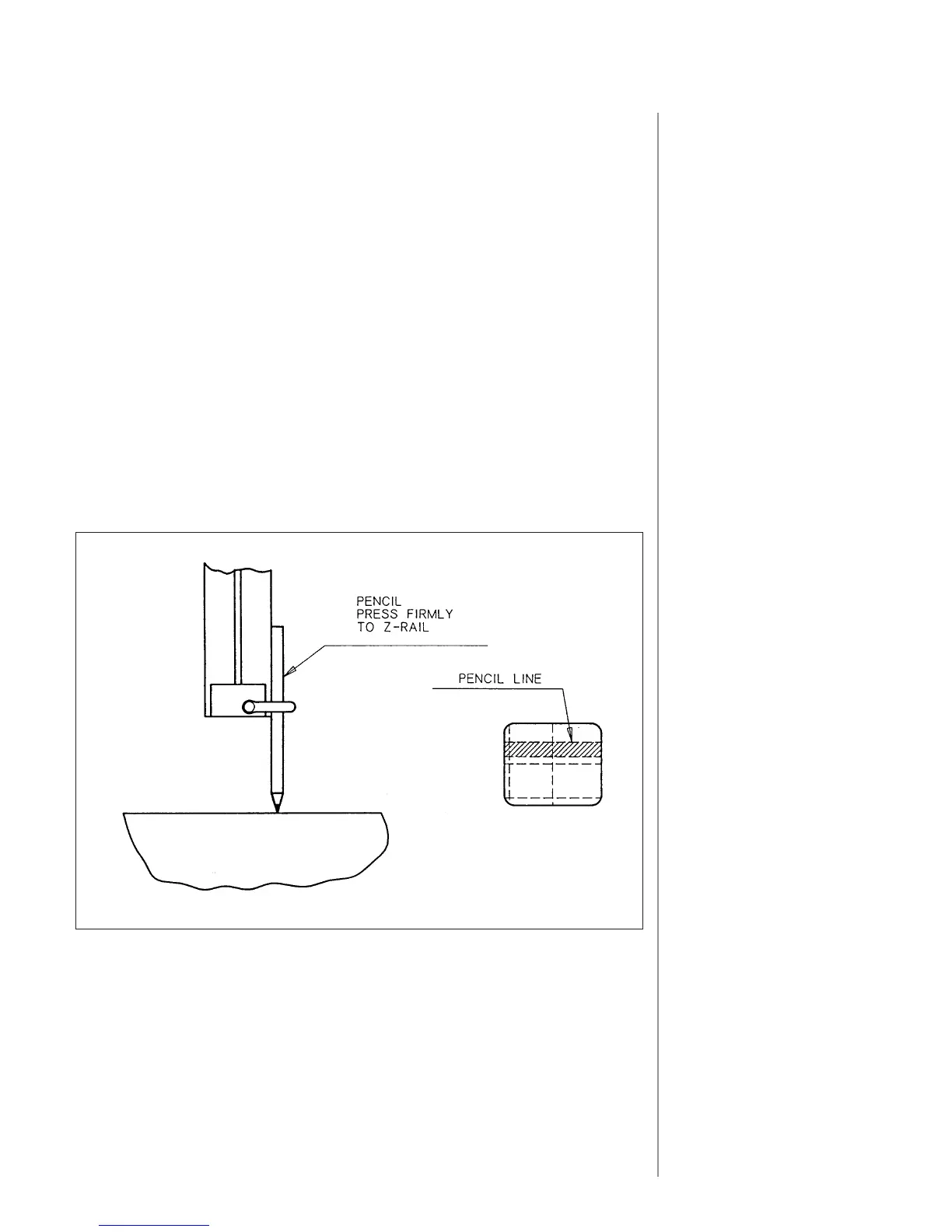
2. Using a sharp pencil, draw a line on the surface of the granite by holding
the pencil tight to the Z-rail and moving the ZX carriage along the X-axis.
3. Using the lowest magnification, focus the probe on the pencil mark on
the granite table.
4. Holding the optical probe with one hand, release the clamp (2) and
rotate the probe in the Z-rail until the crosshair is parallel to the image
of the pencil line.
5. Tighten the clamp (2).
GRANITE TABLE











 To Next Page