4 Product description
18
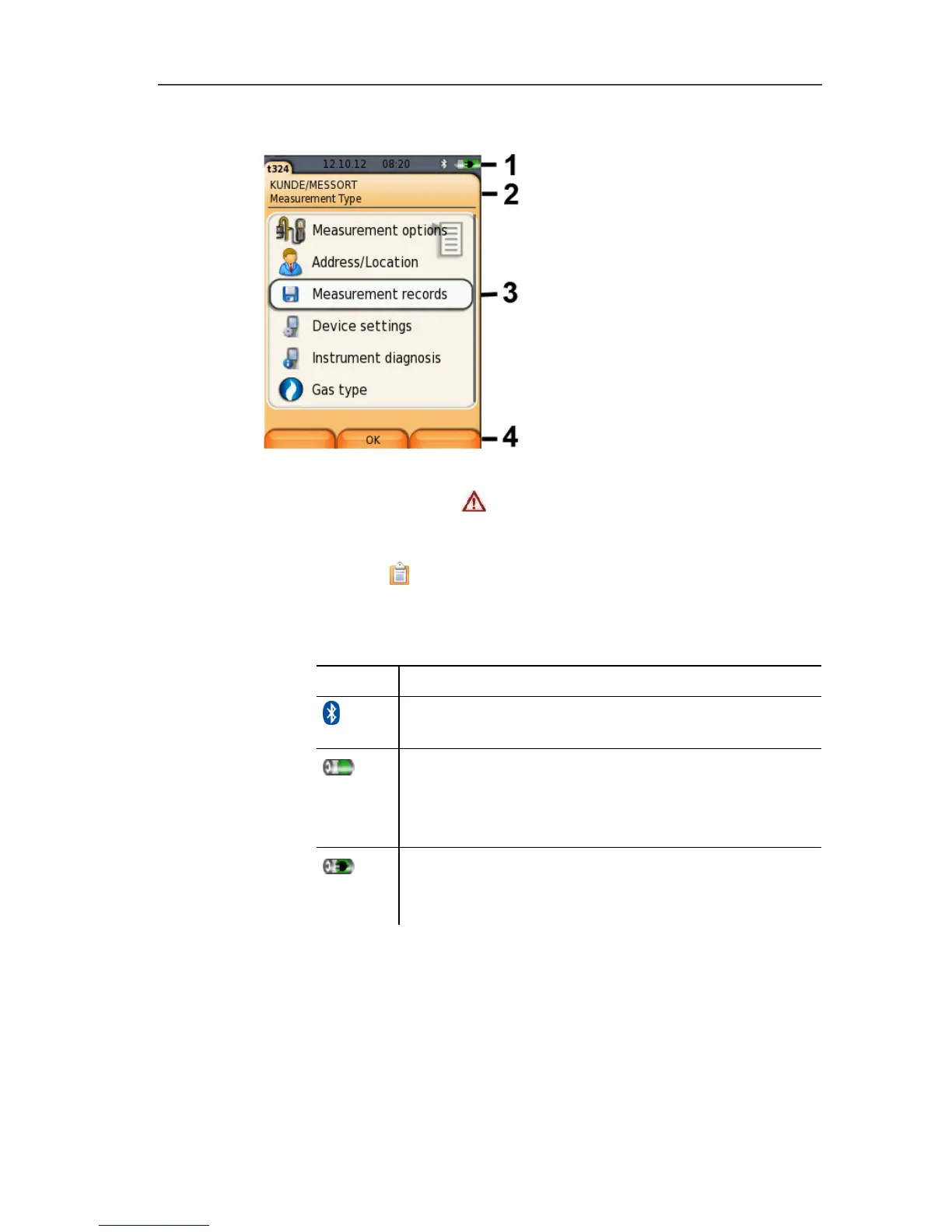
4.1.3. Display
1 Status bar (dark grey background):
• Warning symbol (only if there is an instrument error,
display of error in instrument diagnosis menu), otherwise:
Instrument designation.
• Symbol
• Display of date and time.
• Indication of Bluetooth
®
status, power supply and remaining
rechargeable battery capacity:
Symbol Feature
Blue symbol = Bluetooth
®
on,
Grey symbol = Bluetooth
®
off
Battery operation
Display of remaining rechargeable battery
capacity by colour and fill level of the battery icon
(green = 5 - 100%, red = < 5%)
Mains operation
Display of remaining rechargeable battery
capacity: see above
2 Info field of register tabs: Display of selected address/location,
selected measurement type.
3 Selection field for functions (selected menu item appears
against a white background, unavailable functions are identified
by grey font) or display of measuring values.
4 Function display for function keys.



 To Next Page