Functions of the control and display elements
28
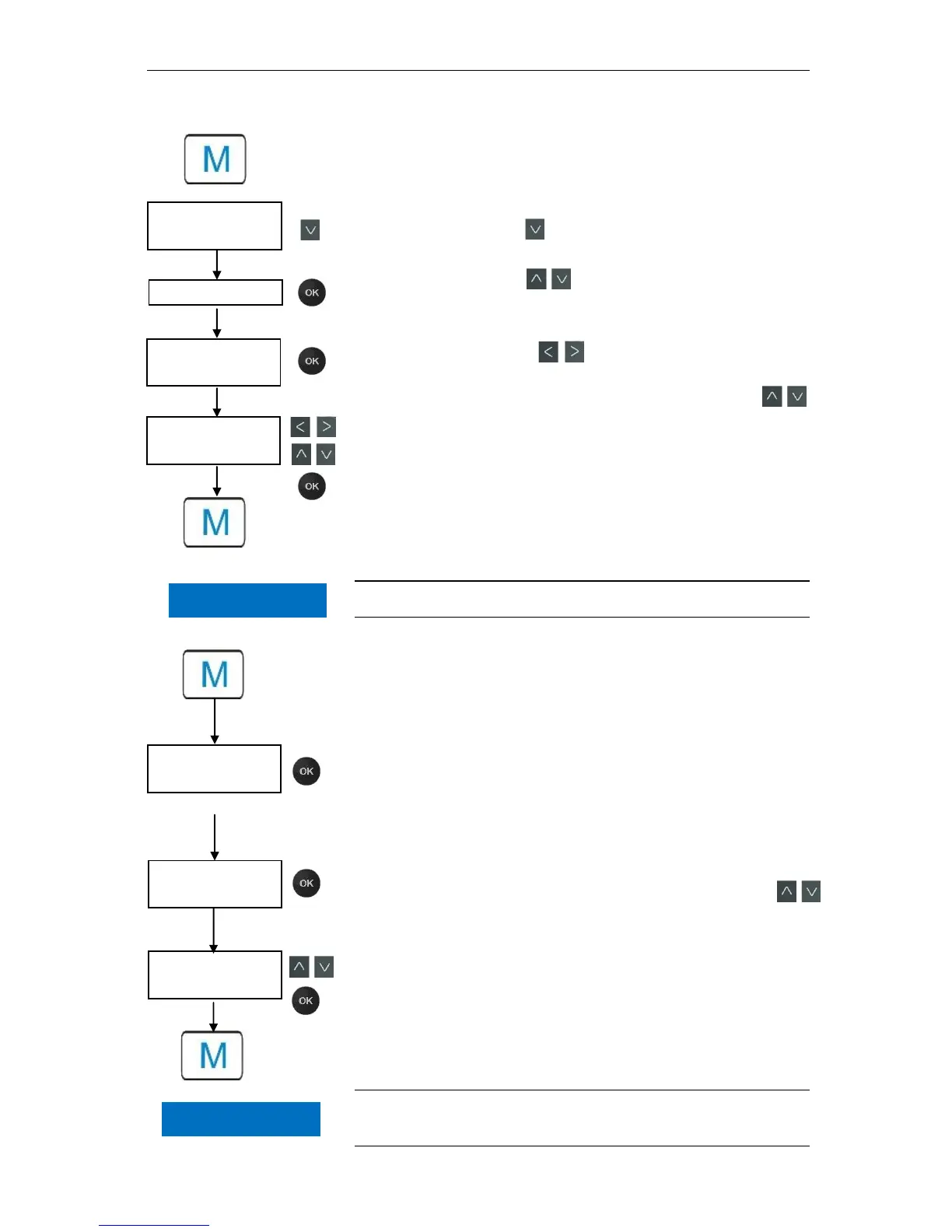
Inputting date and time
Press the "M" button
The following selection appears: "Basic program" or "Ser-
vice"
Using the cursor block , select the menu option "Service"
Confirm your selection with "OK"
Using the cursor block select the desired menu option for
"Time Date"
Confirm your selection with "OK"
Move the cursor with the buttons to the desired position
in the time/date field
Select the desired figure by confirming with the cursor keys
Confirm the newly configured values for the time and date with
"OK"
If you do not wish to change the values, press no buttons for 30
seconds. The device will then revert back to the values in the op-
erating display.
Press the "M" button to leave the levels.
The clock continues to run even if the device is switched off.
Selection of functions (Example: "Select operating mode")
Press the "M" button
The following selection appears: "Basic program" or "Ser-
vice"
Confirm "Basic program" with "OK"
Confirm the menu option "Mode of operation" with "OK"
The following selection appears: "Time controlled", "Vol-
ume interval" or "Volume and Time"
Select the desired function by confirming with the cursor keys
Activate the function with "OK"
(With an active function, an " * " appears at the end of the line)
This activates the selected function.
Press the "M" button to leave the levels.
If you have activated one function, the others are automatically deac-
tivated.



 To Next Page