cutmaster 39
Manual 0-4976 3-3 INSTALLATION
3.04 Gas Connections
A. Connecting Gas Supply to Unit
The connection is the same for compressed air or high pressure gas cylinders. Refer to subsection 3.4-C
if an optional air line lter is to be installed.
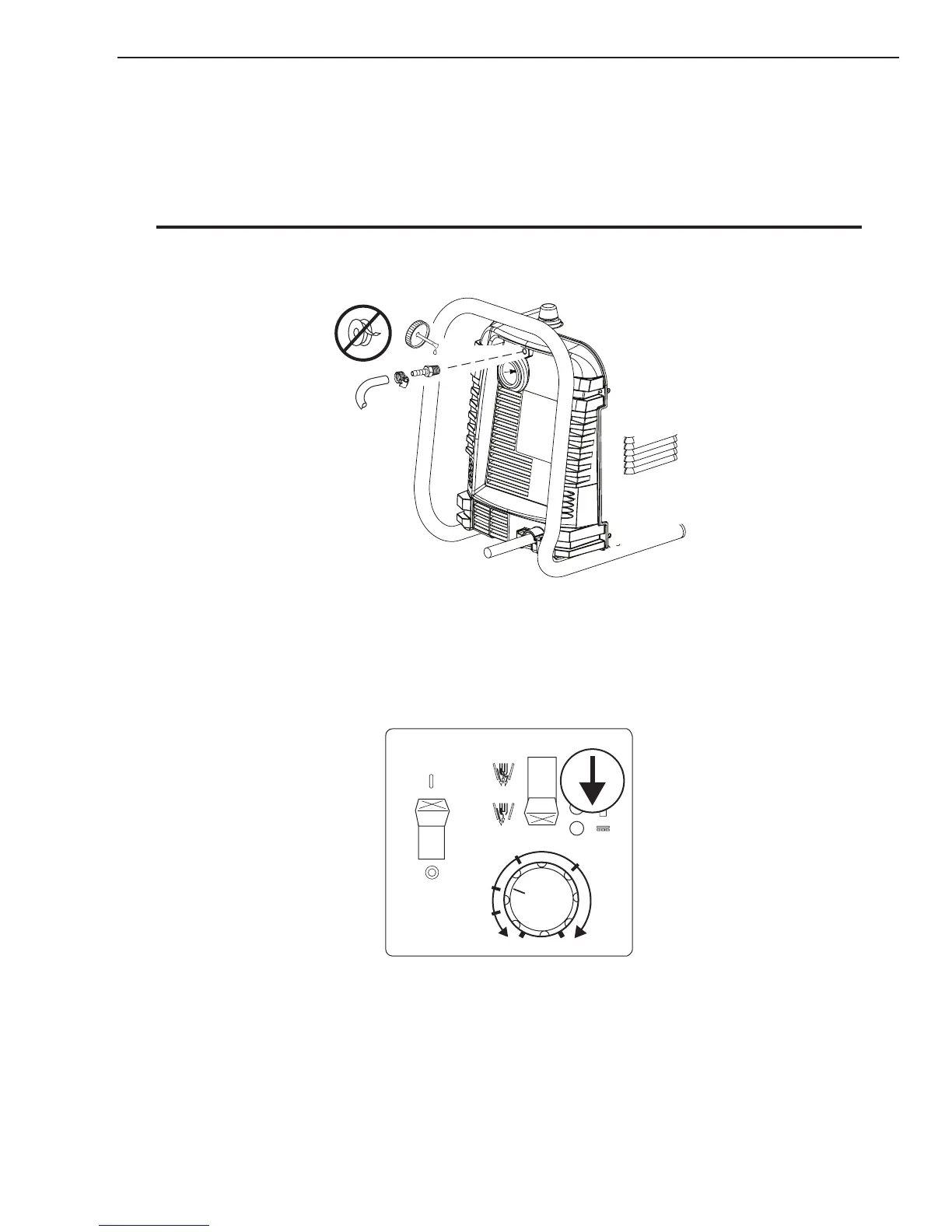
1. Connect the gas line to the inlet port. The illustration shows typical fittings as an example.
NOTE
For a secure seal, apply thread sealant to the fitting threads, according to manufacturer's instructions. Do Not
use Teflon tape as a thread sealer, as small particles of the tape may break off and block the small gas passages in
the torch.
A-07926
Min. 1/4 inch
6.4 mm
Gas Connection to Inlet Port
B. Check Air Quality
To test the quality of air, put the RUN / SET switch in the SET (down) position, place a welding lter
lens in front of the torch and turn on the gas. Any oil or moisture in the air will be visible on the lens.
Do not start an arc!










 To Next Page