CUTMASTER 58
Manual 0-5544 SERVICE
5-7
6. Disconnect the input line from the filter element as-
sembly.
7. Remove the filter element assembly through the rear
opening.
NOTE!
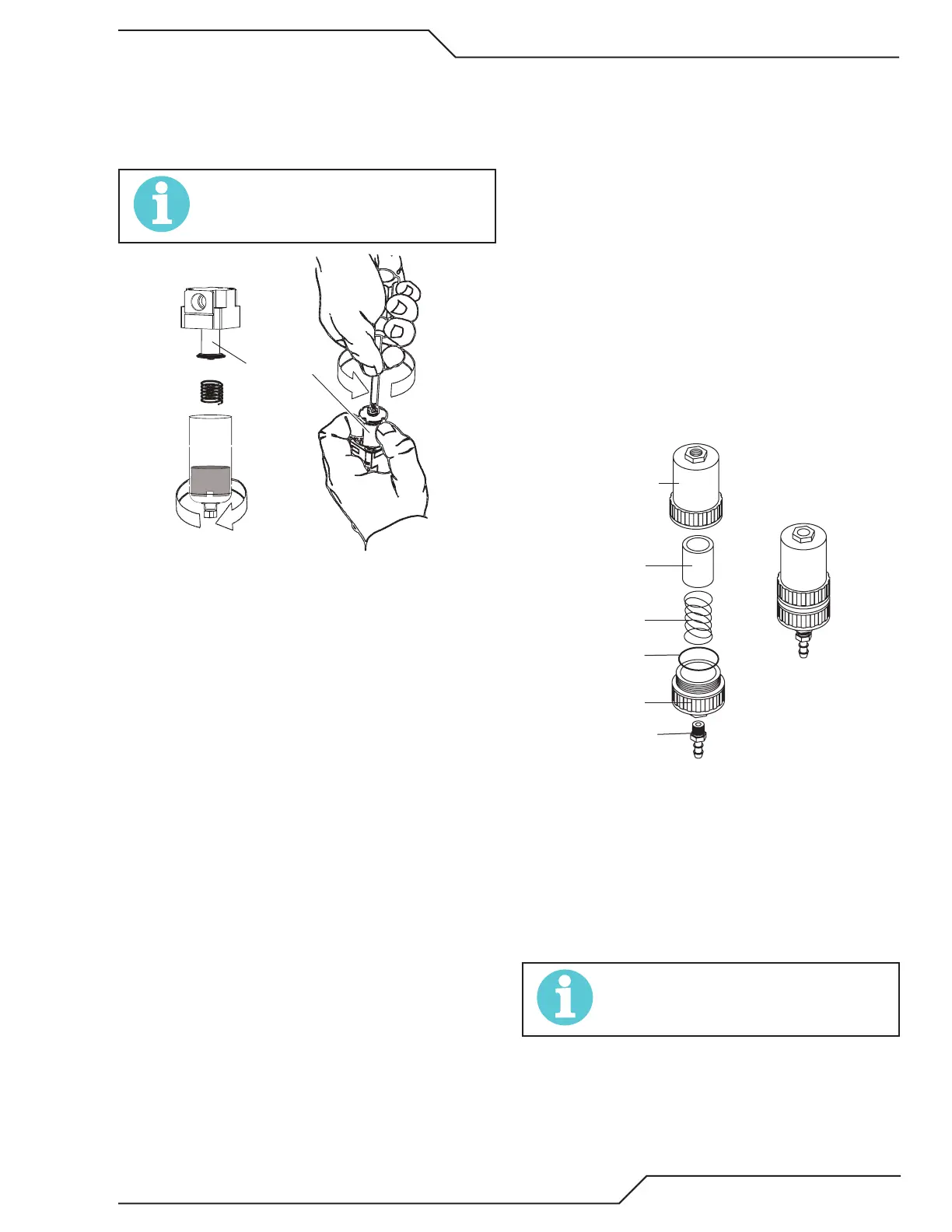
If replacing or cleaning just the lter element refer to
the following illustration for disassembly.
Filter Element
8. Install the new or cleaned assembly by reversing these
procedures.
9. Turn ON the air supply and check for leaks before
reinstalling the cover.
Optional Single-Stage Filter Element
Replacement
These instructions apply to power supplies where the optional
Single-Stage Filter has been installed.
The Power Supply shuts down automatically when the Filter
Element becomes completely saturated. The Filter Element
can be removed from its housing, dried, and reused. Allow
24 hours for Element to dry. Refer to Section 6, Parts List, for
replacement filter element catalog number.
1. Remove power from power supply.
2. Shut OFF air supply and bleed down system before
disassembling Filter to change Filter Element.
3. Disconnect gas supply hose.
4. Turn the Filter Housing Cover counter-clockwise and
remove it. The Filter Element is located inside the
Housing.
Art # A-02476
Filter
Element
(Cat. No. 9-7741)
Housing
Cover
Barbed
Fitting
Spring
Assemb
O-ring
No. 9-7743)
Optional Single-Stage Filter Element Replacement
5. Remove the Filter Element from the Housing and set
Element aside to dry.
6. Wipe inside of housing clean, then insert the replace-
ment Filter Element open side first.
7. Replace Housing on Cover.
8. Reattach gas supply.
NOTE!
If unit leaks between housing and cover, inspect the
O-ring for cuts or other damage.










 To Next Page