CUTMASTER 58
SERVICE Manual 0-5544
5-8
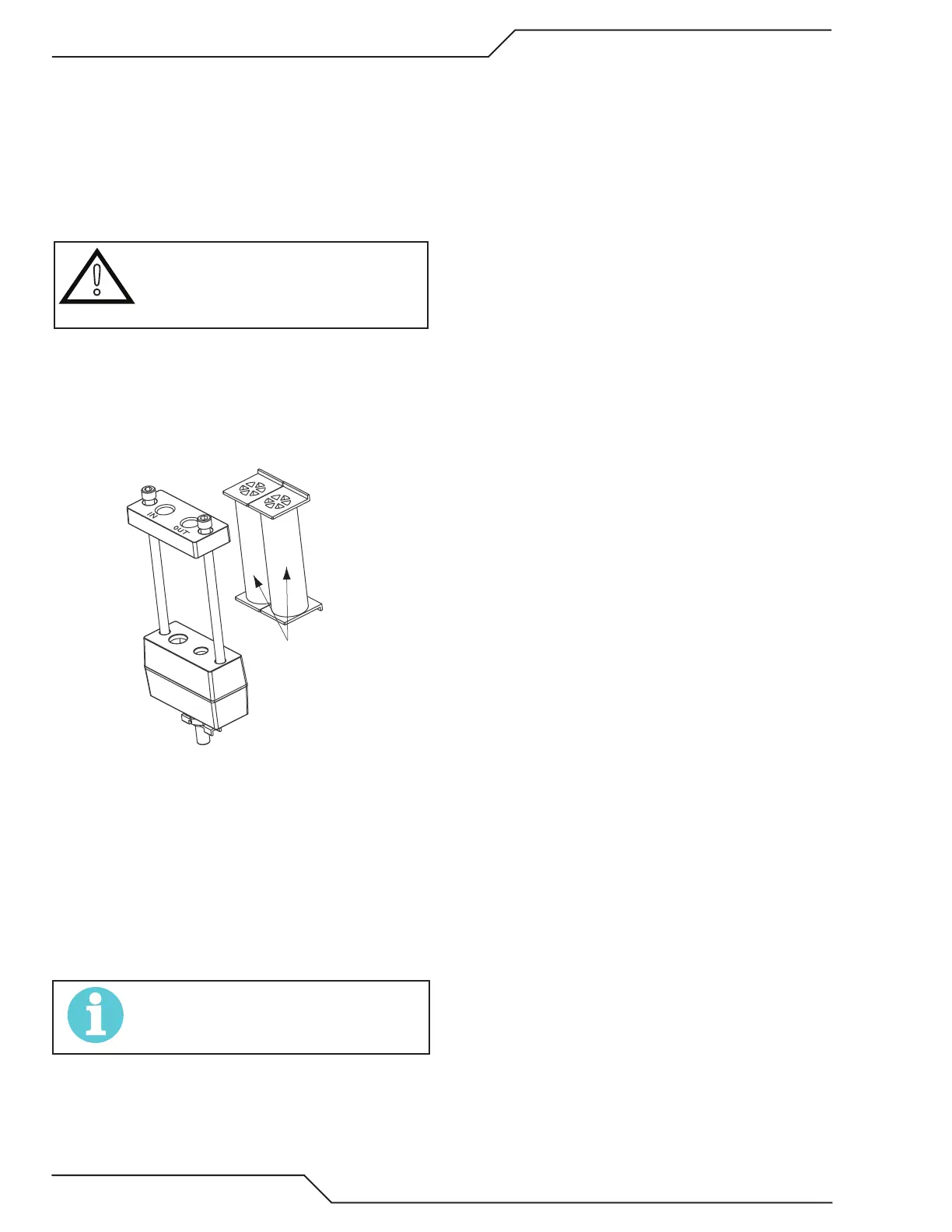
Optional Two-Stage Filter Element Replacement
The Two-Stage Air Filter has two Filter Elements. When the Filter
Elements become dirty the Power Supply will continue to oper-
ate but cut quality may become unacceptable. Refer to Section
6, Parts List, for replacement filter element catalog number.
1. Shut OFF primary input power.
2. Shut OFF air supply and bleed down system.
WARNING
Always turn OFF the air supply and bleed the system
before disassembling the Filter Assembly as injury
could result.
3. Loosen the two bolts on the top of the Filter Assembly
enough to allow the Filter Elements to move freely.
4. Note the location and orientation of the old Filter Ele-
ments.
5. Slide out the old Filter Elements.
Stage
Cartridges
(as marked)
Art # A-02942
Optional Two-Stage Filter Replacement
6. Slide the replacement Filter Elements into the Filter
Assembly, with the same orientation as noted in Step
4 above.
7. Hand tighten the two bolts evenly, then torque each
bolt to 20 - 30 in-lbs (2.3 - 3.4 Nm). Improper torque
may damage the gasket.
8. Slowly apply air pressure to the assembly, checking
for leaks.
NOTE!
A small amount of air leakage from the bottom t-
ting is normal..
This completes the parts replacement procedures.










 To Next Page