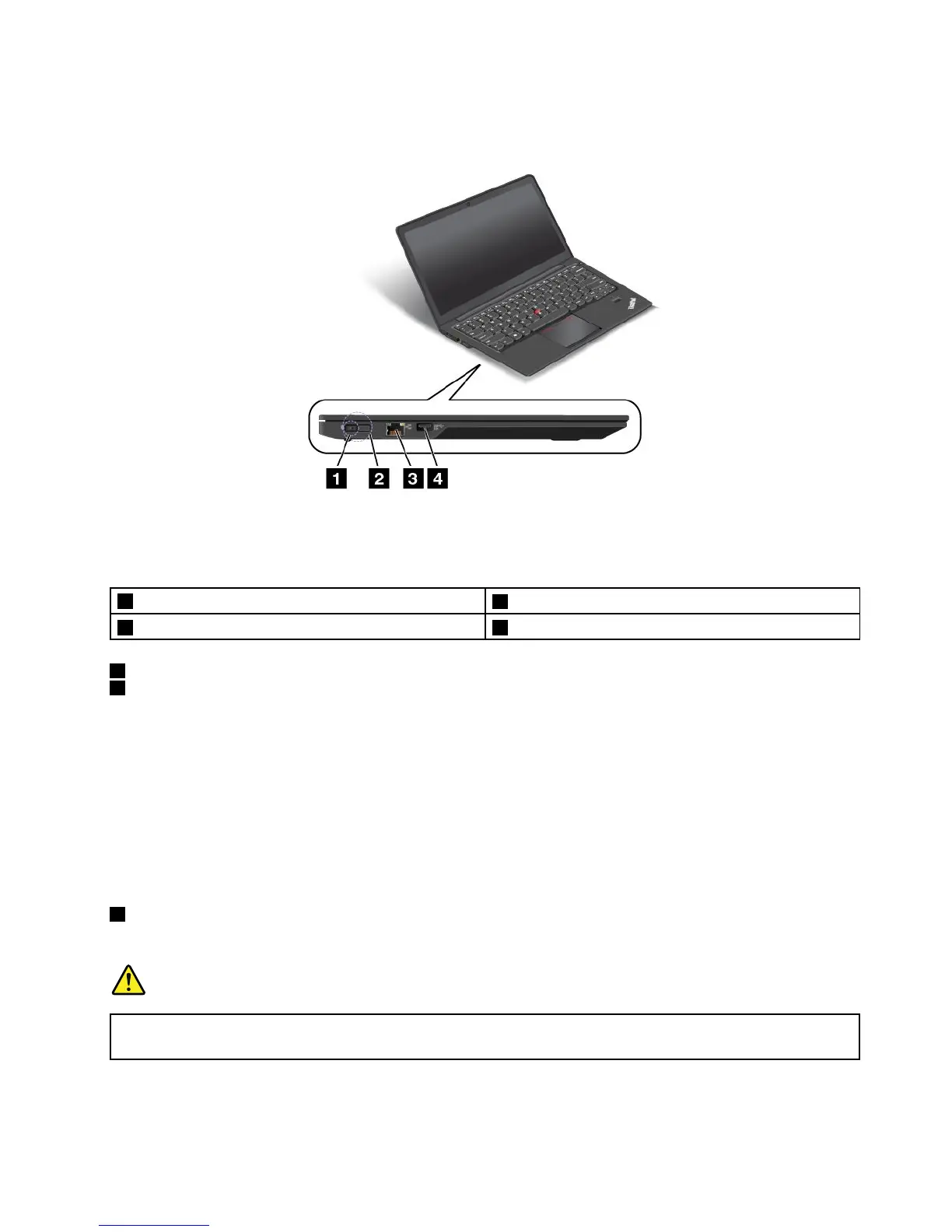
Left-sideview
Figure3.Left-sideview
Note:Yourcomputermightlookslightlydifferentfromtheillustrationabove.
1acpowerconnector
3Ethernetconnector
2LenovoOneLinkconnector4Always-onUSBconnector(USB3.0)
1acpowerconnector
2LenovoOneLinkconnector
Whentheacpoweradapterisconnectedtotheacpowerconnector,itprovidesacpowertothecomputer
andchargesthebattery.WhenasupportedThinkPadOneLinkDockorThinkPadOneLinkProDockis
connectedtotheLenovoOneLinkconnector,itcannotonlyextendthecomputercapabilitiesbutalso
provideacpowertothecomputerandchargethebattery.
TousetheLenovoOneLinkconnector,youneedtoremovetheconnectorcoverfromtheLenovoOneLink
connectorfirst.
Note:Ensurethatyoukeeptheconnectorcover.ReattachittotheLenovoOneLinkconnectorwhen
youarenotusingtheLenovoOneLinkconnector.
3Ethernetconnector
Connectyourcomputertoalocalareanetwork(LAN)withtheEthernetconnector.
DANGER
Toavoidtheriskofelectricalshock,donotconnectthetelephonecabletotheEthernetconnector.
YoucanonlyconnectanEthernetcabletothisconnector.
Chapter1.Productoverview5



 To Next Page