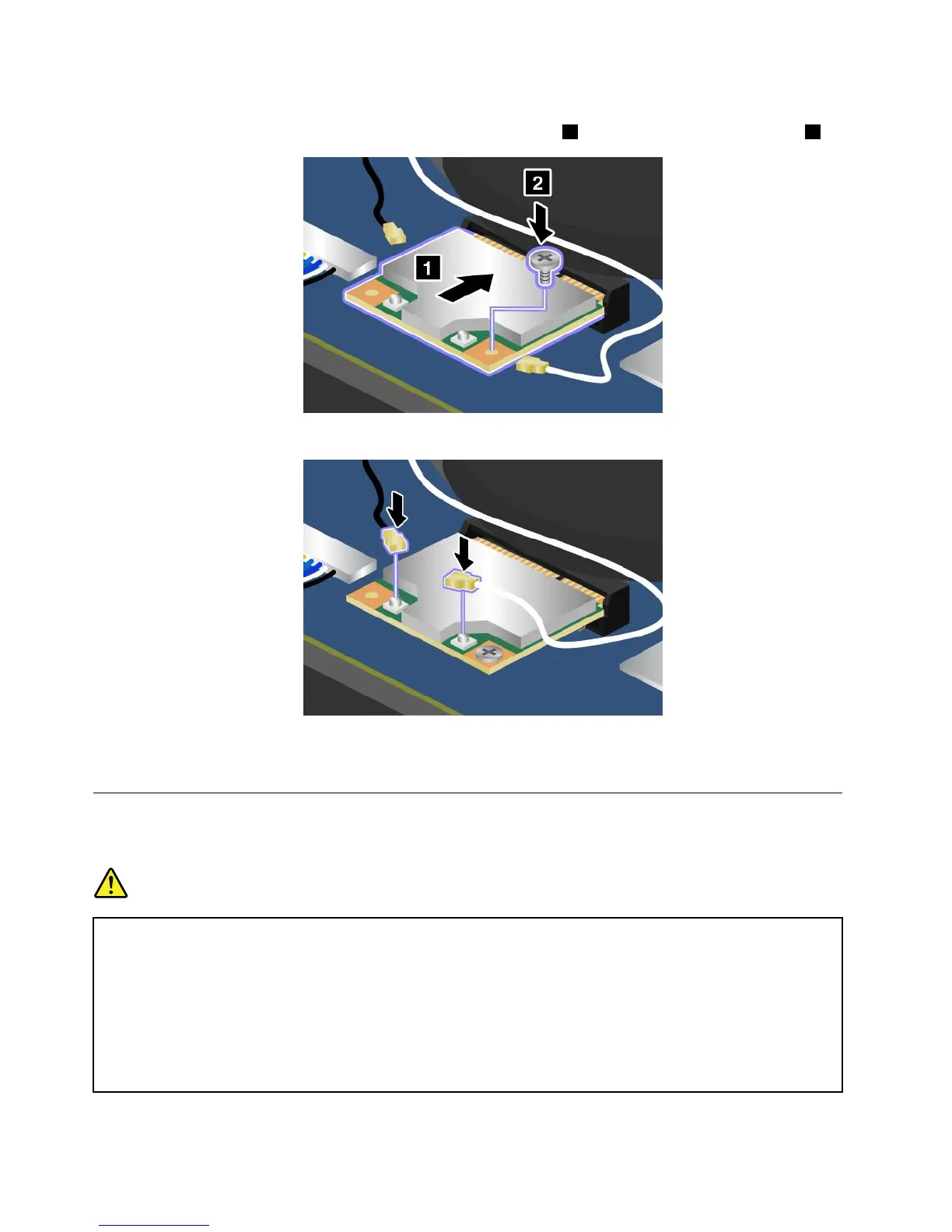
6.AlignthecontactedgeofthenewPCIExpressMiniCardwiththecorrespondingsocket.Theninsertthe
newPCIExpressMiniCardintothePCIExpressMiniCardslot
1.Securethecardwiththescrew2.
7.Connecttheantennacablestothenewcardasshowninthedrawing.
8.Reinstallthebasecoverassembly.See“Replacingthebasecoverassembly”onpage66.
9.Turnthecomputeroveragain.Connecttheacpoweradapterandallcables.
Replacingthecoin-cellbattery
Beforeyoustart,printtheseinstructions.
DANGER
Ifthecoin-cellbatteryisincorrectlyreplaced,thereisdangerofanexplosion.Thecoin-cellbattery
containsasmallamountofharmfulsubstances.Toavoidpossibleinjury:
•ReplaceonlywithabatteryofthetyperecommendedbyLenovo.
•Keepthebatterypackawayfromfire.
•Donotexposeittoexcessiveheat.
•Donotexposeittowaterorrain.
•Donotshort-circuitit.
72UserGuide



 To Next Page