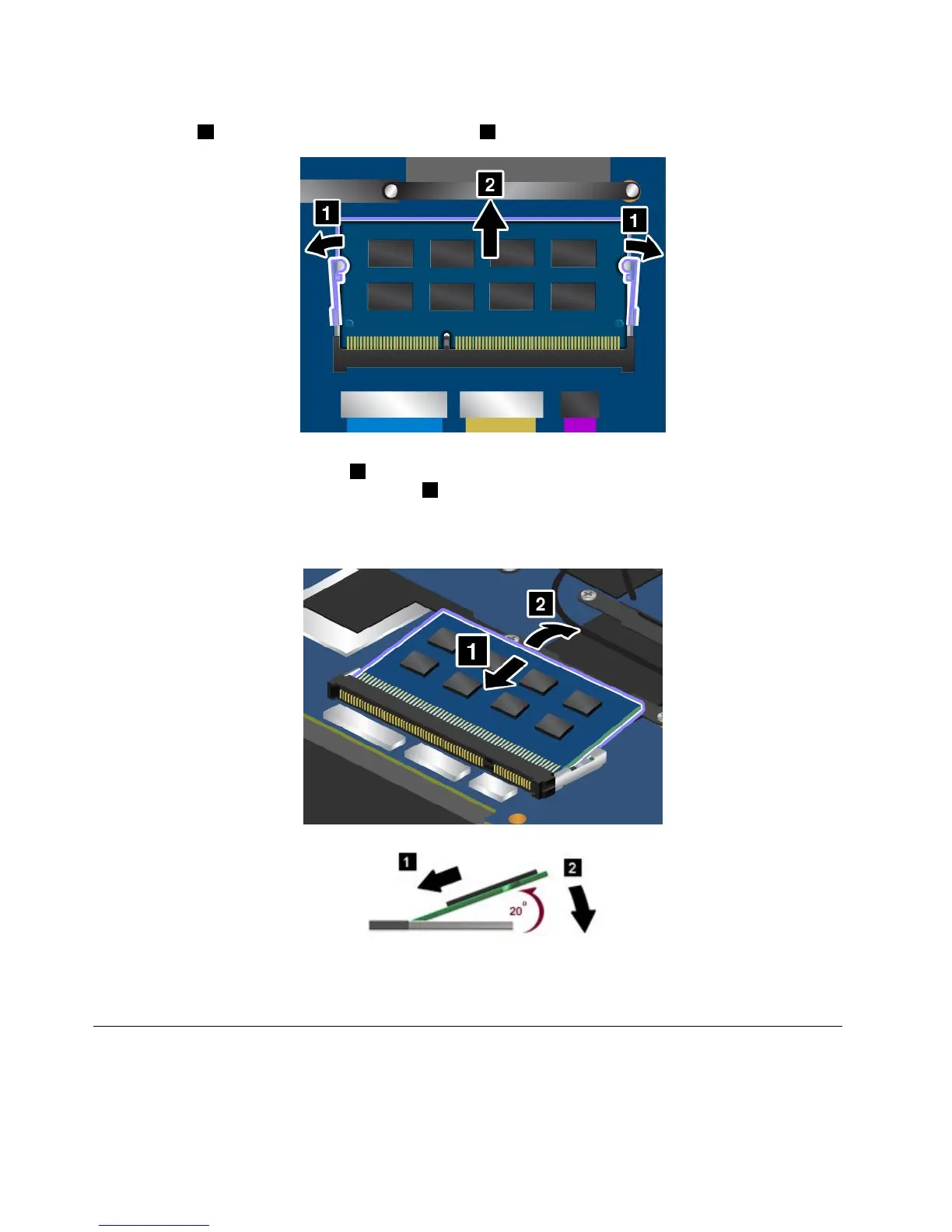
4.Ifthememorymodulealreadyisinthememoryslot,openthelatchesonbothsidesoftheslotatthe
sametime
1,andthenremovethememorymodule2.Savetheremovedmemorymoduleforfutureuse.
5.Placethenotchedendofthenewmemorymoduletowardthecontactedgesideofthememoryslot,
andinsertthememorymodule11intotheslotatanangleofabout20degrees.Pivotthememory
moduledownwarduntilitsnapsintoplace
2.Ensurethatthememorymoduleisfirmlyinstalledin
theslotandcannotbemovedeasily.
Attention:Toavoiddamagingthememorymodule,donottouchitscontactedge.
6.Reinstallthebasecoverassembly.See“Replacingthebasecoverassembly”onpage66.
7.Turnthecomputeroveragain.Connecttheacpoweradapterandallcables.
ReplacingaMiniPCIExpressCardforwirelessLANconnection
Beforeyoustart,printtheseinstructions.
70UserGuide



 To Next Page