•Donotshort-circuitit.
•Donotdrop,crush,puncture,orsubjecttostrongforces.Batteryabuseormishandlingcan
causethebatterytooverheat,whichcancausegassesorflameto“vent”fromthebattery
packorcoincell.
BeforereplacinganyCRU,ensurethatyouhavedisabledthebuilt-inbatterybydoingthefollowing:
1.Turnoffyourcomputeranddisconnecttheacpoweradapterandallcablesfromthecomputer.
2.Turnonyourcomputer.PressF1toenterThinkPadSetupwhentheThinkPadlogoappears.
3.SelectConfig➙Power.ThePowersubmenuisdisplayed.
4.SelectDisableBuilt-inBattery.
5.ClickYesintheSetupWarningwindow.Thebuilt-inbatteryisdisabledandthecomputerturnsoff
automatically.Waitthreetofiveminutestoletthecomputercool.
Replacingthebasecoverassembly
Beforeyoustart,printtheseinstructions.
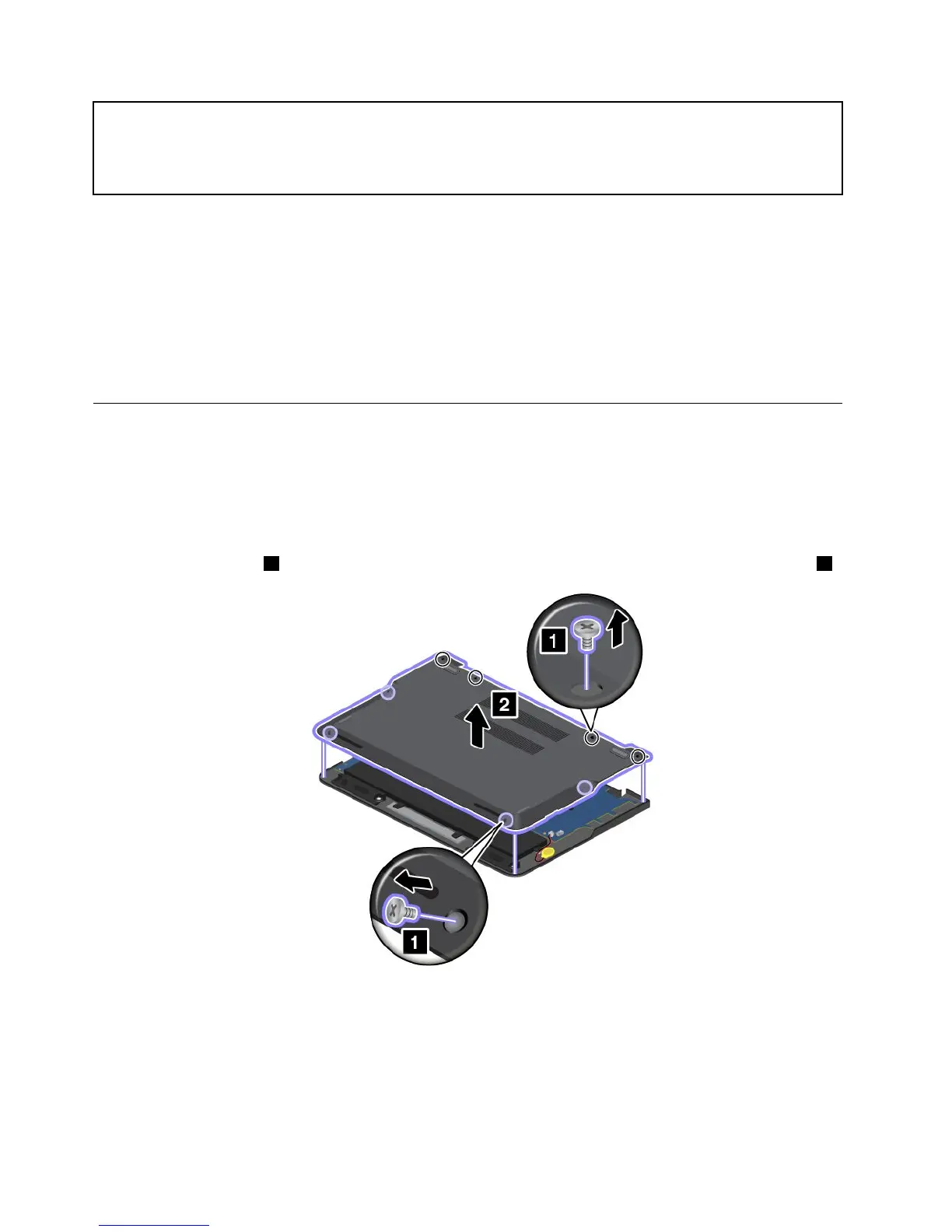
Toreplacethebasecoverassembly,dothefollowing:
1.Disablethebuilt-inbattery.See“Disablingthebuilt-inbattery”onpage65.
2.Closethecomputerdisplay,andturnthecomputerover.
3.Removethescrews1thatsecurethebasecoverassembly.Thenremovethebasecoverassembly2.
66UserGuide



 To Next Page