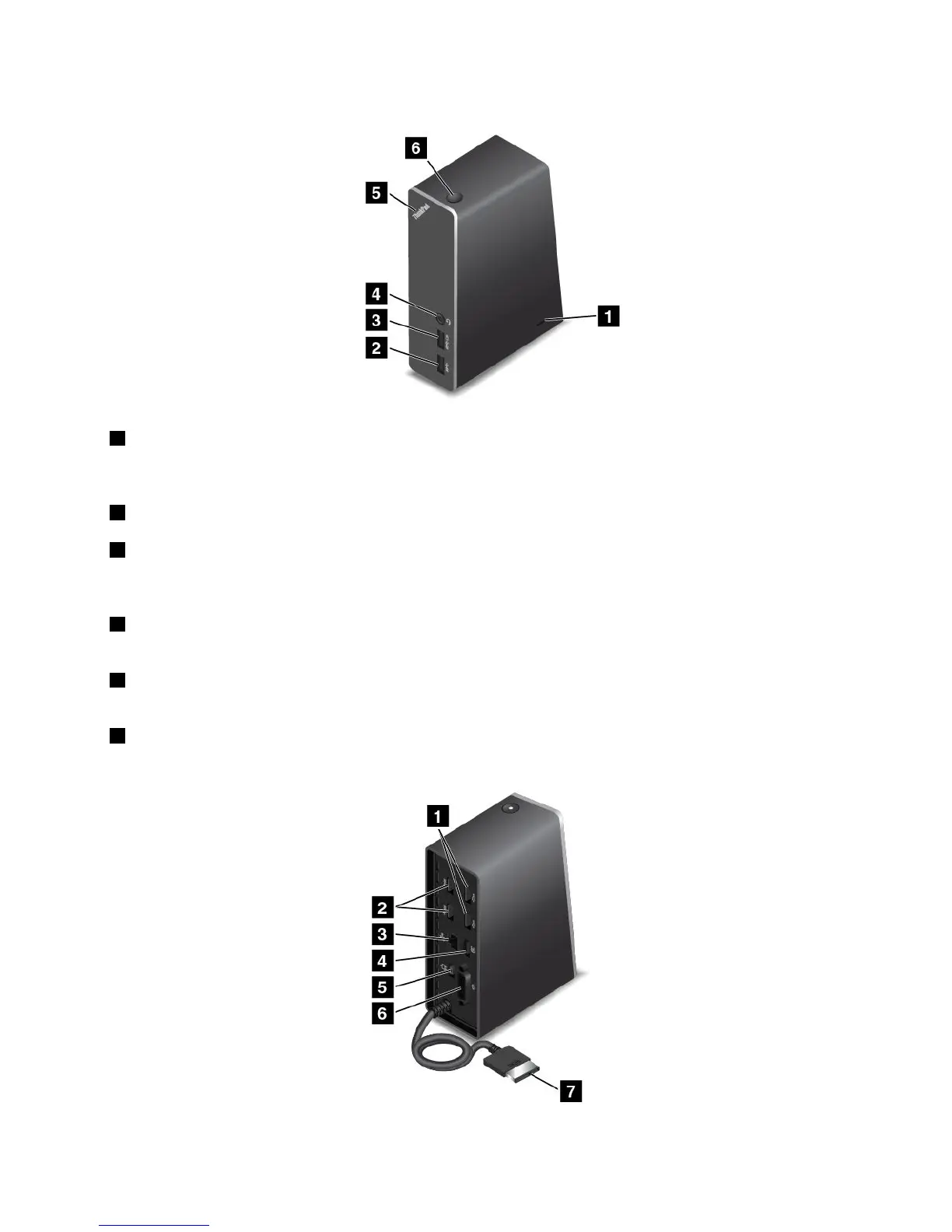
Frontview
1Security-lockslot:Toprotectyourdockfromtheft,youcanpurchaseasecuritycablelock,suchas
aKensington-stylecablelock,thatfitsthissecurity-lockslottolockyourdocktoadesk,table,orother
non-permanentfixture.
2USB3.0connector:UsedtoconnectdevicesthatarecompatiblewithUSB3.0andUSB2.0.
3Always-onUSBconnector:Bydefault,theAlways-onUSBconnectorenablesyoutochargesome
mobiledigitaldevicesandsmartphonesnomatterwhenyourcomputerisinsleepmode,hibernationmode,
orisoff.Formoreinformation,refertothedocumentationthatcomeswiththedock.
4Comboaudioconnector:Usedtoconnectheadphonesoraheadsetthathasa3.5-mm(0.14-inch),
4-poleplug.
5System-statusindicator:TheindicatorontheilluminatedThinkPadlogofunctionsthesameastheones
onthecomputer.Fordetails,see“Statusindicators”onpage7.
6Powerbutton:Thepowerbuttononthedockfunctionsthesameastheoneonthecomputer.
Rearview
Chapter7.Enhancingyourcomputer77



 To Next Page