RAPID CAMP+ MULTIPLEX SYSTEMS
122
CUSTOMER CARE | 877.855.2867
10
To enable Location Services on your Android device:
1. Open your phone's Settings app.
2. Tap Location/App Permission
› If you don't see 'Location', tap SECURITY &
LOCATION/LOCATION.
› If you have a work profile, tap ADVANCED/
LOCATION.
3. Under 'Allowed all the time' and 'Allowed only while in
use,' view the apps that can use your phone's location,
tap it, then choose the location access for the app.
4. To change the App's permissions, tap it, then choose
the location access for the app.
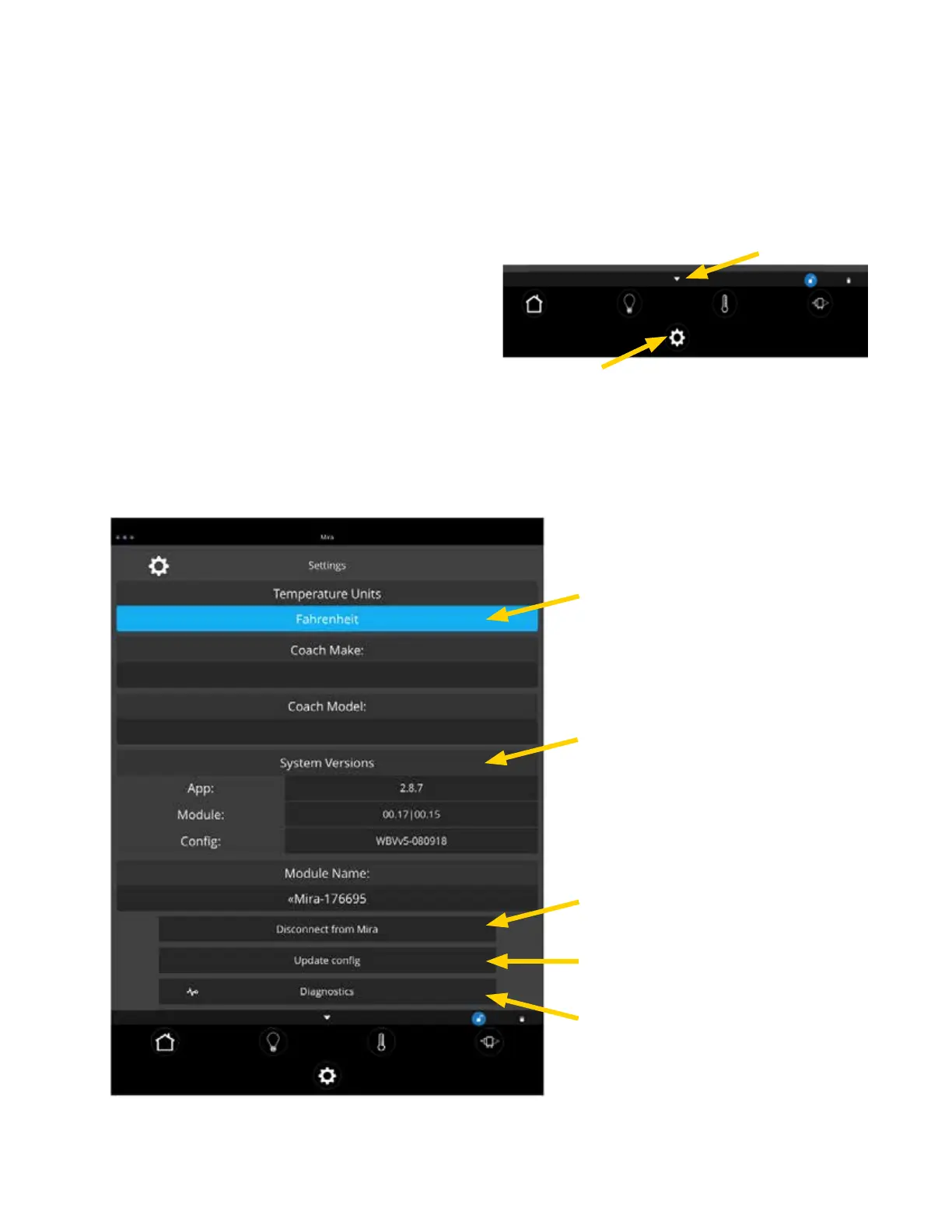
Triangle
Gear Icon
App Settings:
Access the App Settings page (on your phone) by tapping the
triangle at the bottom of the screen, to expose the Settings
Button. Tap the gear icon to go to the app's Settings page.
Tap the Temperature Units selection to
choose between Fahrenheit and Celsius.
System Information and module Name.
Tap to disconnect your device from the
Module.
Tapping Update Config will force a
download of the config from the cloud.
Tap to enter the Diagnostic Tools Screen
Vegatouch Phone App Settings Screen



 To Next Page