ELECTRICAL SYSTEM
11
THOR MOTOR COACH | MADE TO FIT
149
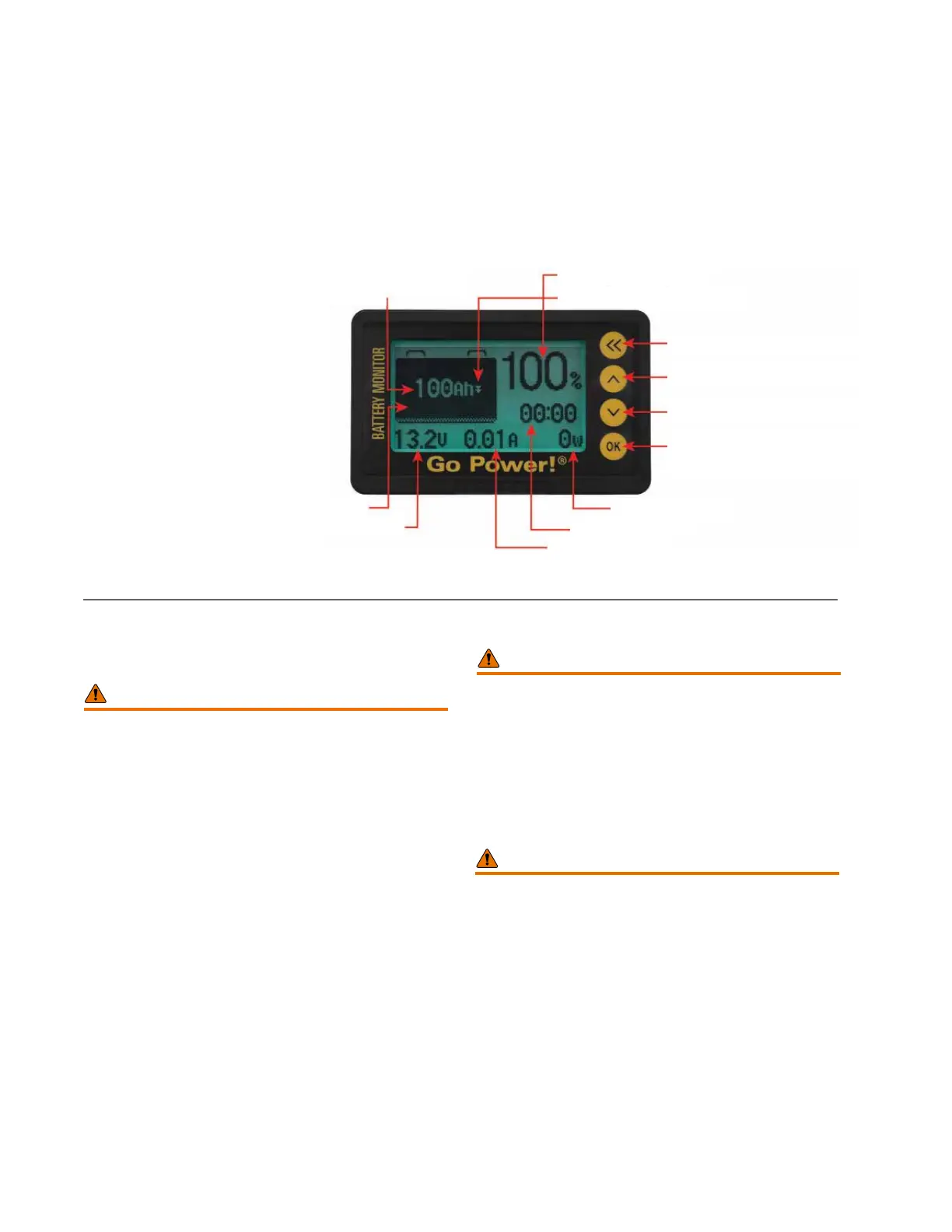
Battery Monitor
Monitoring the Lithium-Ion battery of your Class C motor-
home is accomplished by a factory-installed battery monitor;
typically, the Go Power GP-BMK-25 Battery Monitor (or a
comparable unit). is device allows the user to monitor
important battery parameters, such as:
• State of Charge (SOC)
• Capacity
• Voltage
• Current
Lithium-Ion Auxiliary Battery Charging
It is important to keep the auxiliary battery(ies) in a condi-
tion of full or near-full charge. Doing so will ensure 12-volt
DC energy is available when needed. Battery charging is
accomplished by:
• e auxiliary battery charger, which is powered by the
chassis alternator when the vehicle's engine is running;
When charging an auxiliary battery with a charger, power
source, or method, whether part of the motorhome’s
original factory-installed electrical system or an
aftermarket device, make sure to follow all battery and
charger manufacturer's safety instructions.
WARNING
NEVER SIMULTANEOUSLY CHARGE A BATTERY
FROM SHORE POWER AND THE ENGINE
ALTERNATOR:
• Excessive charging energy will result in battery
damage.
• Contact the manufacturer for recommended charging
specications and safety guidelines.
WARNING
• There is a dangerous potential of exhaust gases
entering the motorhome whenever the vehicle is
parked and the engine is running.
• Avoid inhaling exhaust gases as they contain carbon
monoxide, which is a toxic gas that is colorless and
odorless.
• Before using a stationary vehicle's engine for battery
charging, ensure the vehicle is parked in an open
area and that the vehicle’s exhaust system is free
of obstructions.
• Do not operate the vehicle's engine if the vehicle is
parked in an enclosed building or conned space.
• Test the CO/LP detector and ensure it is operational.
• Never sleep or allow others to sleep in a parked
motorhome while the engine is running.
• Do not operate the vehicle's engine if connected to
shore power.
WARNING
Dynamic Indication
Present Voltage
Capacity Percentage
Charge/Discharge Indicator
Quit Settings/Quit Project
Previous Row (Setting Value +1)
Next Row (Setting Value -1)
Enter Project
Line/Select Digit
Present Power
Remaining Time
Present Current
Full Capacity Voltage








 To Next Page