6-1
Twist Owner’s Manual
OM_TWIST_0811RevA
CHAPTER 6: SIDE GUARDS
Rigid Removable and Quad Removable Side Guards (Aluminum and Carbon Fiber)
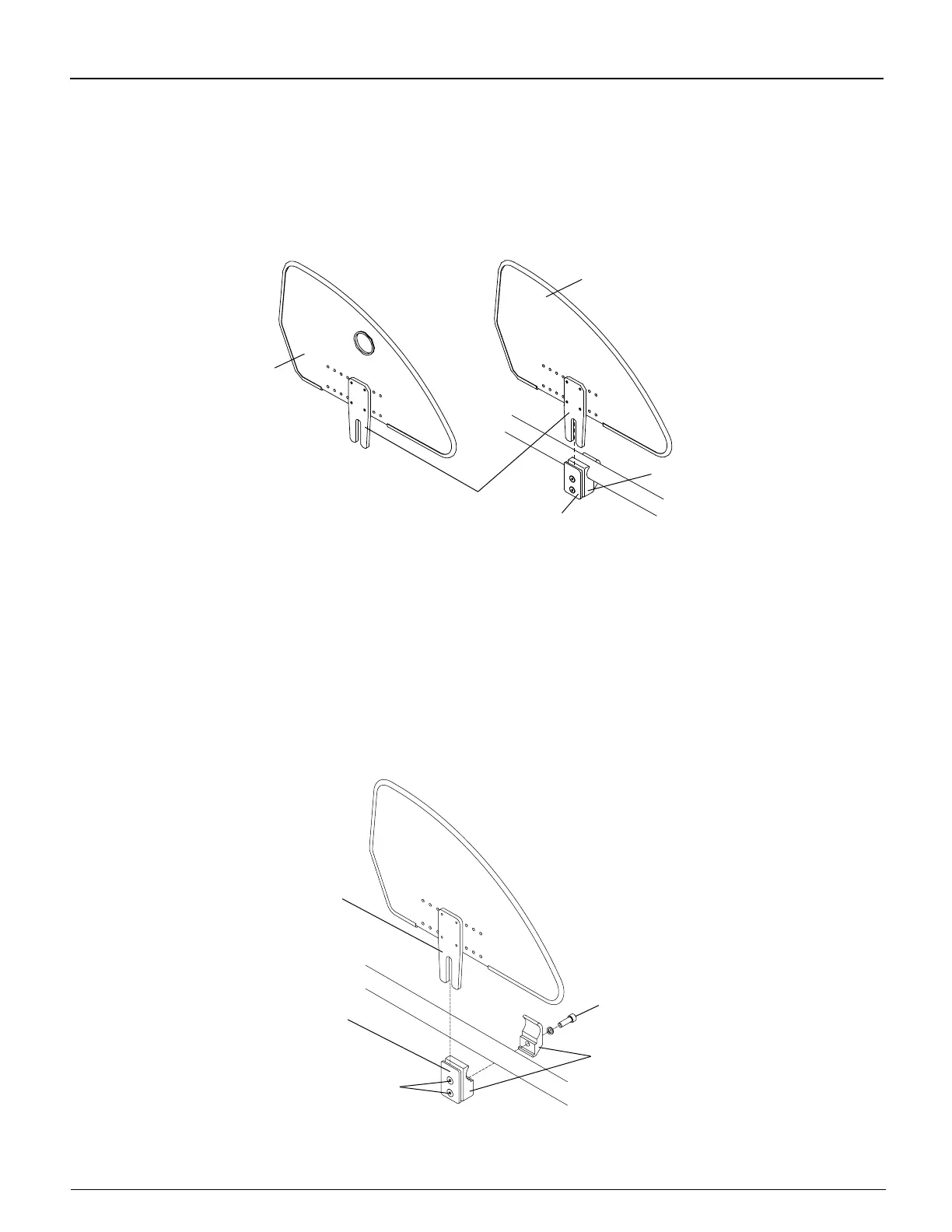
To remove either type of Rigid Side Guard, lift the side guard out of the side guard mount by grasping it at the top or
place nger in the hole and pull it upward. See Figure 6-1. To replace, place the bracket into the slot between the
side guard mount and the clamp and push down.
Figure 6-1
Rigid Side Guards
Clamp
Side Guard
Mount
Bracket
Quad Removable
Side Guard
Rigid Removable
Side Guard
Adjusting
Tools Needed:
• 1/8” Allen Wrench
You can adjust the “snugness” of the t of the side guard bracket in the side guard mount by loosening or tightening
the two Allen screws in the side guard mount. See Figure 6-2.
Either type of Rigid Side Guard can be made “non-removable” by rmly tightening the two Allen screws in the side
guard mount while the side guard is installed.
Figure 6-2
Replacing Rigid Side Guard
Bracket
Allen
Screw
Side Guard
Mount
Allen
Screws
Clamp


 To Next Page