EasyManua.ls Logo

TIM MIRUS Controller - Application of Volatile Anaesthetic (VA); Starting VA Application

TIM MIRUS Controller
68 pages
Print Icon
To Next Page IconTo Next Page
To Previous Page IconTo Previous Page
Loading...
4 Application of VA
38 IFU, MIRUS Controller, en-GB, N.00
4 Application of VA
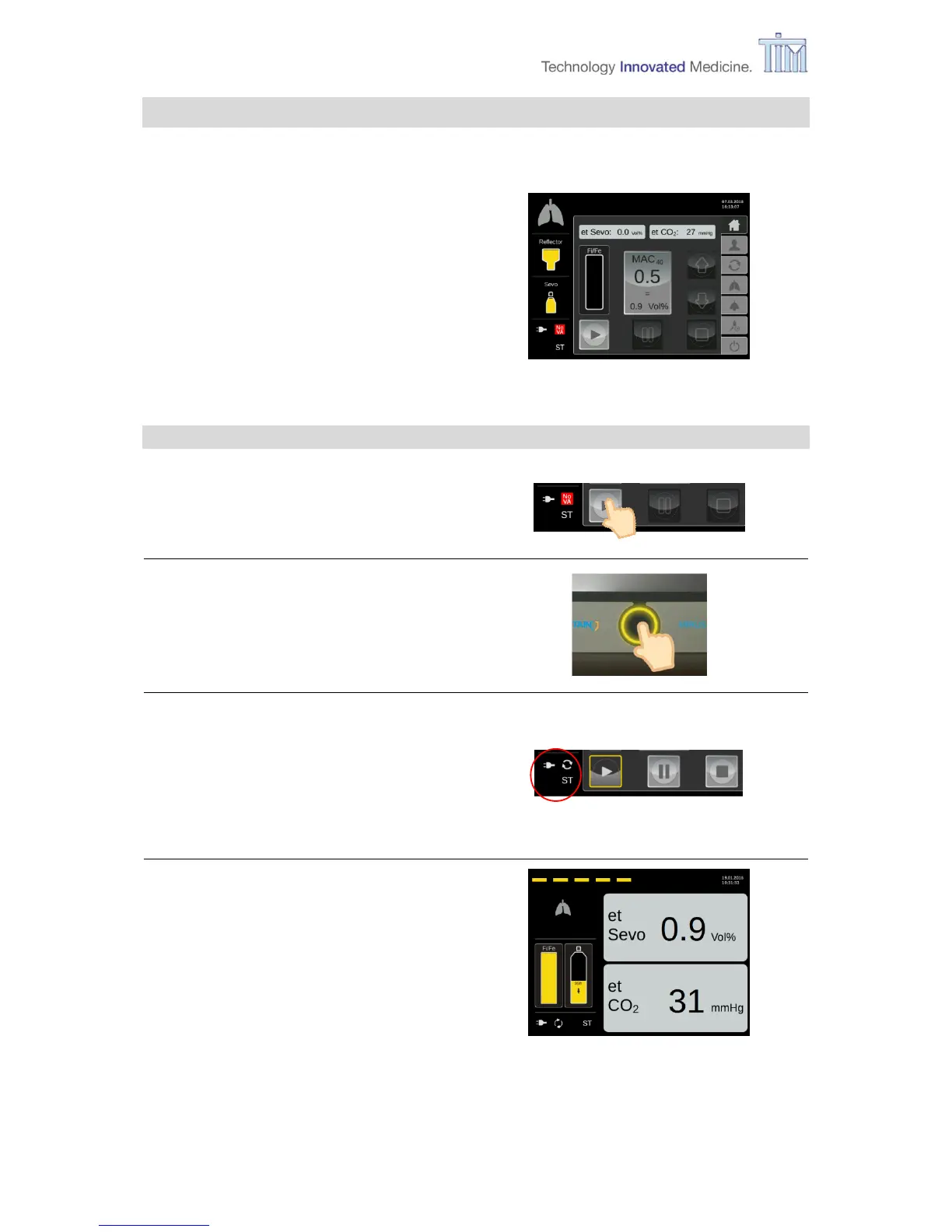
The following activities are all done on the Home screen (operation mode).
Home screen
(Operation mode)
4.1 Starting application
Press button Start.
Press Confirm button.
VA Application active.
Animated life line at the top of the
screen (see next picture). MAC Pilot
status symbol is active.
Pause and Stop buttons activated.
After 10 minutes of no activity on the
touch screen, the controller switches to
snooze screen.
Note: After touching screen, controller
switches back to Home screen.

Table of Contents