1 Introduction
IFU, MIRUS Controller, en-GB, N.00 9
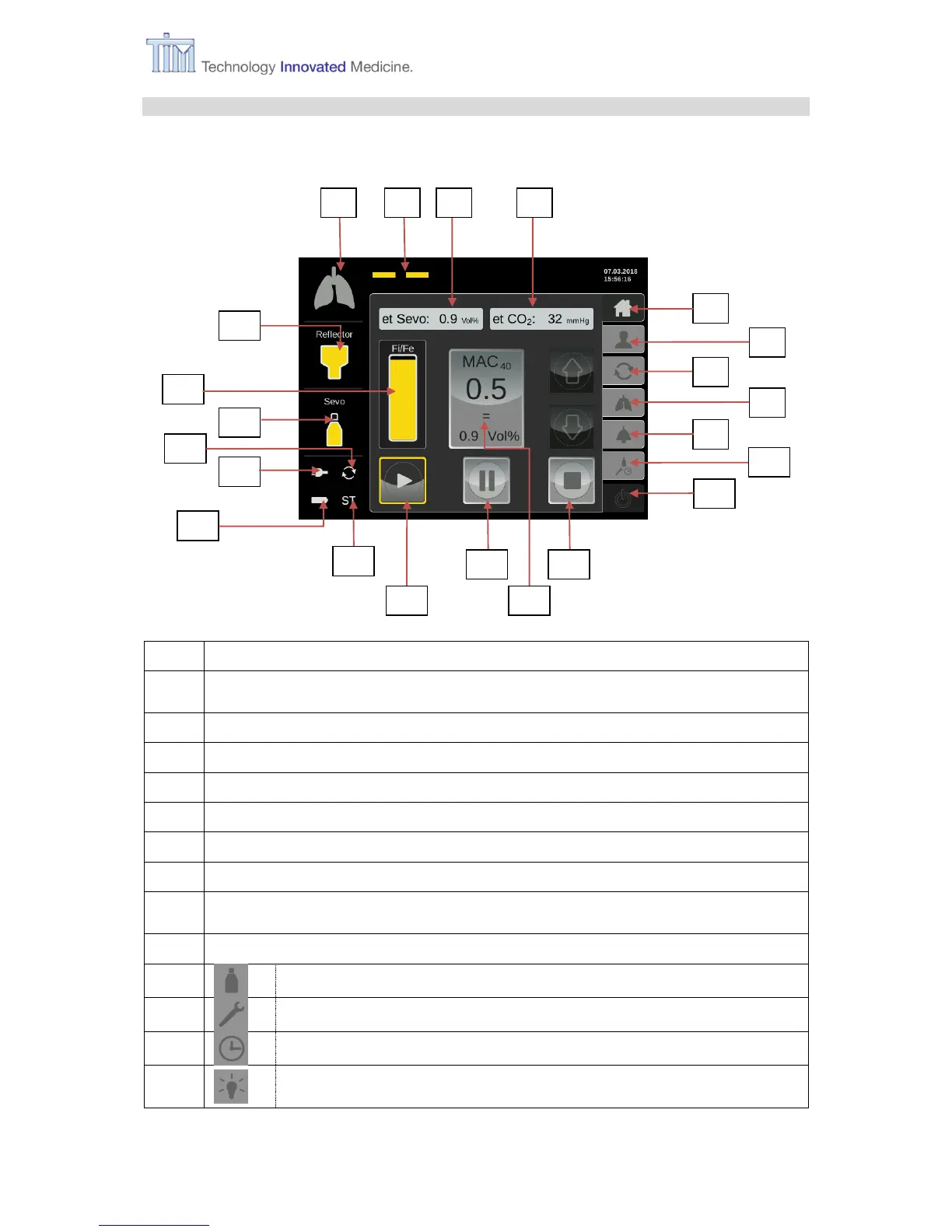
1.4.5 Elements in touch screen
e.g. Home screen – standard operation screen
Status symbol Lung. Animated when patient breathing is detected.
Status symbol Life line. Animated when delivery is in progress, stationary when
delivery is paused. Not visible when delivery is stopped.
Menu button Home (Home screen for standard operation)
Menu button Patient data (gender, weight, size, age)
Menu button MAC Pilot (setting wash-in speed)
Menu button Respiratory monitoring (supervising respiratory patient data)
Menu button Alarm settings: change setting alarm limits
(et CO
2
min, et CO
2
max, et VA min, et VA max, Apnoe time, Alarm vol.)
Menu button Configurations:
Tab Filling (during operation)
Tab Setting (on-screen language, CO
2
unit)
Tab Time setting (local time zone, time and date)
Tab Service (information about HW and SW version of MIRUS
Controller, contact details of the manufacturer)



 To Next Page