3
INTRODUCTION
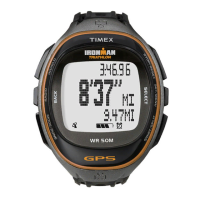
Congratulations on your purchase of the Timex
®
Ironman
®
Run Trainer
™
GPS watch. For first use, please follow
these six easy steps:
1. Charge the watch
2. Load the latest firmware
3. Configure the settings
4. Acquire the GPS signal
5. Record your workout
6. Review your performance
For your convenience, we have posted the Run Trainer
™
Quick Start Guide at:
http://www.timex.com/manuals
Instructional videos are posted at: http://www.YouTube.com/TimexUSA
FEATURES OVERVIEW
• GPS–SiRFstarIV
™
technology tracks pace, speed, distance, and altitude.
• WirelessANT+
™
Radio–WirelesscapabilityenablestheRunTrainer
™
watch to connect to a Heart Rate
and/or Foot Pod sensor.
• HeartRate(HR)Sensor–Whenconnectedtoaheartratesensor,monitoryourheartratetomaintaina
level of activity that matches your personalized workout requirements.
• FootPodSensor–WhenconnectedtoaFootPodsensor,trackmultiplevaluesinyourworkoutincluding
pace, speed, distance, and cadence.
• TheINDIGLO
®
night-light–IlluminatesthedisplaywiththepressoftheINDIGLO
®
button.TheNight-Mode
®
featureilluminatesthedisplaywithanybuttonpress.WhenConstantOnisactive,thedisplayremains
illuminateduntiltheINDIGLO
®
buttonispressedagain.
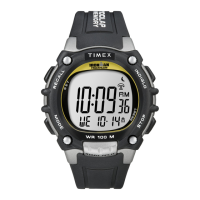
OPERATIONAL BUTTONS
Indiglo
®
night-light
PresstheINDIGLO
®
buttonatanytimetoactivatetheINDIGLO
®
night-light for a few seconds. Hold it to turn on
Night-Mode
®
feature or constant-on lighting.
Radio/Back
PressRADIOtobeginsearchingforaGPSsignal.Inamenu,pressBACKtogobacktothepreviousitem.When
settingparameterssuchastime,pressthisbuttontomovefromrighttoleftthroughtheelds.
InanyworkoutmodeorTimeofDaymode,holdRADIOtoopentheSENSORmenu.
Mode/Exit/Done
Whenintimeofdaymode,pressMODEtocyclethroughtheoperationalmodes.
Whendonewithselectinganoptioninamenuorsubmenu,pressDONEtogobacktothemenucontaining
the option.
Start/Split/Down
Inamenu,pressDOWNtoselecttheitembelowthecurrentone.
In Chrono, Interval Timer, or Timer modes, press START to start the workout. Press SPLIT to take a split while a
Chrono workout is running.
Stop/Reset/Up
Inamenu,pressUPtoselecttheitemabovethecurrentlyselectedone.
Whenthechronographrunning,pressSTOPtostoporpausethechronograph.
Ifthechronographisstopped(orpaused),holdRESETtoresetthechronograph.
Set/Menu/Select/Next
Inamenu,pressSETtoselectthecurrentoption.Thismayopenasubmenuorselecttheitemwithacheck
mark.
Indiglo
®
Button Stop/Reset (p)
(
) Radio/Back
Set/Menu/Select/Next ( )
Mode/Exit/Done
Start/Split/Down (q)





 To Next Page