EasyManua.ls Logo

TIPTEL VP 28 - Using the Advanced Phone Functions; Account Settings; Basic Settings

TIPTEL VP 28
75 pages
Print Icon
To Next Page IconTo Next Page
To Previous Page IconTo Previous Page
Loading...
tiptel VP 28 Trouble Shooting
Using the Advanced Phone
Functions
Account Settings
Basic Settings
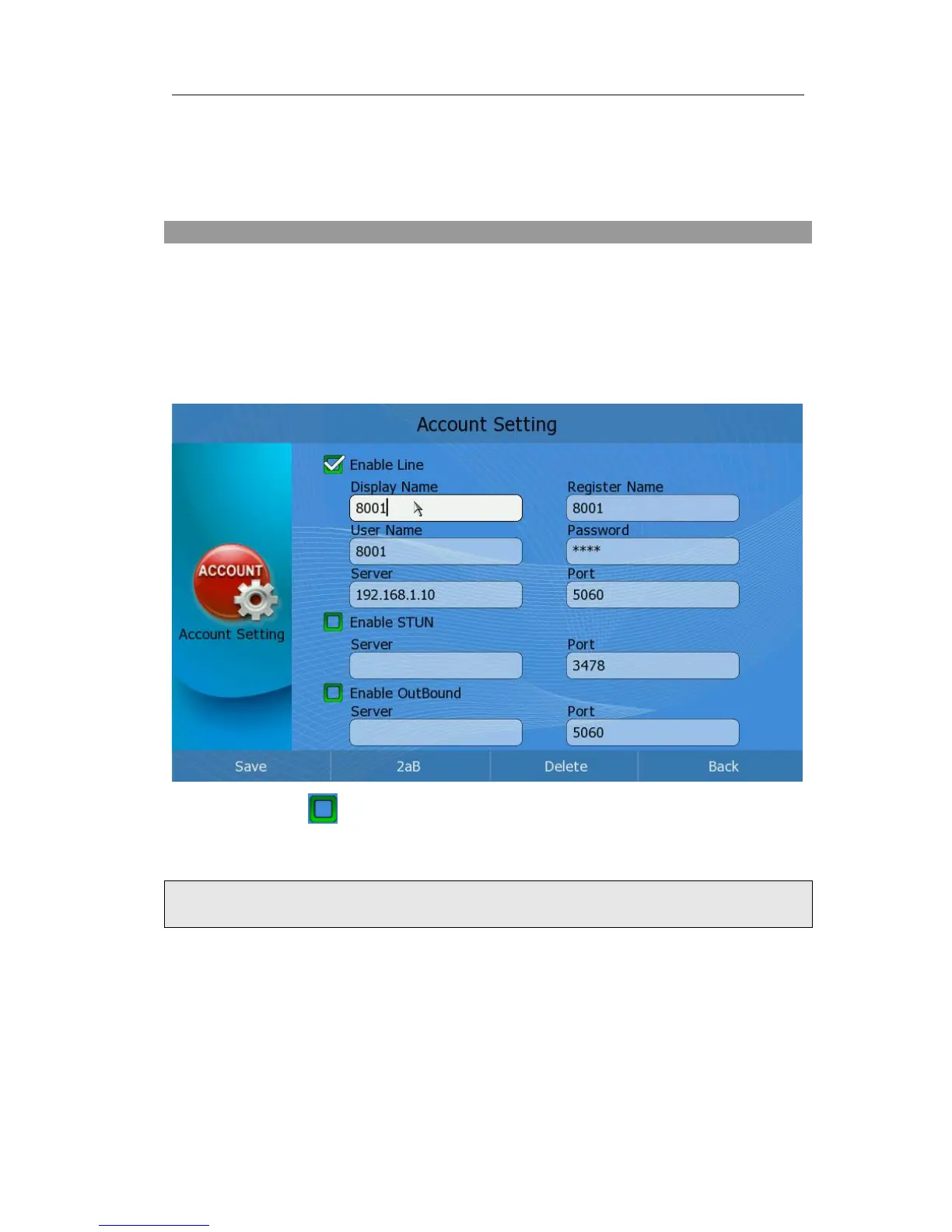
Configure account information via phone interface:
1) Click Setting->Account option, choose a account to enter the configuration page.
2) Click the icon on the left to enable this line;
3) Choose and fill in different options.
4) Press <F1> button to save the changes.
Note:
Please contact your ISP for exact information.
Configure account information via web interface:
1) Choose Account->Account page to do the relating settings.
2) Please reference to “Configuration and Registration” section for more details of the
parameters.

Table of Contents