38
13.3. Basic Setting Operation
13.3.1. Entering the setting mode
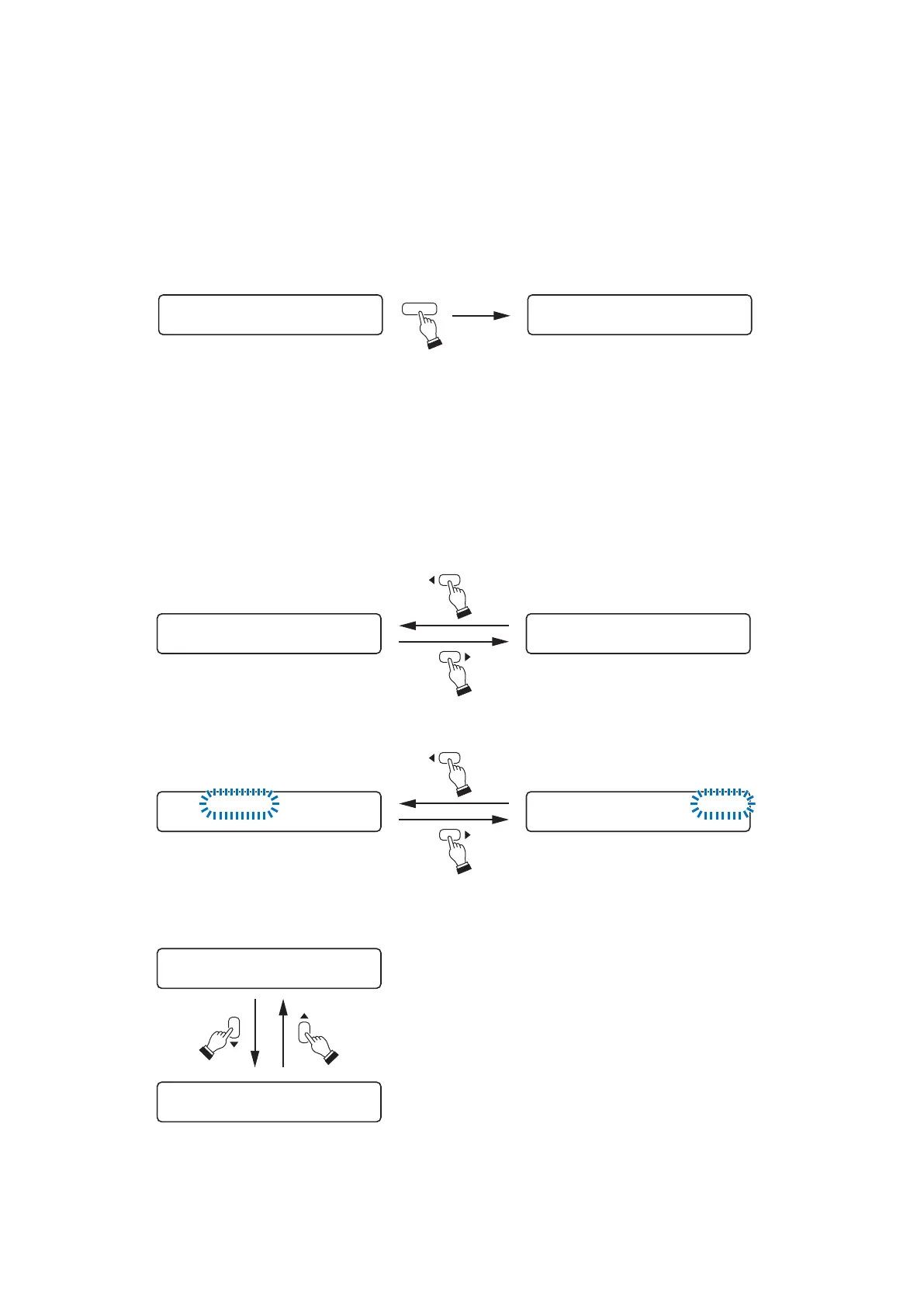
Holding down the Utility menu key for 2 seconds or more displays the setting menu screen.
Note
You cannot enter the setting mode as long as any indication is displayed in the upper line of the VFD screen.
To enter, delete the indication by pressing the Memory key, then hold down the Utility key for 2 seconds or
more.
13.3.2. Setting screen operation examples
[Moving the setting screen or setting item]
Use the Screen shift key mainly. (The Enter and Escape/Back keys may also be used.)
Normal use state
INPUT–SETTIN
G
Setting menu screen
UTILITY
SELECT I NPUT CHINPUT–SETTIN
G
IN1 PRI
O
RITY 8
When moving the setting screen:
• Examples of using the Left and Right shift keys
• Example of using the Up and Down shift keys
IN1–INPUT1
HPF – 4 0 0HZ LP
F
–12 . 5HPF–400HZLP
F
–12 . 5
When moving the setting item on the same screen:





 To Next Page