41
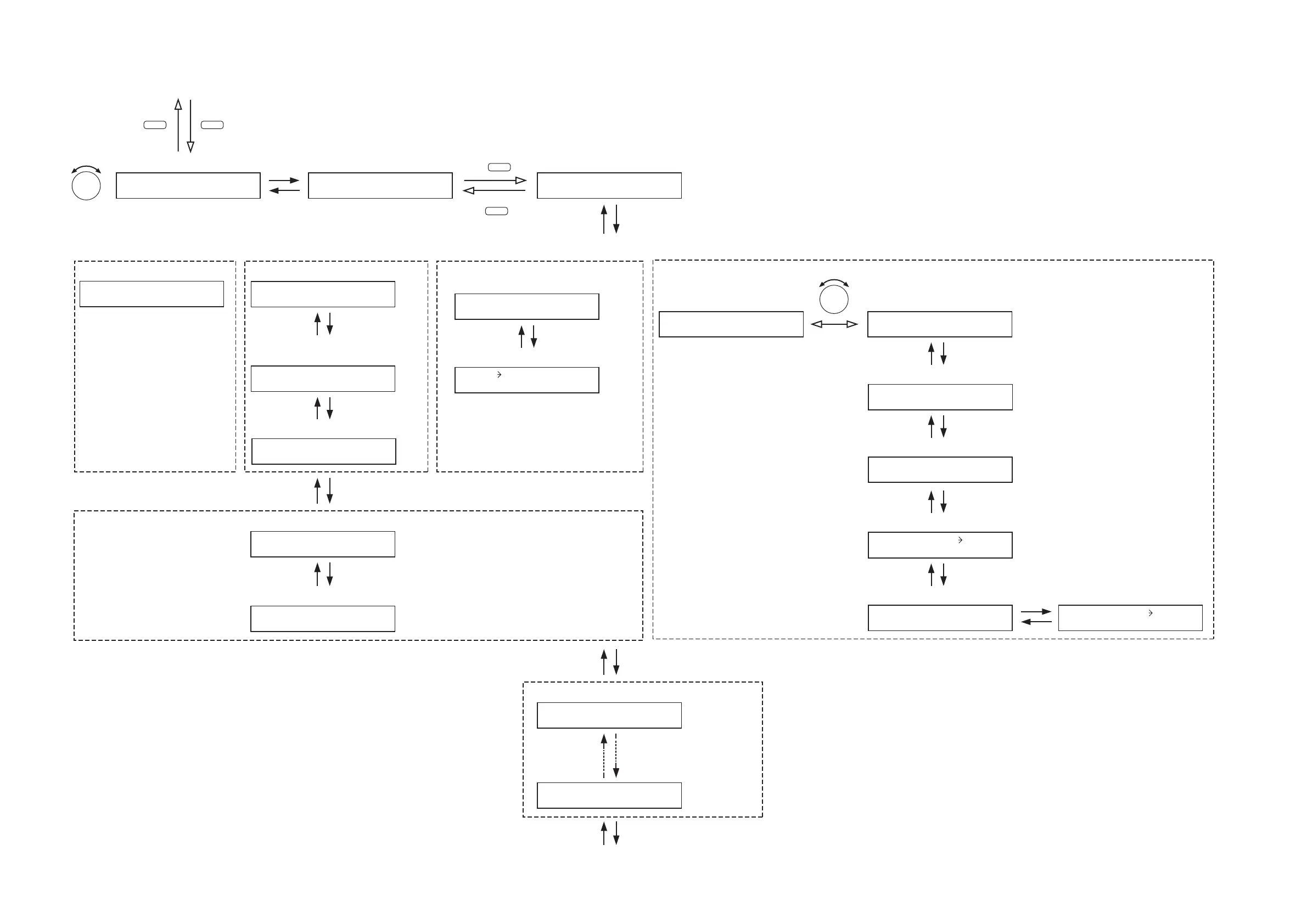
[1-channel or 2-channel output operation]
UTILITY
ESC/BACK
MEMORY
INPUT SELECT
1 – 8
Normal use state
Setting menu screen
SELECT I NPUT CH
Input channel selection
PARAMETER
IN1–_______
Input channel name setting (p. 42-A1)
Input channel name setting
SS-9001 output zone ON/OFF setting (p. 44-A14)
(For the channel on which the D-001T
is used)
PREPA
G
ET
O
NE–
O
FF
Pre-paging tone ON/OFF setting
(p. 43-A5)
Operation mode setting
(p. 43-A6)
IN1–PHANT
O
M
–
O
FF
Phantom power ON/OFF setting
(p. 42-A3)
IN1–SENSITIVITY–10
Input sensitivity setting (p. 42-A2)
Trigger setting (p. 44-A11)
(For the channel on which the ZP-001T is used)
M
O
DE
=
PA
G
IN
G
P
O
RT
Press for over 2 seconds.
IN1 Z
O
NE 1
O
FF
IN1 Z
O
NE 4
O
FF
Priority setting (p. 44-A12)
IN1–DUCKER
O
FF
Ducker ON/OFF setting (p. 44-A13)
(For the channel on which the AN-001T is not used)
(For the channel on which 900 series module or D-001T is used)
IN1 PRI
O
RI
T
Y 8
INPUT–SETTIN
G
IN1–SENSITIVITY–10
(For the channel on which the AN-001T is used)
Input sensitivity setting (p. 42-A2)
IN1–PHANT
O
M
–
O
FF
Phantom power ON/OFF setting (p. 42-A3)
ANC ACT I VE
(When the ANC operation is set
to ACTIVE)
(p. 43-A7)
ANC BYPASS
ANC operation ON/OFF setting
(When the ANC operation is set
to BYPASS) (p. 43-A7)
ANC-activated output setting
(p. 43-A8)
M
O
NIT
O
R
O
UT–
O
FF
Monitor ON/OFF setting (p. 43-A9)
(When Monitor function is ON)
Monitor output channel selection
(p. 43-A10)
M
O
NIT
O
R
O
UT
O
UT1
ANC APPL I ES
O
UT1
(For the channel on which the 900
series module is used)
Trigger setting
(p. 44-A11)
TR I
GG
ER=N
O
NE
TR I
GG
ER=N
O
NE
Note
Set the priority level higher than level 8 for
the input channel to be used for broadcast
(e.g. paging using the ZP-001T) that
overrides BGM broadcasts.
PARAMETER





 To Next Page