115
18.7. Monitoring the Unit's Operation Status
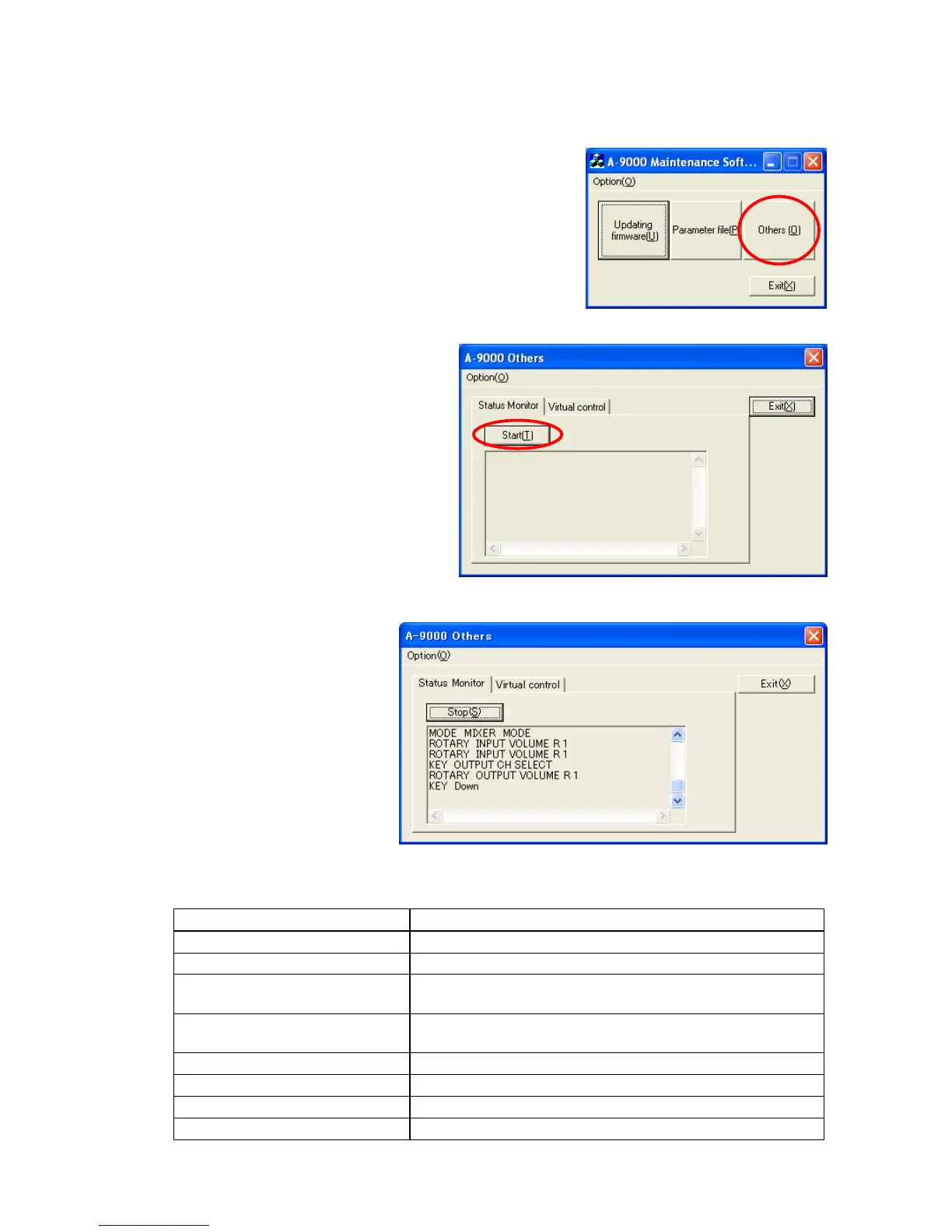
The operation status of the unit can be monitored in real time.
Step 1. Double-click the "MaintCtrl.exe" icon to run the 9000 series
maintenance software.
The screen at right is displayed.
Step 2. Click the "Others" button.
The window at right opens.
Tip
You can also set the communication port
and speed here when pressing the
"Option" button on the menu bar to
select "Communication Setting."
Step 3. Click the "Start" button.
Operation status such as the
unit's key or knob actions is
displayed in real time.
[Screen indications and their descriptions]
3
Indication Description
KEY INPUT SELECT 1 INPUT SELECT 1 key has been pressed.
KEY POWER long Power switch has been pressed long.
KEY UTILITY & ESC/BACK UTILITY key and ESC/BACK key have been pressed at the
same time.
ROTARY INPUT VOLUME L 1 INPUT VOLUME control has been turned one click
counterclockwise.
CIN CONTROL INPUT 2 (ON) Control input 2 terminal has been turned on.
MATRIX MODE Unit is operating in matrix mode.
MIXER MODE Unit is operating in mixer mode.
POWER ON Power has been turned on.
2



 To Next Page