72
Part Number: 4726
Removal:
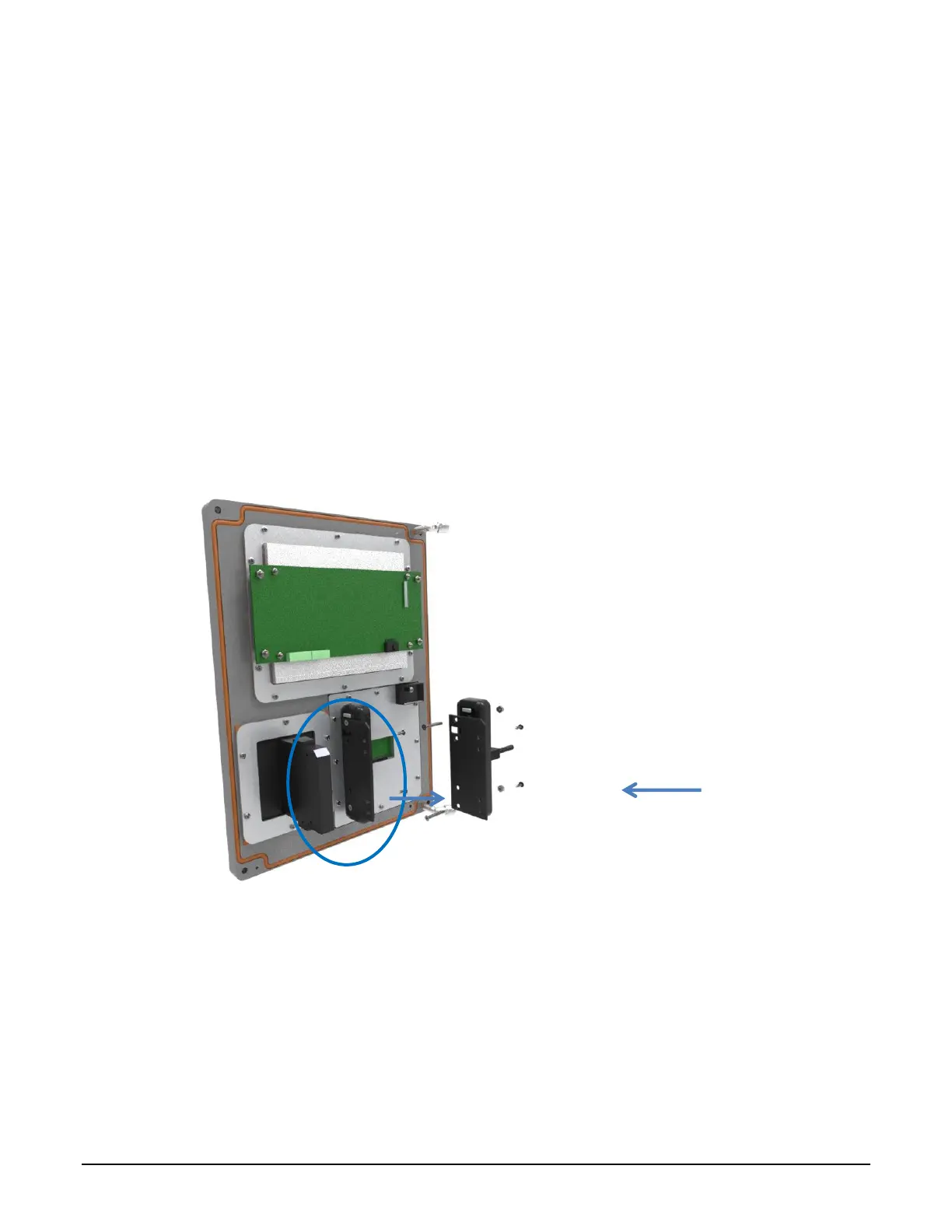
1. Disconnect the prox reader cable from the display subassembly.
2. Remove the 4 screws from the card holder back.
3. Remove the screw at the top of the card reader.
4. Lift the card reader off the card reader backplate. It is not necessary to remove the card reader
back plate.
Installation:
1. Replace the card reader.
2. Reattach the card reader to the back plate. Hook the bottom of the card reader onto the bottom
of the back plate. Align the top hole of the reader with the threaded insert on the back plate.
Reinstall the flat head screw and tighten.
3. Align the assembly back with the card holder. Insert the 4 screws. Start by hand and tighten.
4. Connect the prox reader cable to the display subassembly.
Figure 7.9 Exploded View Front Cover Assembly: Slotted Card Holder with MT11
Bracket Mounted (Obsolete) Prox Reader Removal and Replacement:
7.5.2
Removal:
1. Disconnect the prox reader cable from the display subassembly.
2. Remove the two nuts holding prox reader.



 To Next Page