6
InstallCEDecals
Partsneededforthisprocedure:
1Warningdecal
3Dangerdecal
Procedure
1.AfxthewarningdecaloverEnglishwarningdecal
(104–2053)forCE.
2.AfxthedangerdecalsoverEnglishdangerdecals
(62–5070)forCE.
7
ReadingtheManualsand
ViewingtheVideo
Partsneededforthisprocedure:
1
Operator’sManual
1
EngineOperator’sManual
1
PartsCatalog
1
OperatorVideo
1
Pre-deliveryInspectionSheet
1
Noiseratingcerticate
1
Certicateofcompliance
1Emissionswarranty
2Ignitionkeys
Procedure
1.Readthemanuals.
2.ViewtheOperatorvideo.
3.Storethedocumentationinasafeplace.
ProductOverview
Controls
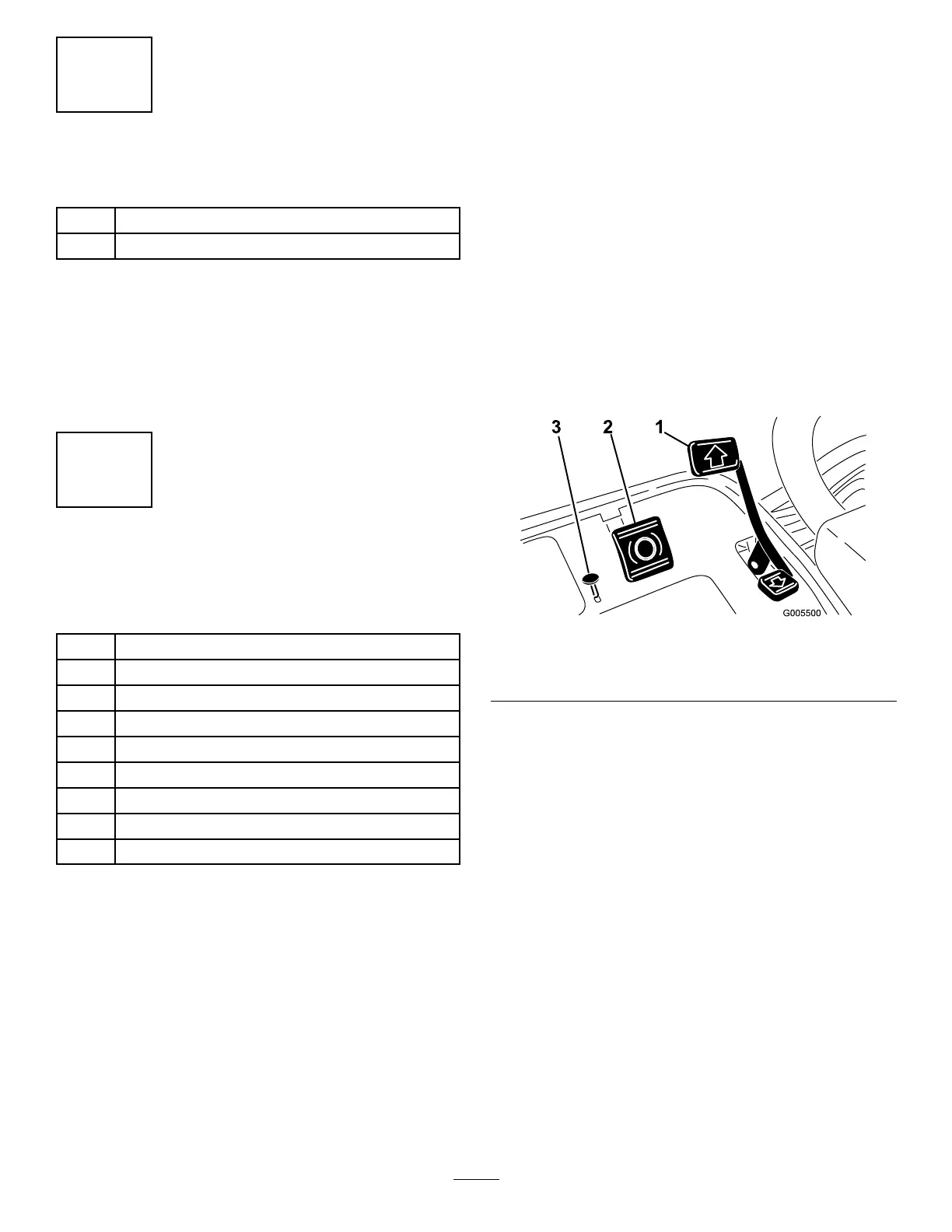
BrakePedal
Thebrakepedal(Figure15)actuatesanautomotive
drum-typemechanicalbrakelocatedateachtraction
wheel.
ParkingBrakeButton
Pressingthebrakepedaltoactuatethebrakeassembly,
thenpressingthesmallbuttonindicated(Figure15)will
keepthebrakesactuatedforparking.Disengageitby
pressingthebrakepedal.Locktheparkingbrakebefore
youleavethemachine.
Figure15
1.Tractionpedal3.Parkingbrakebutton
2.Brakepedal
TractionandStoppingPedal
Thetractionpedal(Figure15)hasthreefunctions:to
makethemachinemoveforward,tomoveitbackward,
andtostopthemachine.Pressthetopofthepedalto
moveforwardandthebottomofthepedaltomove
backwardortoassistinstoppingwhenmovingforward.
Also,allowthepedaltomovetotheneutralpositionto
stopthemachine.Foroperatorcomfort,donotrestthe
heelofyourfootonreversewhenoperatingforward
(Figure16).
16








 To Next Page