ControlsSystem
Maintenance
AdjustingtheMotion-Control
Handle
AdjustingtheRightMotion-Control
Lever
Ifthemotion-controlleversdonotalignhorizontally,adjust
therightmotion-controllever.
Note:Adjustthehorizontalalignmentbeforethe
front-to-backalignment.
1.DisengagethePTO,movetherightmotion-control
levertotheneutralposition,andsettheparkingbrake.
2.Stoptheengine,removethekey,andwaitforallmoving
partstostopbeforeleavingtheoperatingposition.
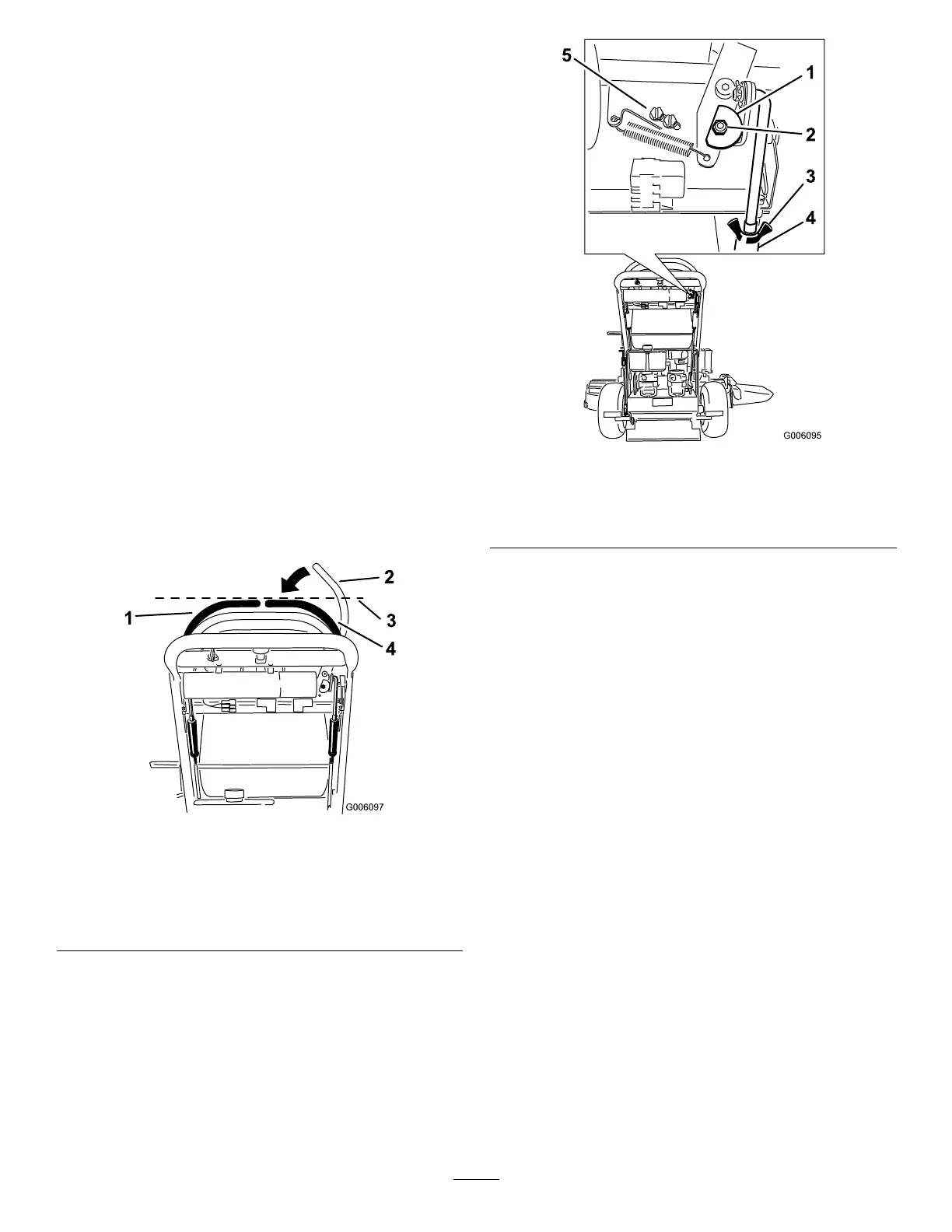
3.Pushtherightmotion-controlleverdownoutofthe
Neutral-Lockposition(Figure53).
4.Checkifitalignshorizontallywiththeleft
motion-controllever(Figure53).
Figure53
1.Leftmotion-controllever3.Checkthehorizontal
alignmenthere
2.Rightmotion-control
leverintheNeutral-Lock
position
4.Rightmotion-controllever
5.Toadjusttherightmotion-controlleverhorizontally,
thecamneedstobeadjusted.
6.Removethecoverunderthecontrolpanel.
7.Loosenthenutandboltholdingthecam(Figure54).
8.Adjustthecamuntilitalignswiththeleft
motion-controlleverandtightenthenutandboltfor
thecam.
Figure54
1.Cam
4.Turnbuckle
2.Nutandbolt
5.Switchscrews
3.Wingnut
9.Afterthecamisadjusted,theleverswitchneedstobe
checked.
10.Checkthegapbetweenthecontrolleverandtheswitch
asshowninFigure55.Thegapneedstobebetween
1.6to2.4mm(1/16to3/32inch).
11.Ifneeded,loosenthescrewsholdingtheswitchand
adjusttheswitch.
12.Tightenthescrewsandinstallthecoverunderthe
controlpanel.
41



 To Next Page