Micro-Master Touch User Guide
115
© 2014 Toro Australia Pty Ltd Ver 1.2, June 2014
15 Manual Spot Watering
15.1 Overview and Operation
The Micro-Master Touch supports Spot Watering and Station Walk-through.
Spot Watering allows isolated auxiliary irrigation for a single group of stations. Station Walk-through
operates a number of stations in sequential order between a start station and a stop station. Station
Walk-through can be used for testing and maintenance purposes.
Manual Operation
Spot Water
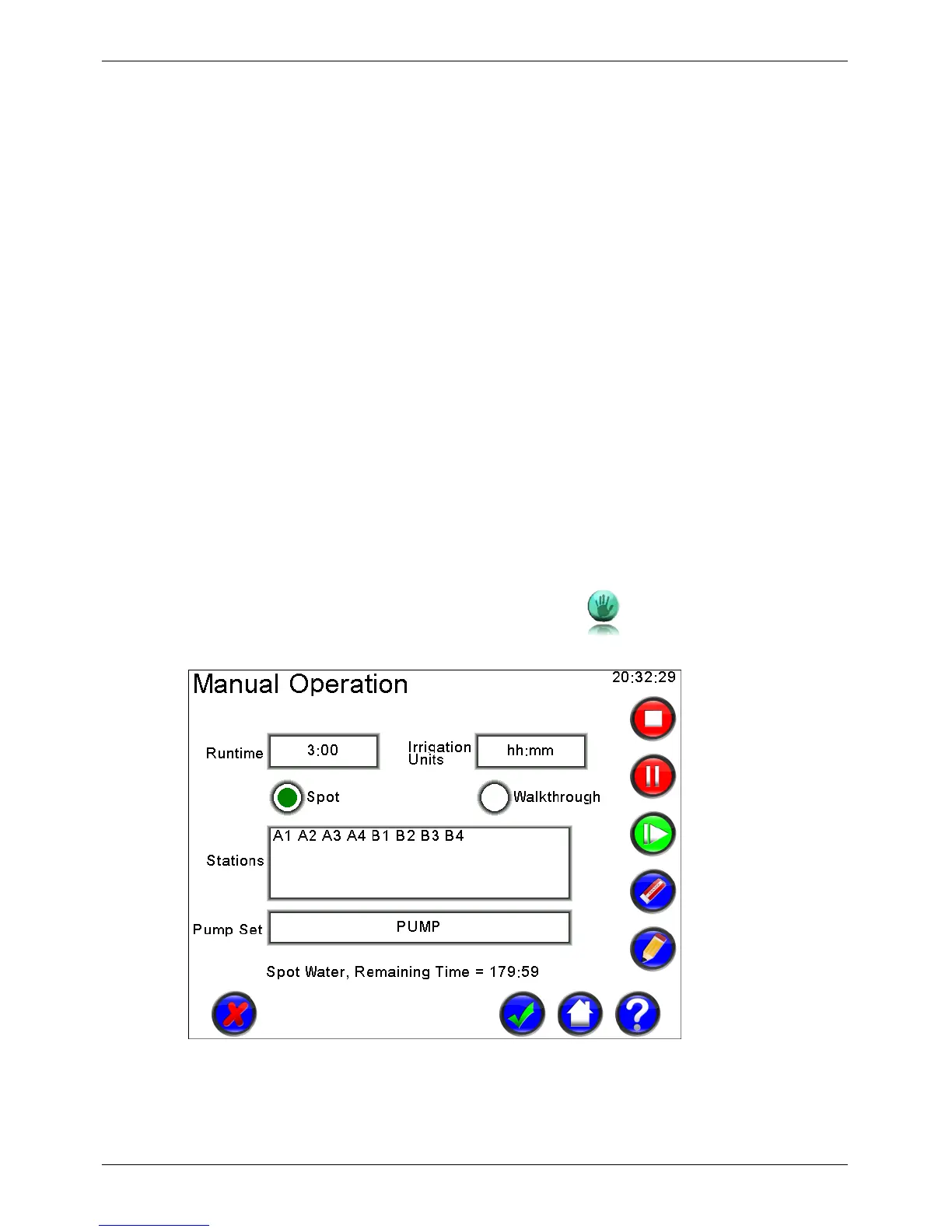
Manual Spot Water Operation begins by selecting the required stations, allocating a Pump Set if
required, and setting a runtime and units. Spot Water irrigation commences when the start button is
pressed.
Station Walk-through
Station Walk-through allows individual station testing in sequential order. Walk-through operation
begins by selecting the desired start and stop stations, allocating a Pump Set if required, and setting
a runtime and units. Walk-through commences when the start button is pressed.
15.2
Manual Operation
The Manual Operation screen is displayed by pressing the icon on the Home Screen.
Figure 85 - Manual Operation Screen, Spot Watering


 To Next Page