Micro-Master Touch User Guide
129
© 2014 Toro Australia Pty Ltd Ver 1.2, June 2014
18.6
Control / Sensor Selection
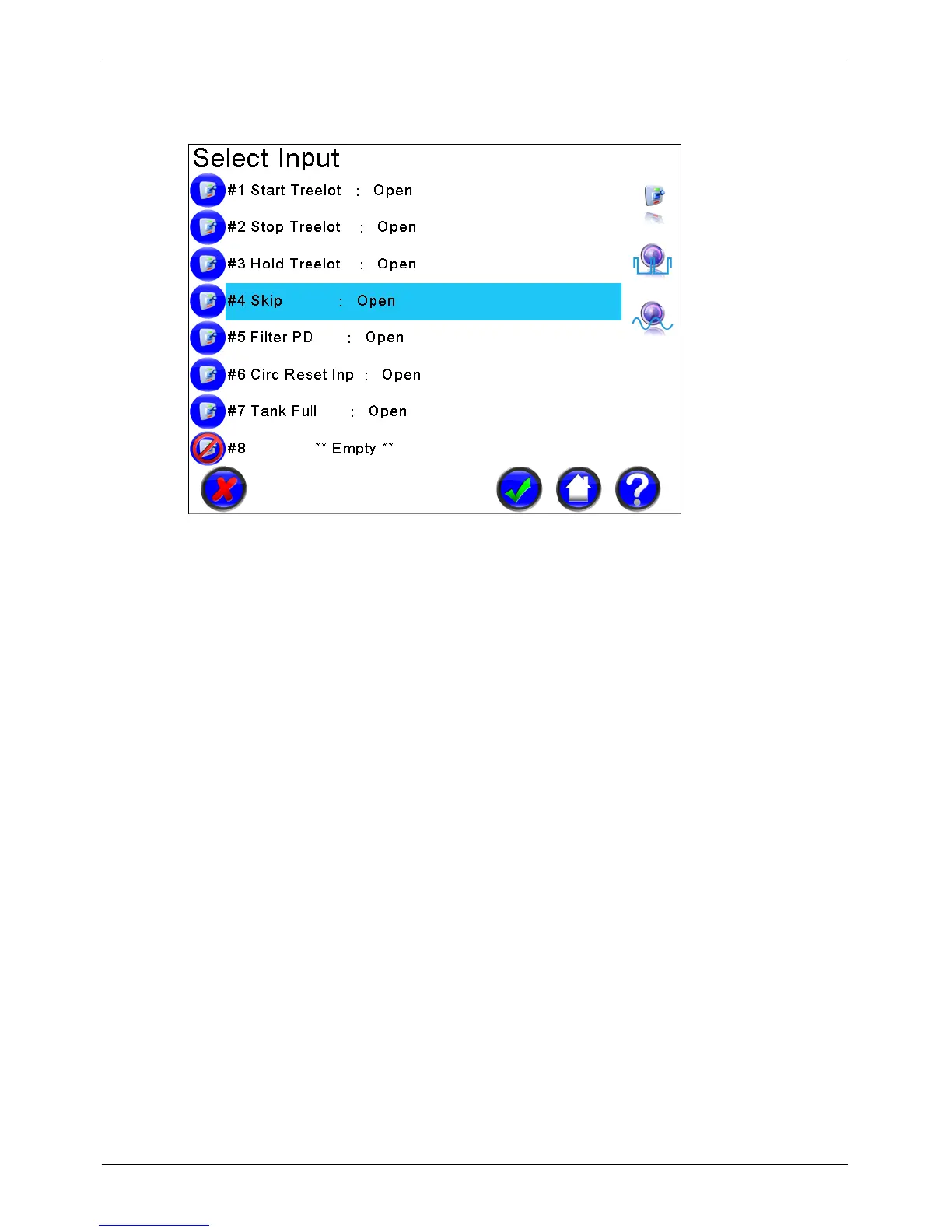
Figure 97 - Control and Sensor Selection Screen
Control / Sensor Names and Status
Each line in this list displays the name and status of the current control or sensor type. Clicking on a
name will select the Control/Sensor, changing the background of the selected Station to light blue.
Control / Sensor Icons
The status of each control / sensor is shown graphically using icons dependent on the current
control / sensor and their status.
Control / Sensor Page Selection
If the current control / sensor has more than 8 items, a range of page select buttons will be shown.
Clicking a page selection button will display the eight control / sensor listed under the button.
Control / Sensor Type Selection
Dependent on the parameter being selected, if there are multiple valid controls or sensors, a range of
control/sensor type buttons will be shown in the display action area. For example, when selecting a
flow meter for a Pump Set, both flow meters and aggregate flow meters are valid sensors.
Clicking a control / sensor type button will display the control/sensors selected. If the range includes
more than 5 valid control / sensors, clicking the top or bottom control/sensor type buttons will display
more icons in the display action area.


 To Next Page