This allows you to connect your DVD Recorder-VCR to other
external devices and view or record their outputs.
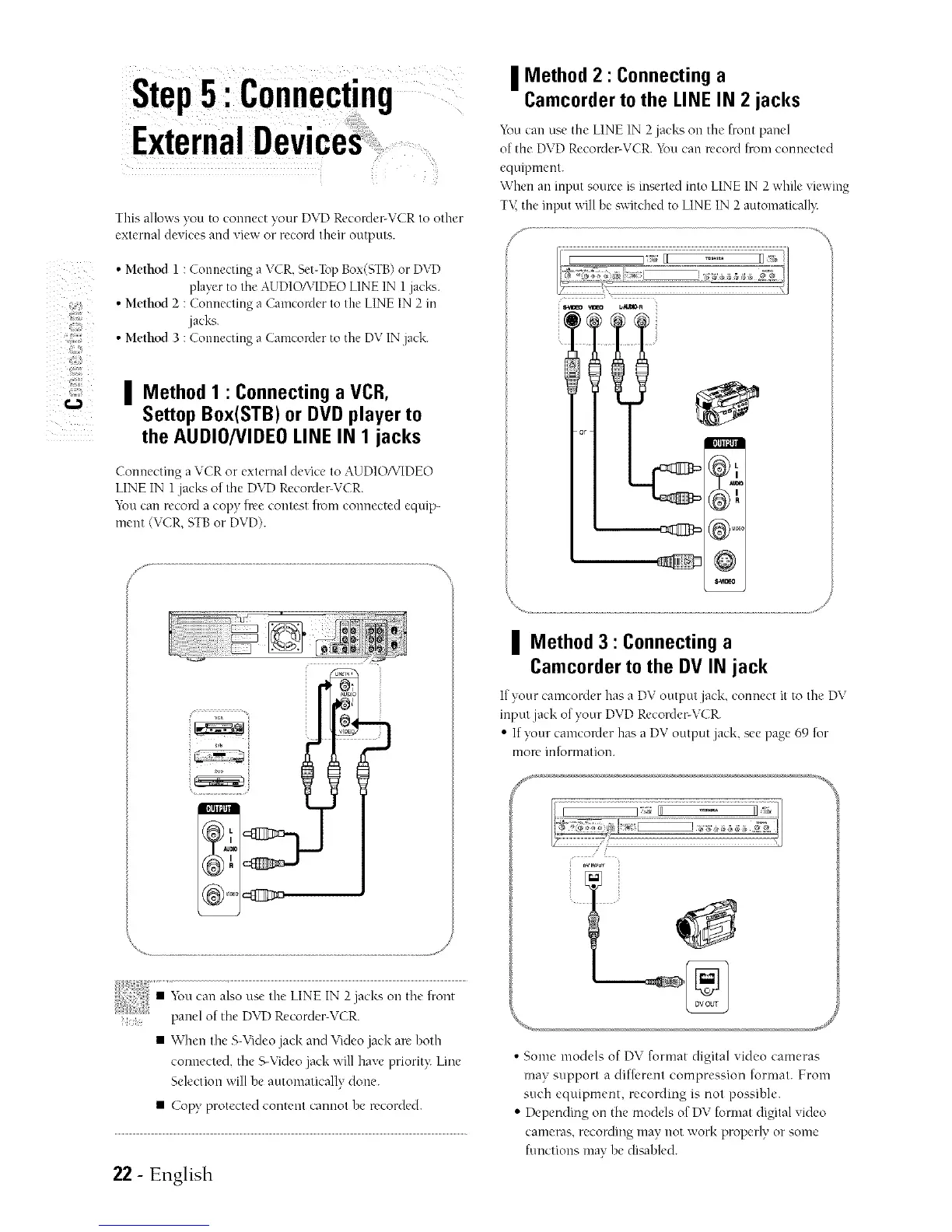
• Method l : Connecting a VCR,Set-TopBox(STB)or D\T)
playerto the AUDIO/VIDEOLINE IN 1jack_..
• Method 2 : Connecting a Camcorder to the LINEIN 2 in
jacks.
• Method 3 : Connecting a Camcorder to the DV INjack.
| Method 1 : Connecting a VCR,
Settop Box(STB) or DVD player to
the AUDIO/VIDEO LINE IN 1 jacks
[,IlR@III
Connecting a VCR or external device to AUDIONIDEO
LINE IN 1jacks of the DVDReconler-VCR.
You can reconl a copy tree contest trom connected equip-
ment (VCR, STBor DVD).
• When the S-Videojack and Video jack arc hoth
connected, the S-Videojack will have priorit}: Line
Selection will be automatically done.
• Copy protected content cannot he recorded.
22- English
| Method 2 : Connecting a
Camcorder to the LINE IN 2 jacks
You can use the LINE IN 2jacks on the front pam'l
of the DVDRecorder-VCR. You can record from connected
equipment.
When an input sonrce is inserted into LINE IN 2while xiewing
T\< the input will be switched to LINEIN 2 automatically:
@
| Method 3 : Connecting a
Camcorder to the DV IN jack
If your camcordcr has a DV output jack, connect it to the' DV
input jack of your DVD Recorder-VCR.
• If your camcorder has a DV output jack, see page 69 for
more inlormation.
..... J
• Some models of DV format digital video cameras
may support a difti,rent compression format. From
such equipment, recording is not possihle.
• Depending on the models of DV format digital video
cameras, recording may not work properly or some
functions may he dia_hled.



 To Next Page