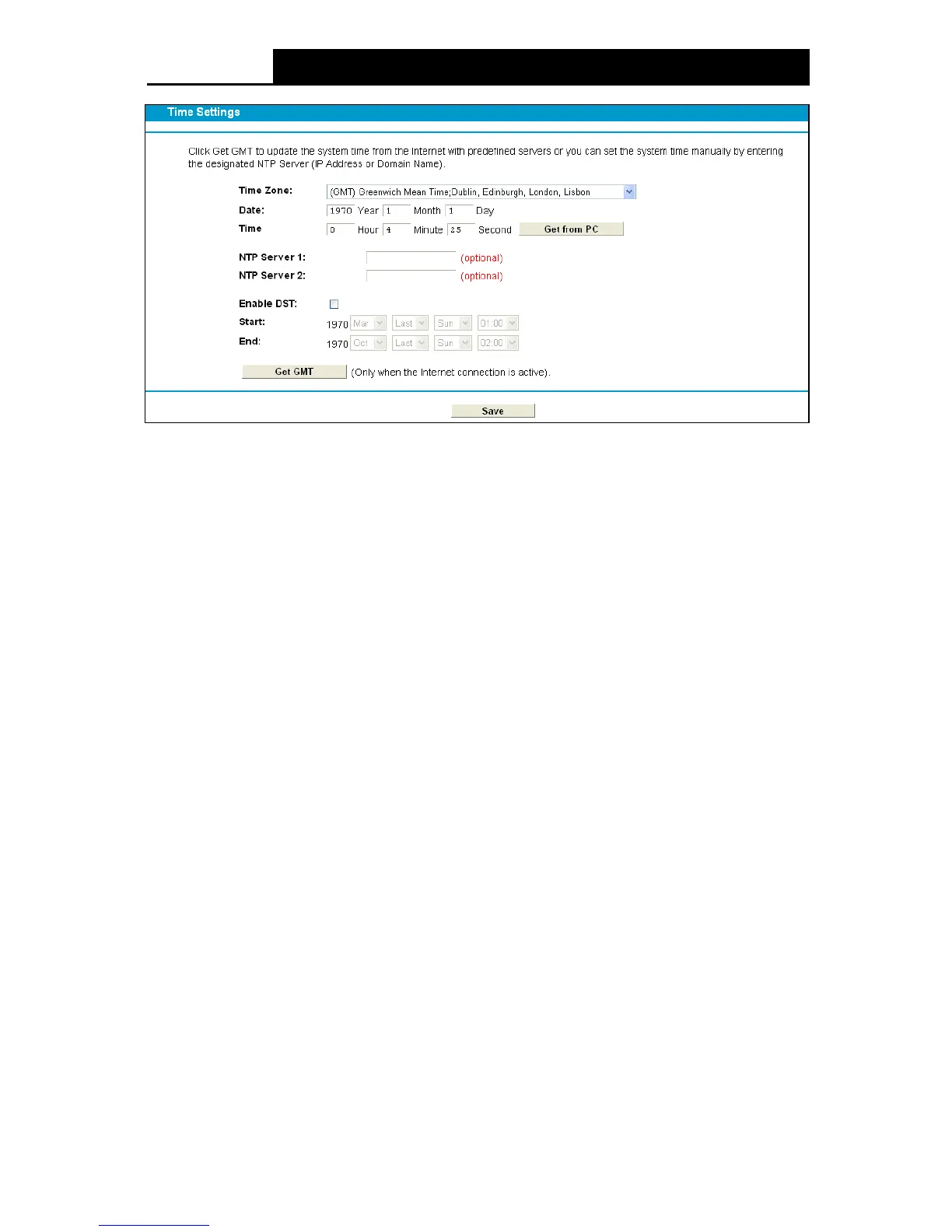
Figure 4-110
Time Zone : Select your local time zone from this drop-down list.
Date: Enter your local date in MM/DD/YY into the right blanks.
Time : Enter your local time in HH/MM/SS into the right blanks.
NTP Server 1 / NTP Server 2: Enter the address or domain of the NTP Server 1 or NTP
Se rver 2, and then the modem router will get the time from the NTP Server preferentially. In
addition, the modem router has some common NTP Servers built in, so it can get time
automatically once it connects the Internet.
Enable DST: Select the checkbox to enable daylight saving function.
Start/End: Select the correct Start time and End time.
To set time manually:
1. Select your local time zone.
2. Enter the Date in Year/Month/Day format.
3. Enter the Time in Hour/Minute/Second format.
4. Click Save.
To set time automatically:
1. Select your local time zone.
2. Enter the address or domain of the NTP Server 1 or NTP Server 2.
3. Click the Ge t GM T button to get system time from Internet if you have connected to the
Internet.
4.23.3 Manage Control
Choose “System Tools”












 To Next Page