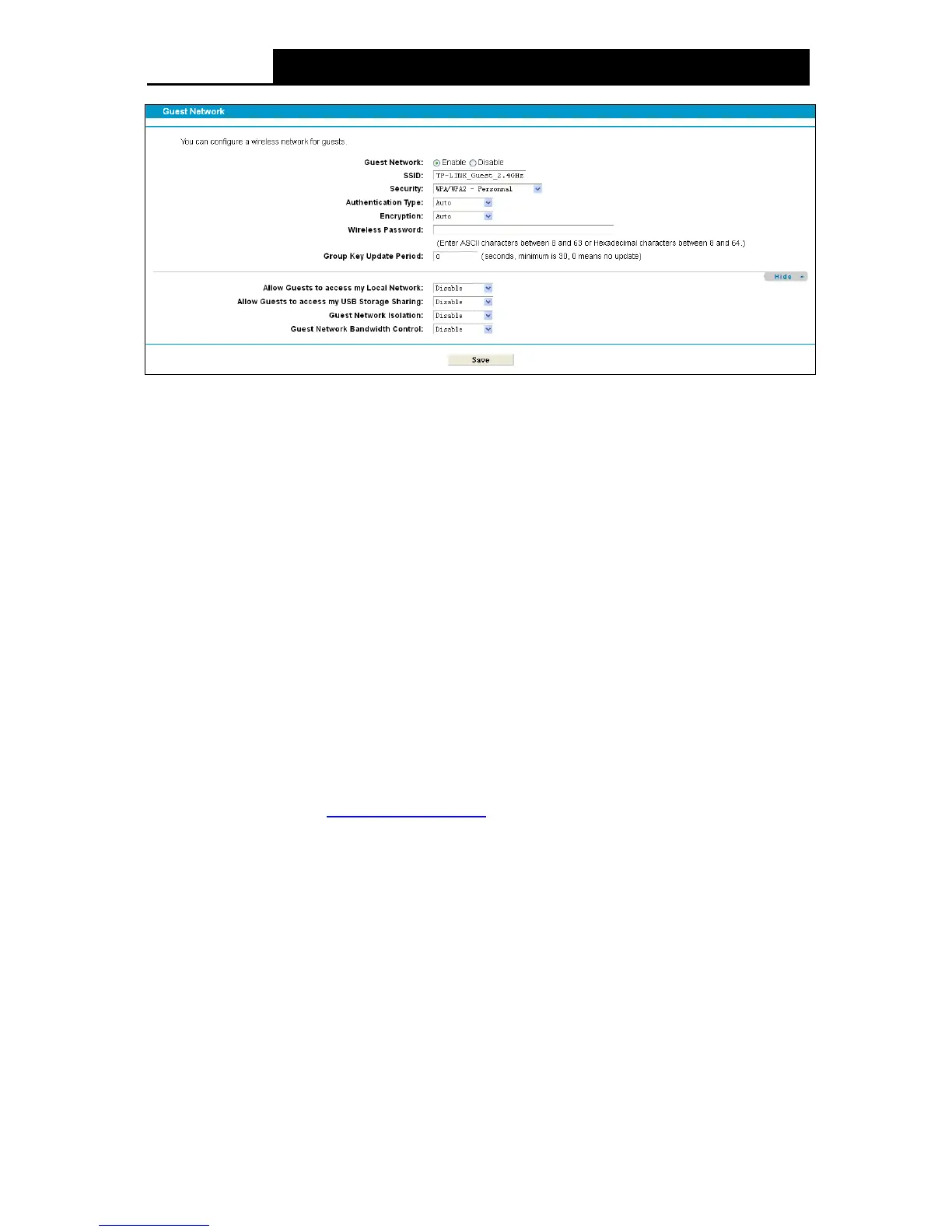
Figure 4-52
SSID: The guest network name. When setting up a Guest network, it is strongly
recommended to use a name that easily distinguishes it from your primary network. The
default name is TP-LINK_Guest_2.4GHz.
Se curity: It’s strongly recommended to enable WPA/WPA2-Personal.
Authentication Type: Select the Authentication Type from the drop-down list or keep the
default setting Au t o .
Encryption: You can select Aut o , TKIP or AES.
Wireless Password: You can enter ASCII characters between 8 and 63 characters or 8 to 64
Hexadecimal characters.
Group Key Update Period: Specify the group key update interval in seconds. The value
should be 30 or above. Enter 0 to disable the update.
Allow Guests to access my Local Network: The guests have access to your Local
Network, but can not login the modem router’s web-management page.
Allow Guests to access my USB Storage Sharing: The guests can access the specified
files on the USB storage device via the function of USB Storage Sharing, but the function of
FTP Server, Media Server and Print Server are not available in Guest Network. For more
details please refer to 4.11.3 Storage Sharing
.
Guest Network Isolation: This function can isolate wireless clients on your guest network
from each other. Client isolation is disabled by default.
Gue st Network Bandwidth Control: With this function, you can configure the Upstream
/Downstream Bandwidth for guest network.
Click Sav e to save your settings.
4.10.2 Basic Settings 5GHz
Choose menu “Gue st Network”“Basic Settings 5GHz”, and you will see the screen as shown
in Figure 4-51. This feature allows you to create a separate network for your guests without
allowing them to access your main network and the computers connected to it.
64











 To Next Page