AC1900 Wireless Dual Band Gigabit ADSL2+ Modem Router User Guide
• Ke y Type: You can select the WEP key length (64-bit, or 128-bit.) for encryption.
"Disabled" means this WEP key entry is invalid.
64-bit:
You can enter 10 hexadecimal digits (any combination of 0-9, a-f, A-F, zero key is
not promoted) or 5 ASCII characters.
128-bit: You can enter 26 hexadecimal digits (any combination of 0-9, a-f, A-F, zero key is
not promoted) or 13 ASCII characters.
Be sure to click the Sav e button to save your settings on this page.
4.8.4 Wireless Schedule
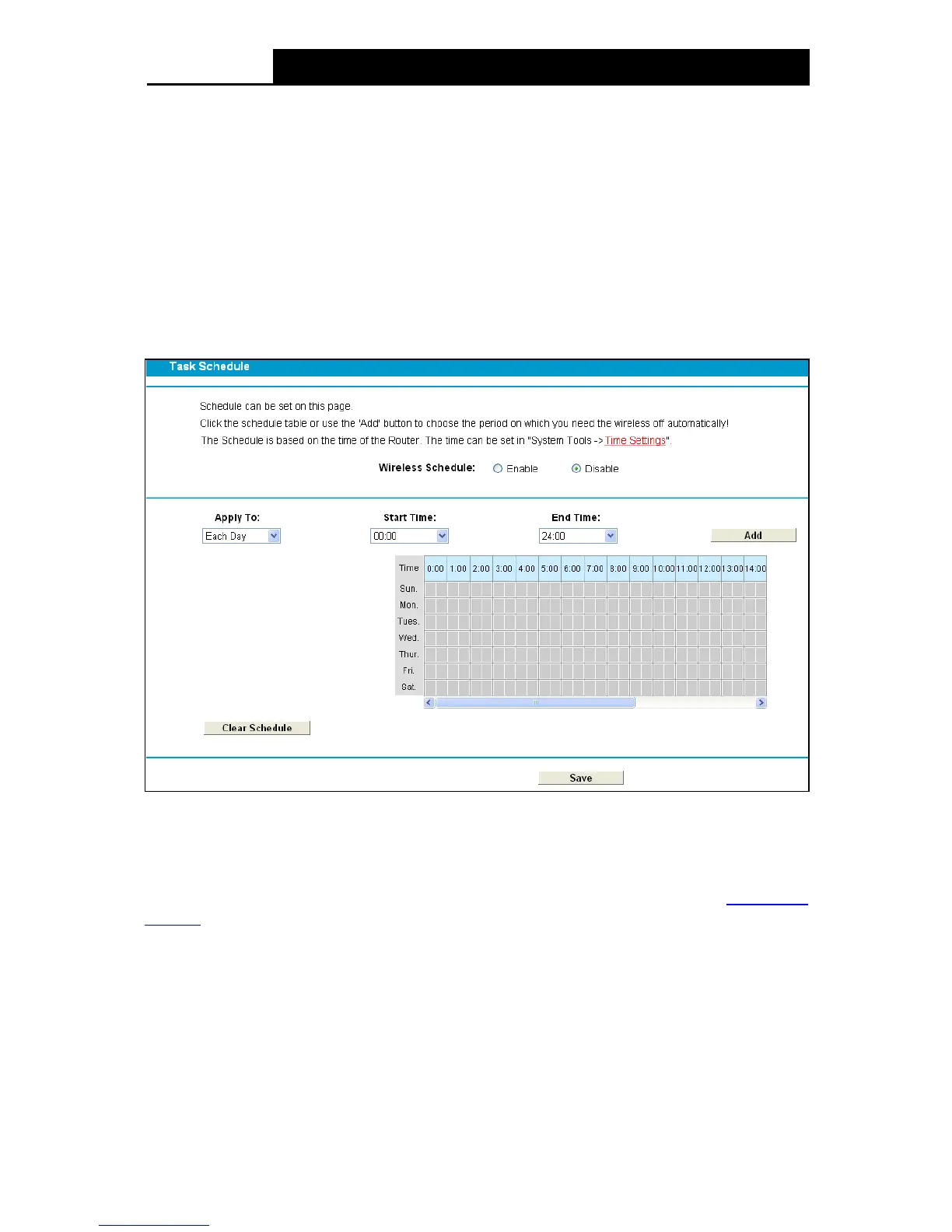
Choose menu “Wireless 2.4GHz”“Wireless Schedule”, you can configure the Task Schedule
as shown below.
Figure 4-36
Note:
The time you set is the period you need the wireless off.
Before configure the wireless schedule, please set system time first which refer to
4.23.2 Time
Settings, then you can enable or disable Wireless Schedule.
Apply To: Select the day or days you want to switch the wireless off.
Start Time, En d Time : You can select all day-24 hours or you may enter the Start Time and
End Time in the corresponding field.
Add: Click this button to add your selected time to the below table.
Click the Clear Schedule button to clear your settings in the table.
Click Sav e to complete the settings.
48












 To Next Page