4.8.7 Wireless Status
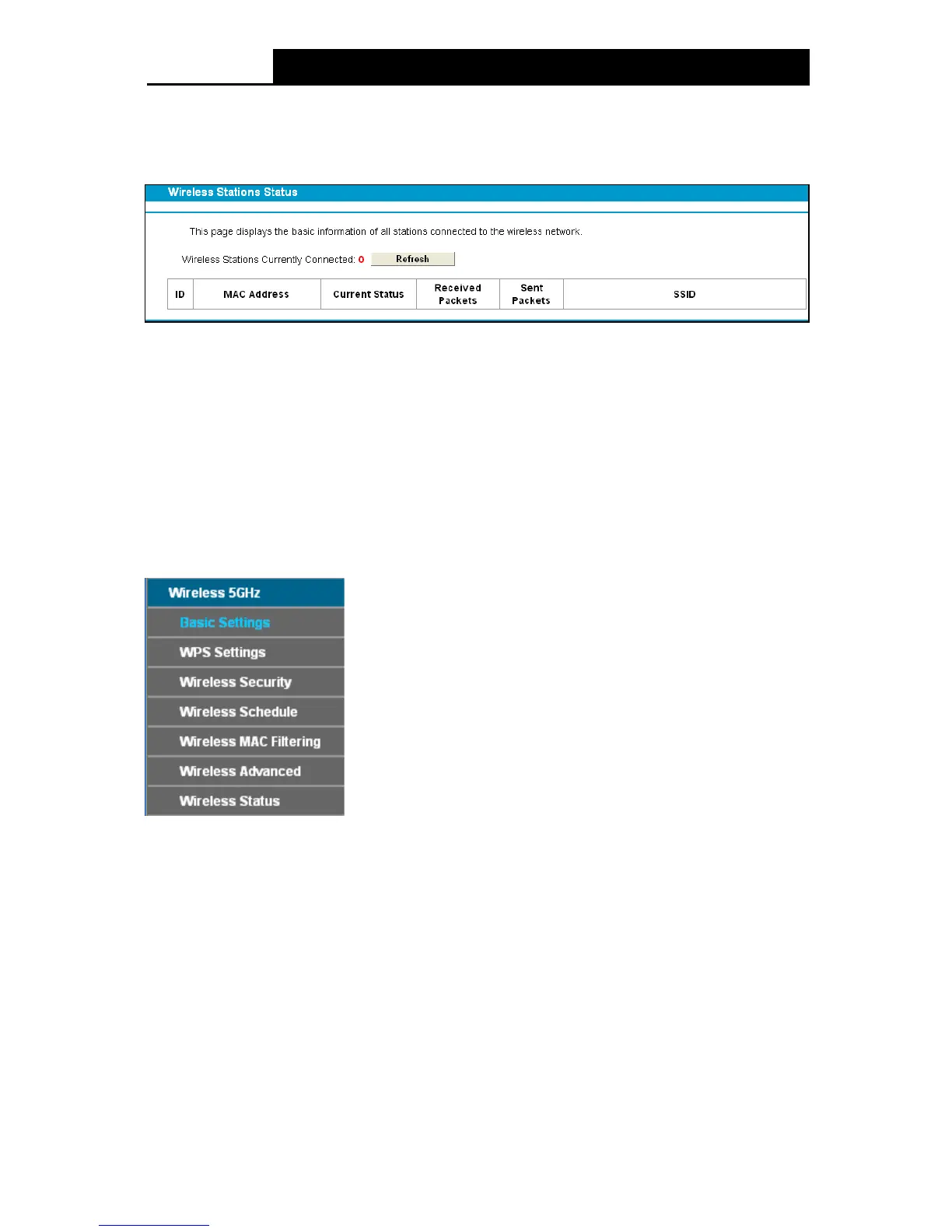
Choose menu “Wire le ss 2.4GHz””Wireless Status”, you can see the MAC Address, Current
Status, Received Packets and Sent Packets for each connected wireless station.
Figure 4-40
M AC Ad dr e ss: The connected wireless station's MAC address.
Current Status: The connected wireless station's running status.
Received Packets: Packets received by the station.
Sent Packets: Packets sent by the station.
SSID: The wireless network name.
Click on the Refresh button to update this page.
4.9 Wireless 5GHz
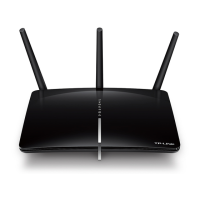
There are seven submenus under the Wireless 5 GHz menu: Basic Settings, WPS Se ttings,
Wireless Security, Wireless Schedule, Wire le ss MAC Filtering, Wireless Advanced and
Wireless Status. Click any of them, and you will be able to configure the corresponding function.
4.9.1 Basic Settings
Choose menu “Wireless 5GHz”
“Basic Settings”, you can configure the basic settings for the
wireless network of 5GHz on this page.
52












 To Next Page