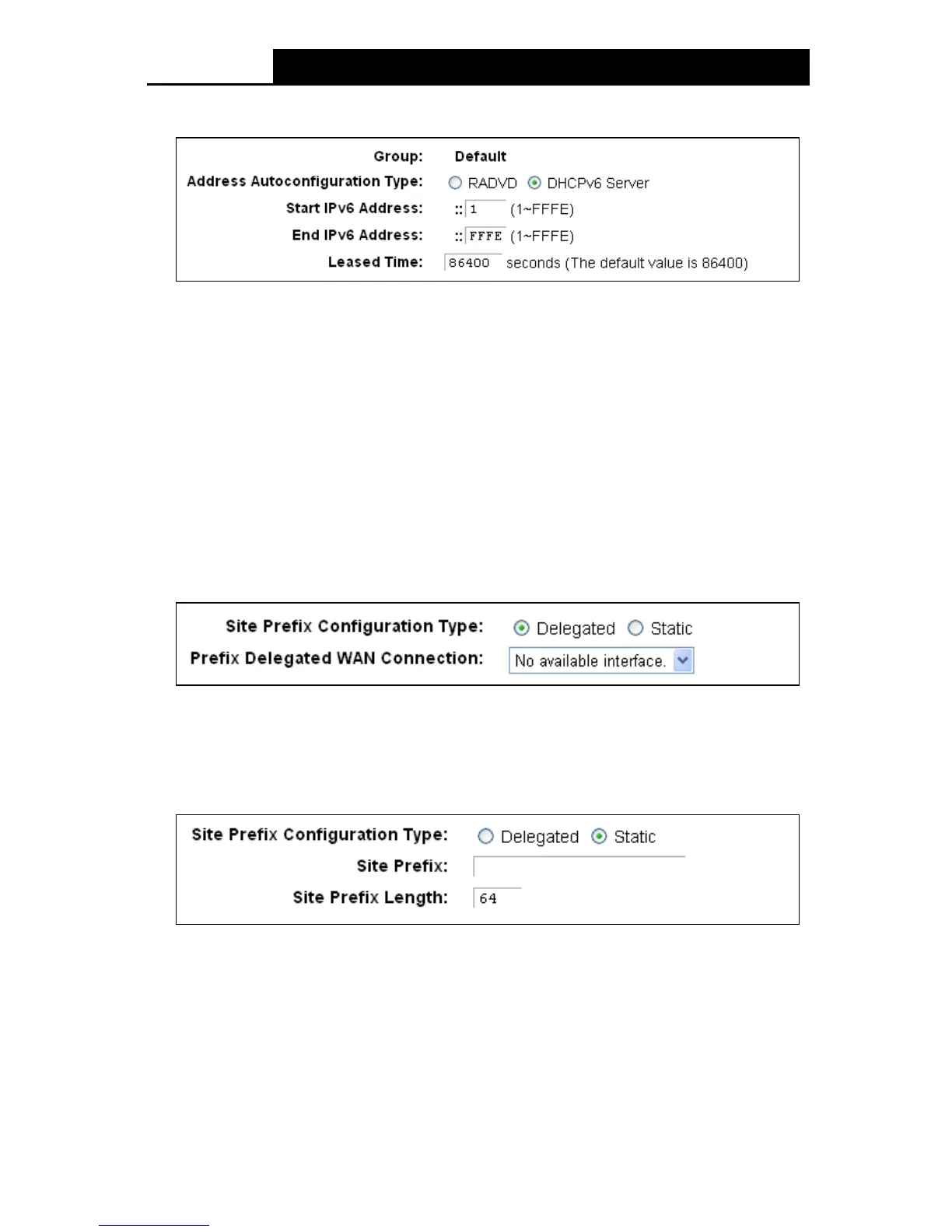
2) If DHCPv6 Server is selected, please complete the following parameters.
Figure 4-15
• Start IPv6 Address: Enter a value for the DHCPv6 server to start with when issuing IPv6
addresses.
• End IPv6 Address: Enter a value for the DHCPv6 server to end with when issuing IPv6
addresses.
• Leased Time : The Leased Time is the duration in which a DHCP client can lease its
current dynamic IPv6 address assigned by the modem router. After the dynamic IPv6
address has expired, the user will be automatically assigned a new dynamic IPv6
address. The default is 86400 seconds.
Site Prefix Configuration Type : Select a type to assign prefix to IPv6 addresses. Delegated
and Static are provided.
1) If Delegated is selected, please complete the following parameters.
Figure 4-16
• Prefix Delegated WAN Connection: Select a WAN connection form the drop-down list
to assign prefix.
2) If Static is selected, please complete the following parameters.
Figure 4-17
• Site Prefix: Enter a value for the site prefix.
• Site Prefix Length: Enter a value for the site prefix length.
Click the Sav e button to save the settings.
31











 To Next Page