20
Chapter 4
Set Up Internet Connection
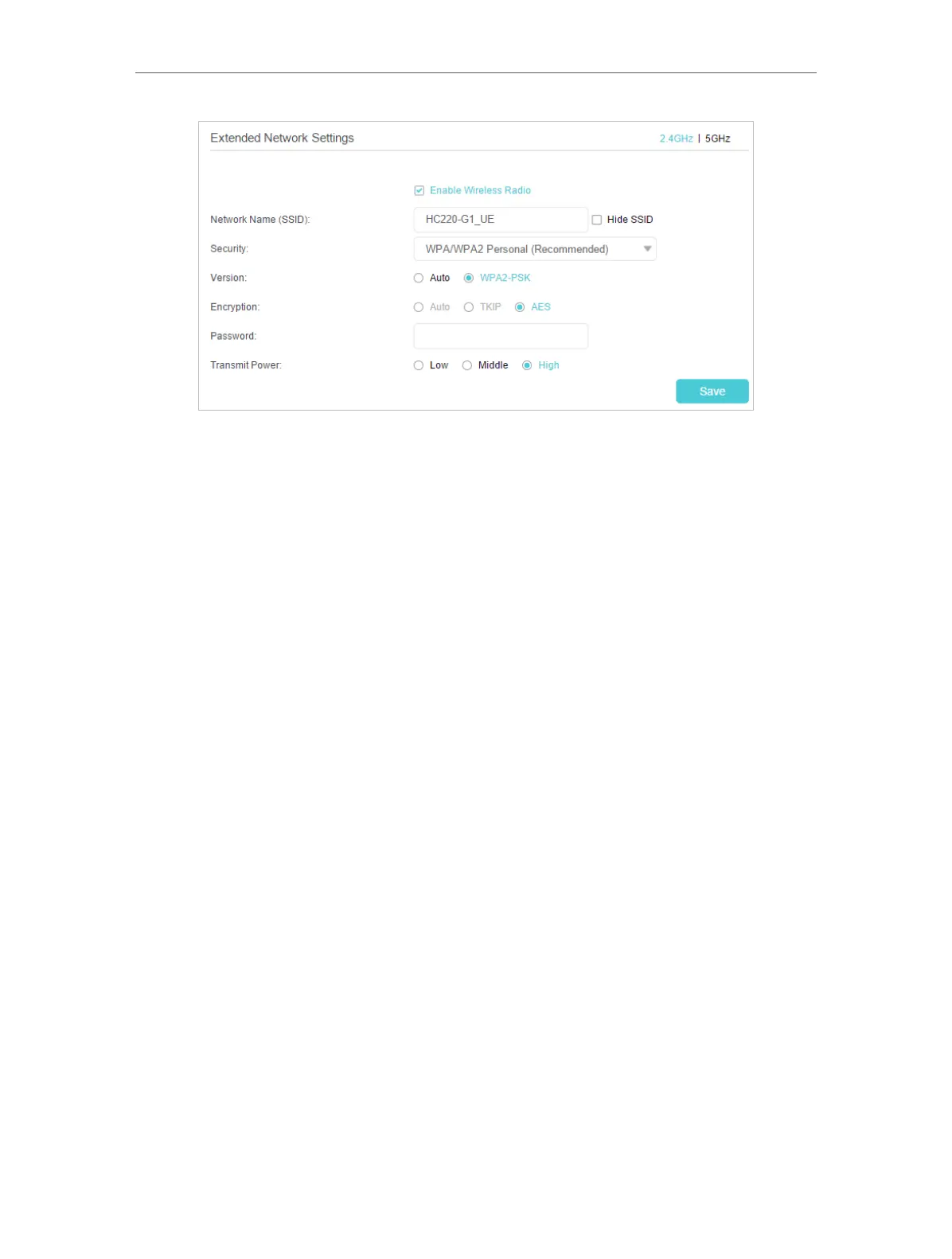
• Network Name (SSID): Enter a new SSID (up to 32 characters long) or just use the SSID
of the default name copied from the host network. This field is case-sensitive. Do not
select Hide SSID unless you want the client devices to join the network manually.
• Security: Select one of the security options and configure the corresponding settings
for the extended wireless network.
• No Security - This option disables the wireless security.
• WPA/WPA2(Reconmmended) - Select this option to enable the wireless security.
This is highly recommended to protect the wireless network from unauthorized
access. And then you can select a security version and encryption type.
• WEP - This option is the most basic form of wireless security that can be used
if your client devices can only access wireless using WEP (Wired Equivalent
Privacy).
• Transmit Power: Select Low, Middle, or High to specify the data transmit power. The
default and recommended setting is High.
2 ) Click Save to make the settings effective.
Now, you can connect to the SSID and enjoy the extended network.



 To Next Page
 Loading...