© Copyright 2013 TRENDnet. All Rights Reserved.
TRENDnet User’s Guide
TEW-810DR
45
2. Unzip the file to a folder on your computer.
Please note the following:
• Do not interrupt the firmware upgrade process. Do not turn off the device or press
the Reset button during the upgrade.
• If you are upgrade the firmware using a laptop computer, ensure that the laptop is
connected to a power source or ensure that the battery is fully charged.
• Disable sleep mode on your computer as this may interrupt the firmware upgrade
process.
• Do not upgrade the firmware using a wireless connection, only using a wired
network connection.
• Any interruptions during the firmware upgrade process may permanently damage
your router.
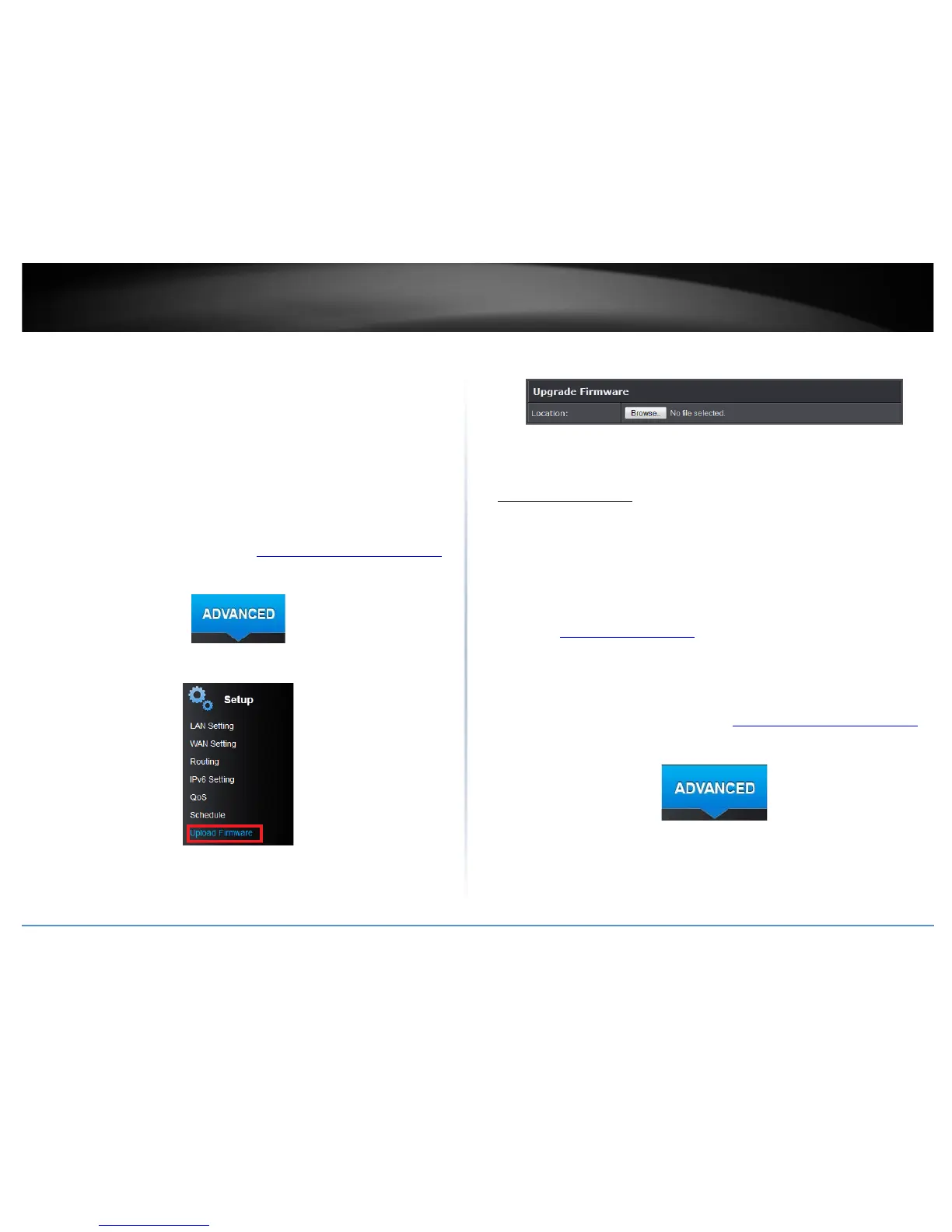
1. Log into your router management page (see “Access your router management page
”
on page 15).
2. Click on the Advanced tab.
3. Click on the Setup section and click on Upload Firmware.
3. Depending on your web browser, in the Upload Firmware section, click Browse or
Choose File.
4. Navigate to the folder on your computer where the unzipped firmware file (.bin) is
located and select it.
5. Click Apply. If prompted, click Yes or OK.
Reboot your router
Administrator > Settings Management
You may want to restart your router if you are encountering difficulties with your router
and have attempted all other troubleshooting.
There are two methods that can be used to restart your router.
• Turn the router off for 10 seconds using the router On/Off switch (EU version
only) located on the rear panel of your router or disconnecting the power port,
sees “Product Hardware Features
” on page 5.
Use this method if you are encountering difficulties with accessing your router
management page. This is also known as a hard reboot or power cycle.
OR
• Router Management Page – This is also known as a soft reboot or restart.
1. Log into your router management page (see “Access your router management page
”
on page 15).
2. Click on the Advanced tab.
3. Click on the Administrator section and click on Settings Management.













 To Next Page