TRENDnet User’s Guide TEW-735AP
© Copyright 2015 TRENDnet. All Rights Reserved. 25
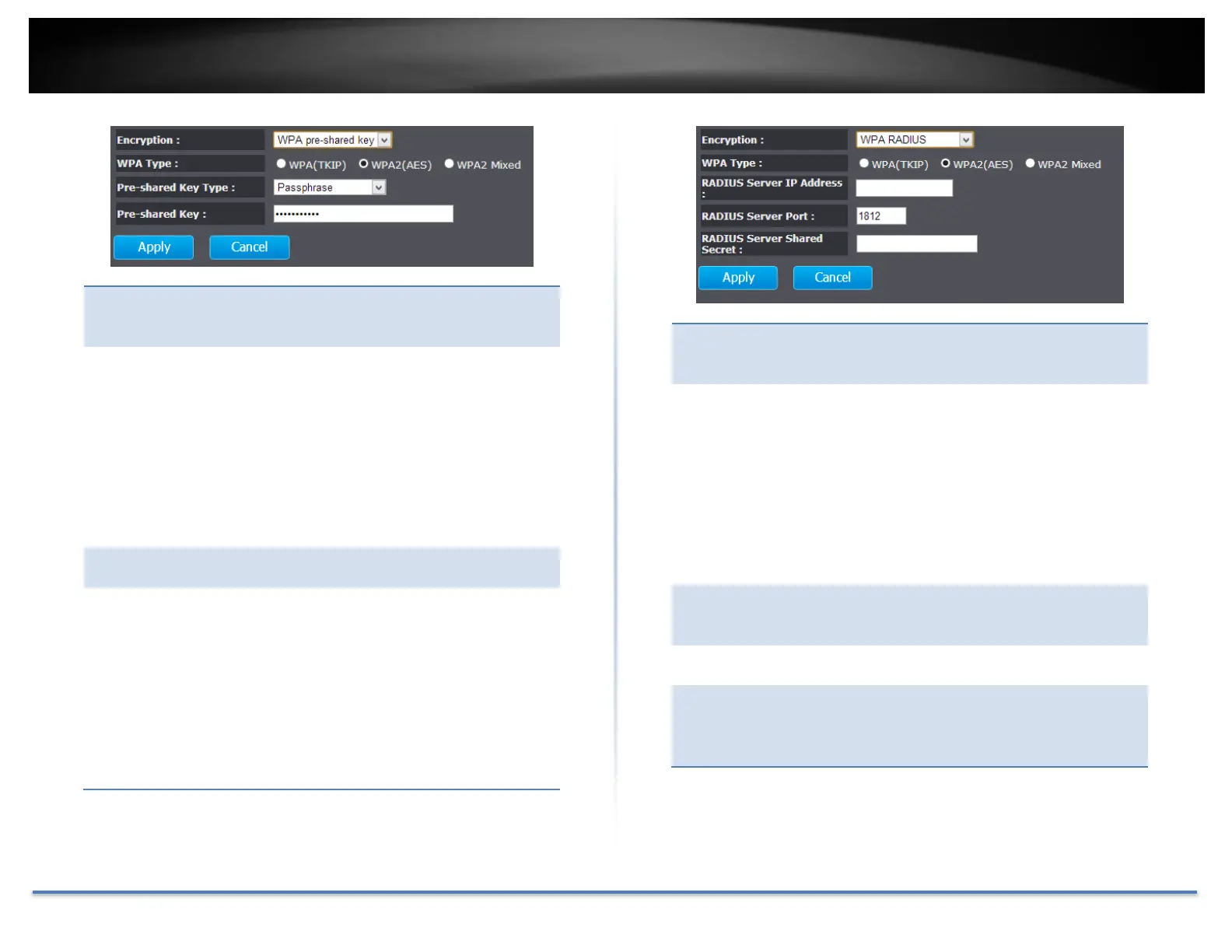
Encryption
(WPA pre-
shared key):
Wi-Fi Protected Access (WPA) pre- shared key
Select TKIP, AES, or WPA2 Mixed. This is the
encryption algorithm used to secure the data
communication. TKIP (Temporal Key Integrity
Protocol) provides per- packet key generation
and is based on WEP. AES (Advanced
Encryption Standard) is a very secure block
based encryption. Note that, if the bridge uses
the AES option, the bridge can associate with
the access point only if the access point is also
set to use only AES.
The key type can be passphrase or Hex format.
The key is entered as a pass-phrase of up to 63
alphanumeric characters in ASCII (American
Standard Code for Information Interchange)
format at both ends of the wireless connection.
It cannot be shorter than eight characters,
although for proper security it needs to be of
ample length and should not be a commonly
known phrase. This phrase is used to generate
session keys that are unique for each wireless
client.
Encryption
(WPA
RADIUS) :
Use RADIUS server manage your wireless
authentication keys for easier account
management.
Select TKIP, AES, or WPA2 Mixed. The
encryption algorithm used to secure the data
communication. TKIP (Temporal Key Integrity
Protocol) provides per- packet key generation
and is based on WEP. AES (Advanced
Encryption Standard) is a very secure block
based encryption. Note that, if the bridge uses
the AES option, the bridge can associate with
the access point only if the access point is also
set to use only AES.
RADIUS
Server IP
Address:
IP address of RADIUS server.
RADIUS service port number. Default: 1812.
RADIUS
Server
Shared
Secret:
RADIUS service shared secret to authenticate
this credential agent.
Apply: Click this button to save and activate
Cancel: Click this button to abandon the change














 To Next Page