© Copyright 2016 TRENDnet. All Rights Reserved.
Protocol-based VLAN
The Protocol based VLAN allows users to create VLAN with packet frame type. The packet
frame type can be one of the three frame types: EthernetII, NonLLC-SNAP and LLC-SNAP.
If configuring the Ethernet II frame type, the configuration will be more detail with the
ethernet type.
When the user configures the protocol VLAN as LLC-SNAP, VLAN:22, ports list: 1-3.
If the Switch receives packets with LLC-SNAP frame type from port 1 to 3, the packets’
VLAN will be replaced with VLAN 22 and be forwarded to VLAN 22 member ports.
Notices: The 802.1Q port base VLAN should be created first.
CLI Configuration
This command displays the all of
the protocol-vlan configurations.
protocol-vlan frame-type
ethernetII ether-type STRINGS
vlan VLANID ports PORTLISTS
This command creates a protocol-
vlan entry with ethernetII frame
type.
protocol-vlan frame-type
nonLLC-SNAP vlan VLANID ports
PORTLISTS
This command creates a protocol-
vlan entry with nonLLC-SNAP frame
type.
protocol-vlan frame-type LLC-
SNAP vlan VLANID ports
PORTLISTS
This command creates a protocol-
vlan entry with LLC-SNAP frame
type.
no protocol-vlan frame-type
ethernetII ether-type STRINGS
vlan VLANID
This command deletes a protocol-
vlan entry with ethernetII frame
type.
no protocol-vlan frame-type
nonLLC-SNAP vlan VLANID
This command deletes a protocol-
vlan entry with nonLLC-SNAP frame
type and vlan.
no protocol-vlan frame-type LLC-
SNAP vlan VLANID
This command deletes a protocol-
vlan entry with LLC-SNAP frame
type and vlan.
This command deletes all of the
protocol-vlan entries.
Example:
TI-PG1284I(config)#protocol-vlan frame-type LLC-SNAP vlan 12 ports 1-2
TI-PG1284I(config)#protocol-vlan frame-type nonLLC-SNAP vlan 13 ports 3-4
TI-PG1284I(config)#protocol-vlan frame-type ethernetII ether-type 0800 vlan 14 ports 1-
2
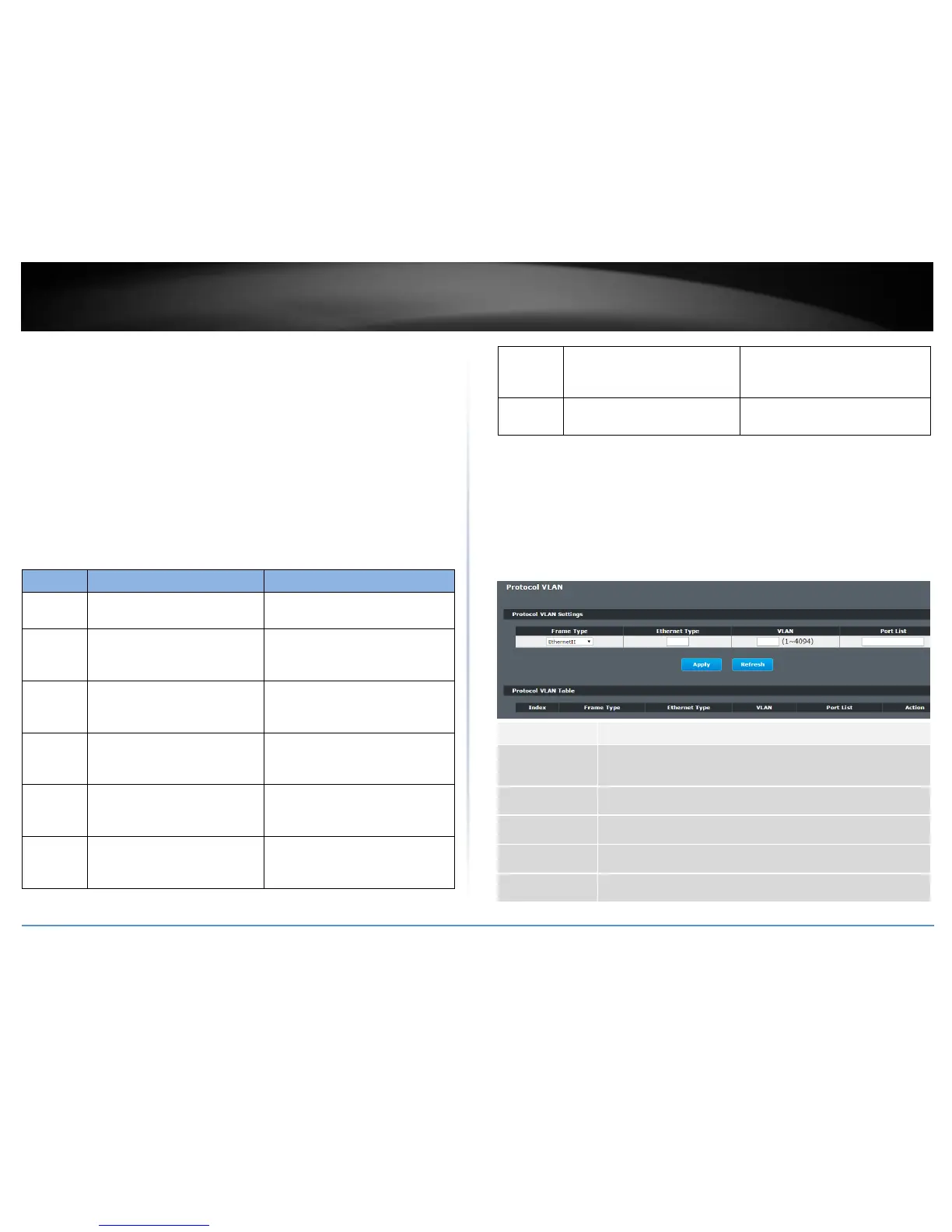
Web Configuration
Advanced Settings > VLAN > Protocol VLAN
Select one of three frame types, “EthernetIU” and “NonLLC-SNAP”
and “LLC-SNAP”.
Input the Ethernet type for the EthernetII frame type.
Configure the member ports.
Click the “Delete” button to delete the protocol VLAN profile.



 To Next Page