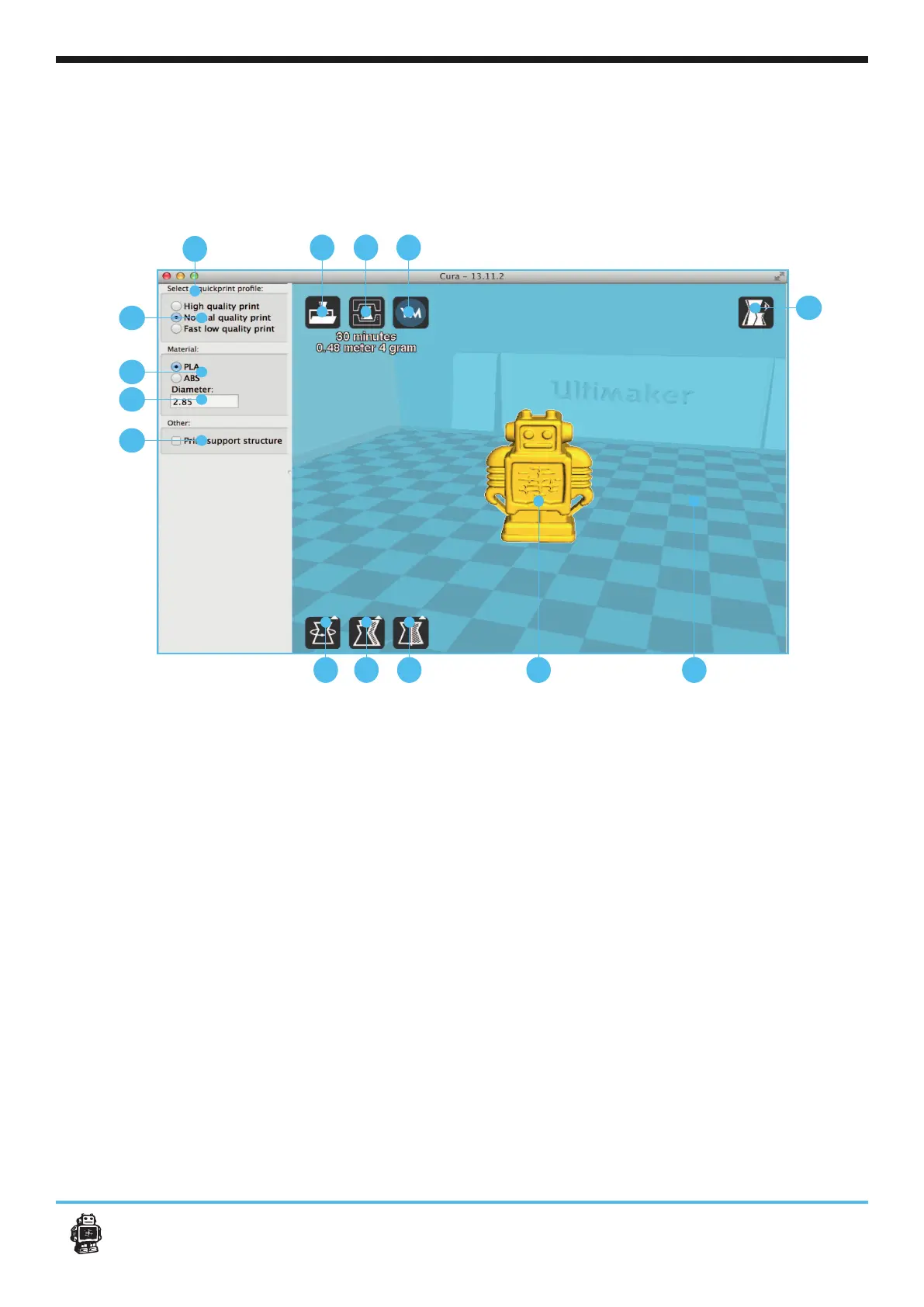
print. And how you want them to be printed.
1.
Click this button to load an
2.
When you press this button
the prepared toolpath will be
saved on your drive or SD card.
It can also be printed directly if
a usbcable is connected.
3. Share on
YouMagine.com
Through this button you can
YouMagine.
4. Menu bar
In this bar you can change to
Full settings, preferences and
more expert settings.
5.
3 options to choose a print
6. Material settings
7. Material Diameter
the default value is 2,85mm
8. Print with support struc-
ture
The option to give your model
some support material to
make the print more
successfull.
9. View modes
After your model has been
prepared for printing, you can
analyse your design.
10. Rotate model
options
Option to change the rotation
print.
11. Scale model options
Option to change the scale of
print.
12. Mirror model
options
you’d like to print.
13. Loaded 3D model
button.
14.
This is a visualisation of the
print area of your Ultimaker.
1
4
2 3
5
6
7
8
9
10 11 12 13 14
C1.
16
C1. Cura software interface












 To Next Page