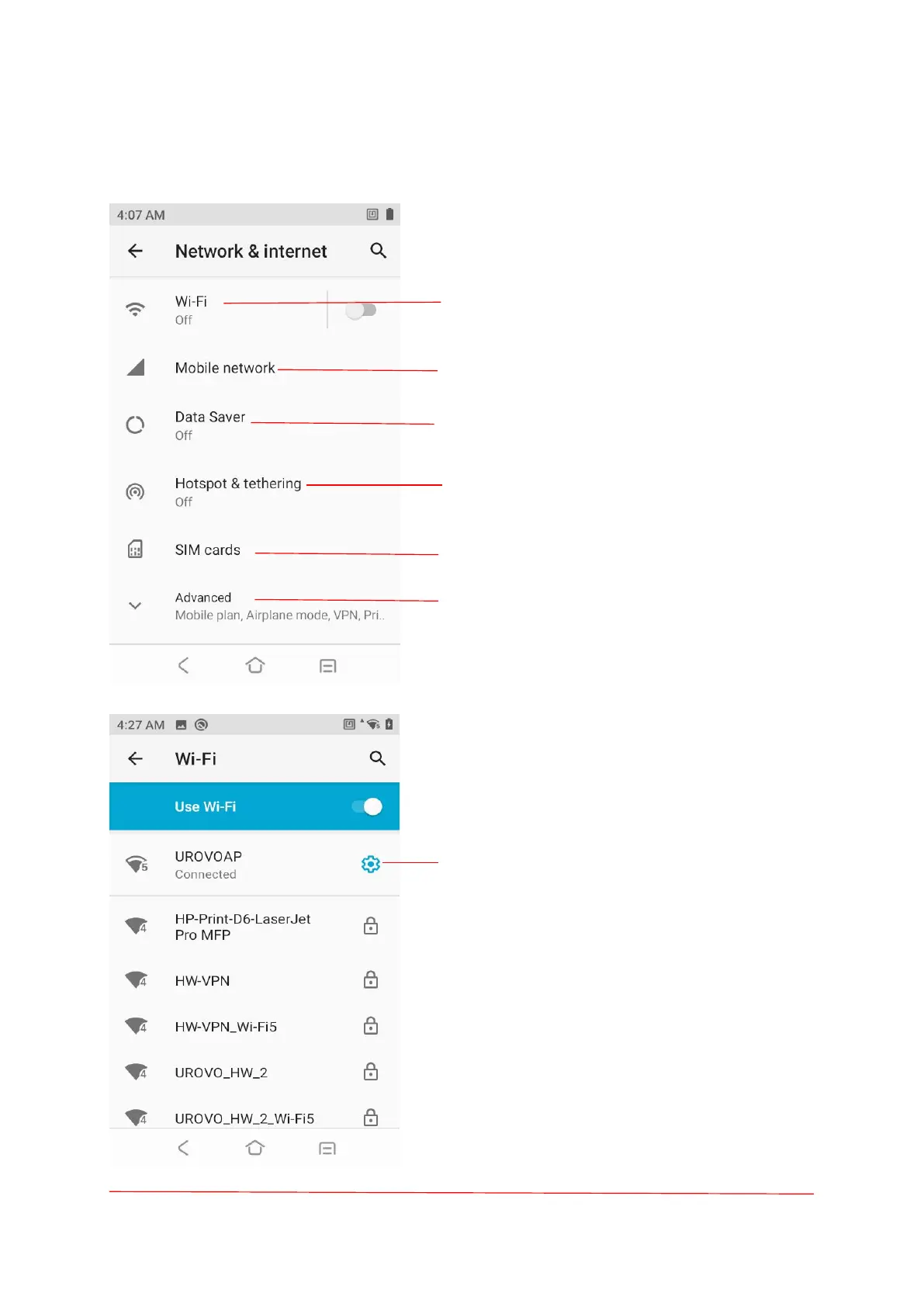
Connecting to a Wi-Fi Network.
Turn on/off Mobile data、Roaming.
Data usage (Data Usage warning, Data Limit).
Sharing the Mobile Data Connection.
Related to SIM card Settings.
Mobile plan, Airplane mode, VPN, Private DNS.
Touch the Wi-Fi item and enable the "Use of Wi-Fi".
The device searches for WLANs in the area and lists
them.
Click on the icon to view the network details.
Scroll through the list and select the desired WLAN
network.For open networks, touch profile once or
press and hold and then select Connect to network or
for secure networks enter the required password or
other credentials then touch Connect. The device
obtains a network address and other required
information from the network using the dynamic host
configuration protocol (DHCP) protocol. In the Wi-Fi
setting field, Connected appears indicating that the
device is connected to the WLAN.



 To Next Page