Allocation
Instructions and Error codes
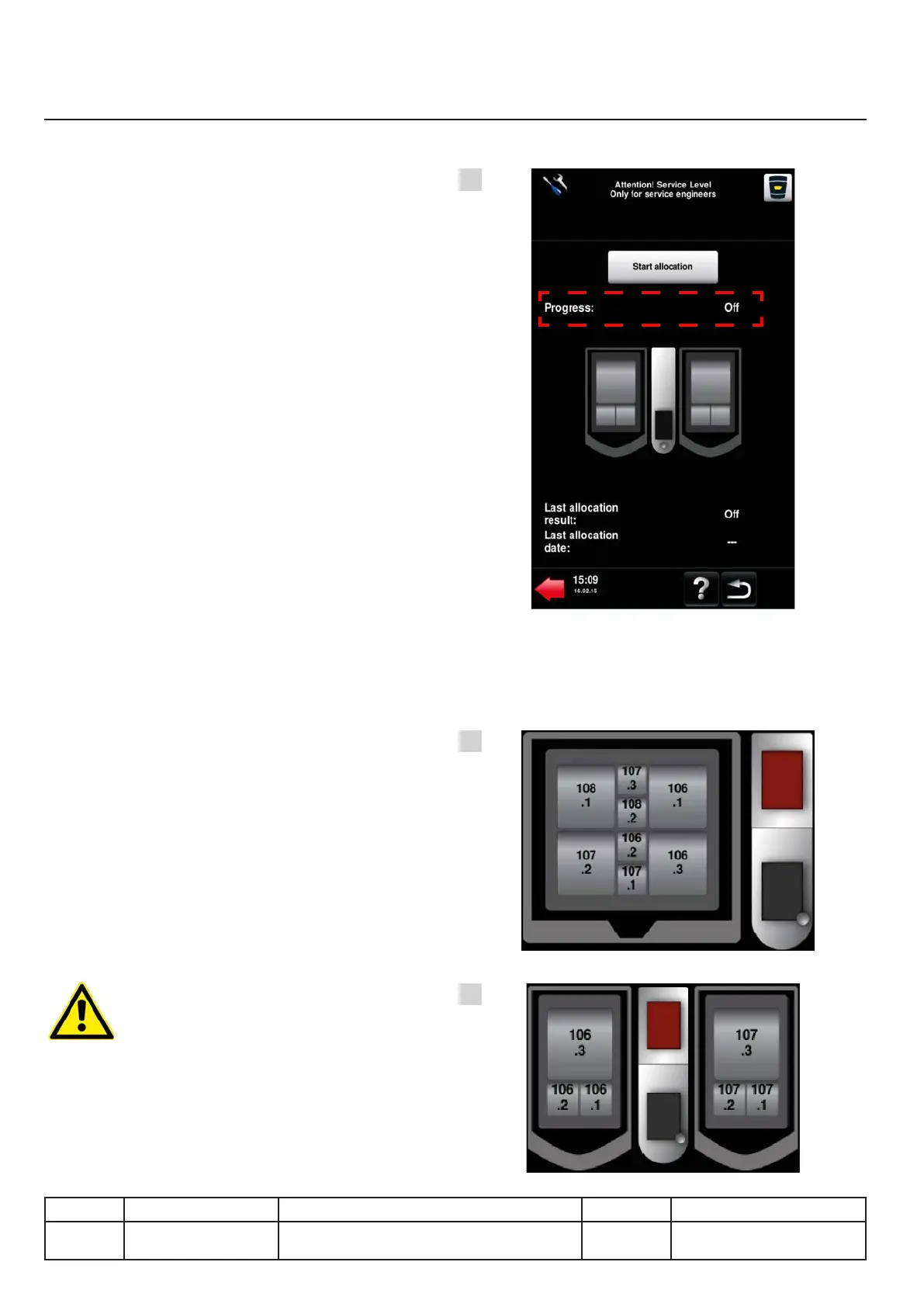
Progress
Information on the state of progress. Figure A.
Possible statuses are:
●Stopped
Allocation stopped
●Started Allocation in progress
●In progress Allocation in progress
●Cancelled Allocation cancelled by user
●Completed Allocation carried out successfully
●Error-xx See next page for the description
of possible errors and their diagnosis.
NB:
For more information about the service mode
and allocation see the Service Mode chapter.
Chart:
A chart also displays the progress of the process.
Figures B and C.
The following are displayed:
The active heating element as well as the number
of the connector (electronic board A4) allocated
to the thermocouple. From software version 01-
00-12 this information remains displayed even
after a reboot of the unit.
Result (examples: Figures B and C)
The result of the allocation is displayed in a chart.
(Figs. B & C). The numbers of the connectors
included on these illustrations are given as
examples and may vary depending on the
congurationoftheunit.
The indication of the thermocouple
connector is not dynamic. If thermocouples are
swapped on the board another allocation should
be done to refresh the display.
v03 • July-2016 • Hen
IX.12
Heating system module
Line Units Serial number (starting from) Sw Revision
VCCM
VCCWE
All ExxXH1009xxxxxxx
A
B
C



 To Next Page