Press to create the group.
6.4. Total statistics
Select Statistics / Total statistics in the menu and select files from which you want to calculate the statistics.
The following options are available:
One file: displays statistics for one file. In the following dialog select the file for which you want to
calculate the statistics.
One group: displays the summary statistics for a group of files. In the following dialog select the file
group for which you want to calculate the statistics.
More files: displays the statistics for several selected files. In the following dialog use the key to
select files you want to include into the calculation.
All files: displays the summary statistics for all files stored in the scale.
In Statistics, display a histogram of selected files by pressing the key.
6.5. Comparing files
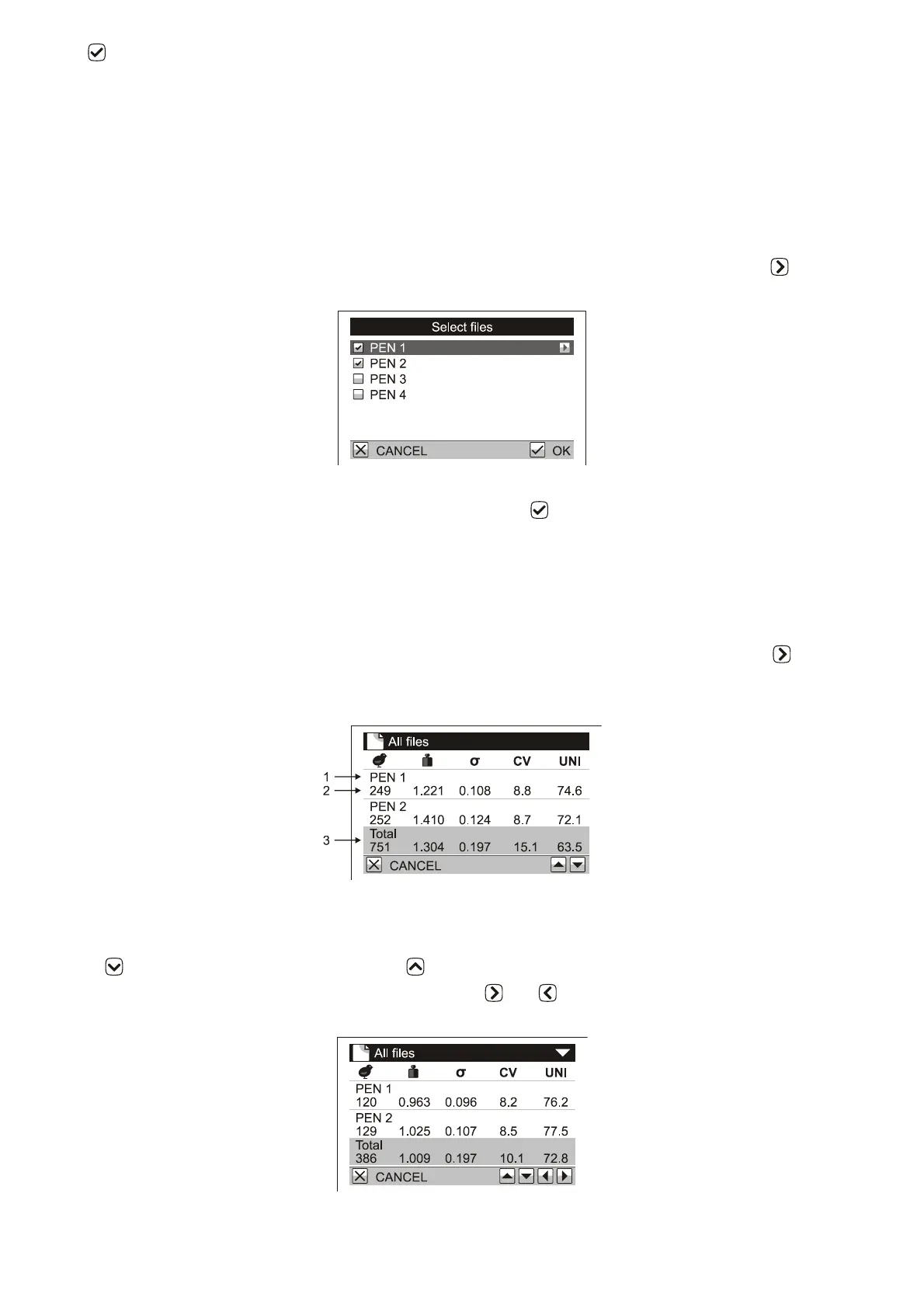
Select Statistics / Compare files menu and select which files you want to compare. The following options are
available:
One group: displays a comparison of files in one file group.
More files: displays a comparison of several selected files. In the following dialog use the key to
select files you want to compare.
All files: a comparison of all files in the scale is displayed.
1. File name
2. Statistics of the file
3. Total statistics for all selected files
Use the key to display the next page. Use the key to display the previous page.
If the mode of weighing with sorting is activated, use keys and to display statistics for light, acceptable
and heavy birds.



 To Next Page